
marcus
Join Marcus LIVE In Orlando April 15-16
Join Simple Sites Bootcamp – get 16 full weeks of training, a high ticket niche, a seat at one of our live events this year and a whole lot more!
STOP Chasing Money And Make Money Chase You
17 SEO Hacks For Affiliate Marketers – Get Free Traffic Fast
Join My Saturday SEO Class And Learn All About FREE Traffic
17 Seo Hacks
1. Keyword Research is Key
2. Create A List Of All Possible Related Topics And Sub Category Keywords
3. Install An Seo Plugin On Your Blog
4. Do Your First Page Research
5. Make An Seo Plan BASED On What Is Already Ranking
6. Create Your Content For What Is Already Ranking
7. Push Content In Front Of Channels Already Out There
8. Get Involved In Your Market
9. List On Other Sites As Helpful Info (forums, quora, comments, facebook)
10. Produce Your Content For Multiple Types Of Media
11. Become A Guest Blogger
12. Use Marcus’ Search Glossary Method For Writing Topics And Keywords
13. Add “Bonus” Words To Titles And Content
14. Look At Your Stats And Go For Rankings You Can Improve
15. Have A Good Link Structure
16. Permalinks On Your Blog
17. Get A Good Keyword Domain Name
Join Us As Marcus Teaches All 17 Seo Hacks In Detail On Saturday Feb. 23rd @ 10am Est
www.FreeTrafficDude.com
10 Mistakes Bloggers Make That KILL Their Blogging Income
#1. they don’t focus on one niche per blog when starting out
#2. they don’t make the purpose of the content to lead people to what makes them money
#3. they focus to much on fancy design
#4. forget that its all about answering the question of why your visitor is there in the first place
#5. waffle when it comes time to sell
#6. swim against stream rather than naturally letting the profits in
#7. ask people to join their newsletter
#8. neglect stats
#9. not focusing on one traffic source for each piece of content
#10. settle for low numbers
Simple Affiliate Site From Scratch – Step By Step Instructions
Click Here To Download Marcus’ SimpleBlogTheme
Click Here To Signup For Web Hosting Like Marcus Did In The Video
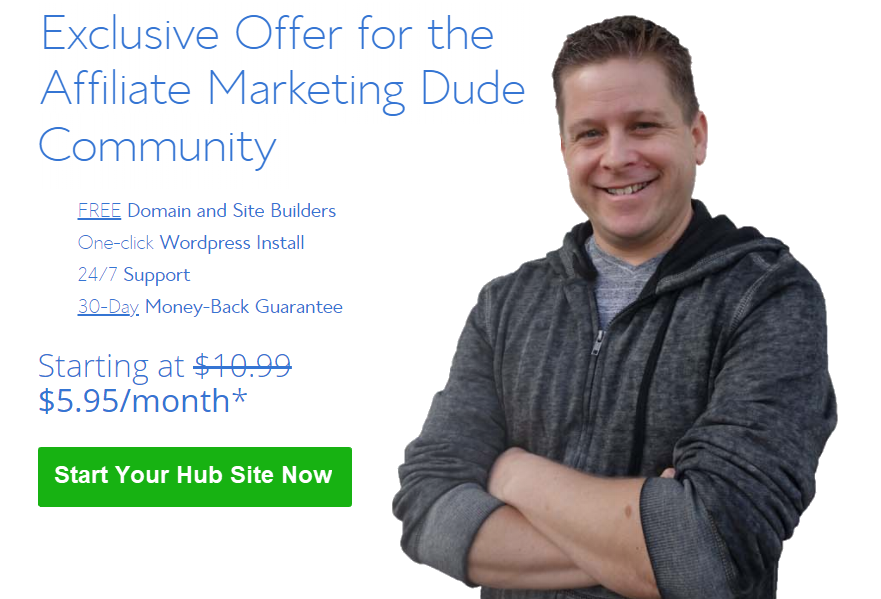
Step One: Click Here To Get Started Then Click – Get Started Now
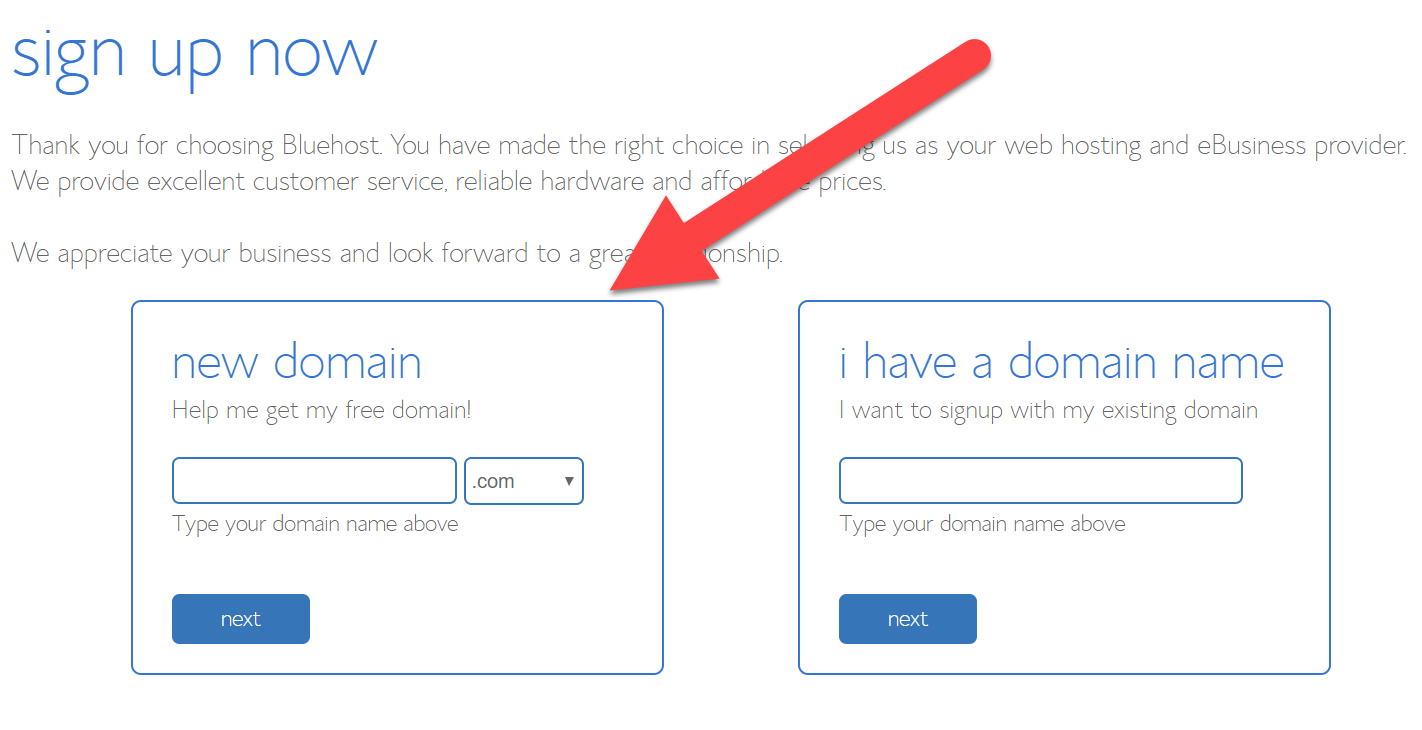
Step Two: Search For Your Domain Name (enter .com, net, or org like this domain.com)
Make Sure You Enter Like This newdomain.com (availible TLD = .com, .net, .org, .me, ect)
Examples could be yournametips.com but use your name 🙂
For Me I Would Use marcustips.com or something
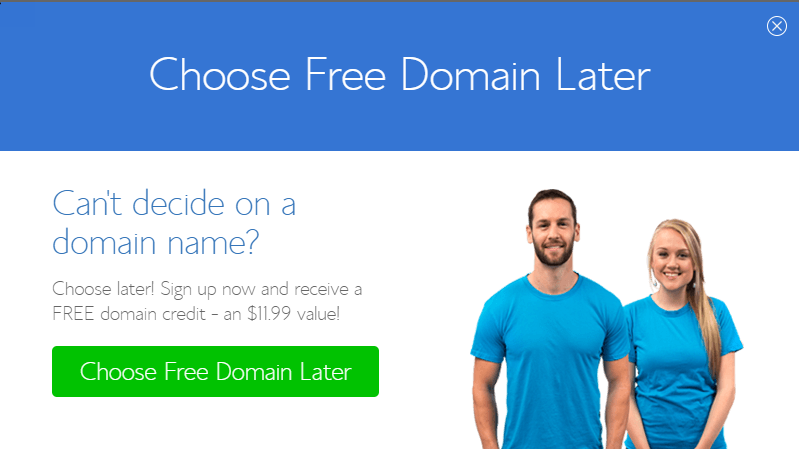
If You Want To Choose A Domain Later… Use This
If Your Domain Is Not Available Try Another TLD Like .org, .net, .biz, .me, .us, ect…
Step Three:
Choose your add ons, bonuses, and pay plan…
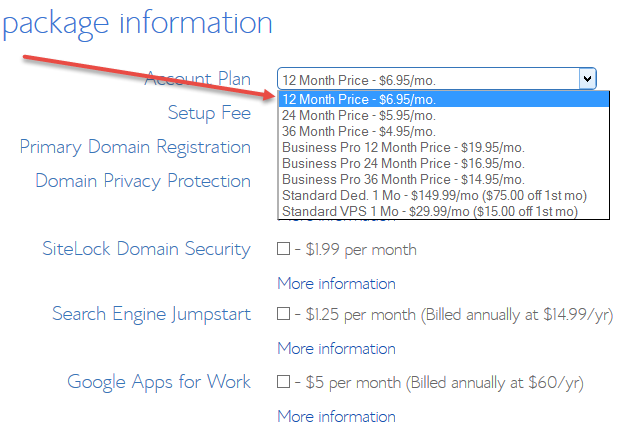
Choose 36 Month For The Best Deal
This Step Should Cost Between $95 (12 month plan) And $214 (36 Month Plan) If You Followed The Steps Correctly
The Offers On This Page Are Affiliate Offers And We Are Compensated For Referring You… Which Is Why We Make All These Cool Videos And Tutorials For You 🙂
How To Make A Simple Profitable Affiliate Toolbar Download Site
How To Make $500 A Week With Affiliate Marketing
How To Make $500 A Week
Download Your $500 A Week in 2019 Affiliate Report Here
How would you feel if you were able to make an extra $500 a week in 2019 with affiliate marketing?
For the average American household, the world would change for them if they had an extra $500 a month – let alone $500 a week.
That’s an extra $26,000 a year
You could go pay for a car
You could pay your mortgage
…..just out of your affiliate earnings
That would cover the private school tuition for my kids!
So, if we could show you guys how to get this,
I think it’ll really, really help you guys understand how this stuff works.
Help you focus and get your mind in the right place!


Now we’re going to show you how this stuff works.
I’ve been doing affiliate marketing for over 19 years
I’ve been making a full-time living for those 19 years
A lot of people asked me
“How long did it take you to get profitable?”
and I said “The first day”
We’re going to talk about how to be profitable the first day.
Why that works
How that works
What you need to understand to make this stuff happen
I believe that every single person reading this can get the results that they want if they focus enough. There is no difference between me sitting here and you sitting there; Nothing at all.
The only difference is I have some knowledge that made it work.
With the Internet age,
I have another business where I actually sell my knowledge to you
You can actually buy that knowledge!
You could buy that experience!
which is worth its weight in gold.
What would it be worth to you to hear about:
19 years of struggle
19 years of the things that went good
19 years of things that were like
“Oh, Wow! That worked way better than I thought!”
19 years of “Hey… That didn’t work so good at all.”
What would that be worth to you?
For me, it has been worth close to over $8,000,000
over the course of my internet marketing career.
We’re gonna break it down and show you some of the things that have made money. We’re gonna show you inside the sites. We’re gonna show you inside the things that work, inside the things that don’t work.
We’re gonna show you what’s going on.
We are going to talk about how to make that extra $500 or more per week
I got students that are making $500 a week!
I got students that are making way more than that!
and the majority of students never make anything!
We’re gonna talk about that as well because I think that
You can learn a lot more from your failures than your successes
And, also, I heard it said that:
A smart man learns from their own mistakes
but a wise man learns from the mistakes of others
Can you learn?
Are you open?
Are you ready to make this happen?
Now you’re gonna notice here that I have it broken down for you:
If you want to make $500 a week
that is approximately $71 a day
approximately $2.95 per hour
Once we break this down it becomes a lot easier
If I told you
You’d probably freak out and be like:
But if I told you
That’s a lot easier Goal!
I like to focus on the small goal
I like to focus on the little thing that I can do
because now I know….
“Hey! I need to make $71 a day or $2.95 per hour all day, every day”
because our sites don’t take days off!
They don’t have weekends!
They don’t like go to lunch!
They’re always there!
These things are working 24/7!
So, if we want to do this we have to look at:
What do I want to do?
Do I want to sell a web hosting package?
Do I want to get a couple people to buy a Clickbank book every day?
Do I want to sell maybe $1,000 membership thing for where I get $1,000?
What is it that we need to do to get where we want to go?
This is the most laser-focused thing that you need to focus on.
You have to look at what’s going to work for your market
Here is what’s going to work:
Having the right message for the right market
I don’t care how fancy it is.
I could write on a piece of paper what I want to say
and if I give it to the right person,
They’re gonna buy.
Plain and simple.
This is how marketing works
If you go out and you try to sell ice to Eskimos,
it’s gonna be a tough sale
If you try to sell it to people here in Florida where it’s hot every day,
it’s gonna be a lot easier.
FOCUS ON THAT.
Those are the fundamentals of marketing.
DO NOT STRAY FROM IT
Do not look outside anything else
That’s the deal.
If you don’t have the right message to the right market, You are OUT.
If you want to make your $500 dollars a week,
How are you gonna do it?
You’re NOT gonna do it by learning more tech skills…
You’re NOT gonna earn it by doing some fancy image editing skills…
You’re NOT gonna earn it by doing some fancy blog, wordpress theme thing…
You’re NOT gonna do it by learning a bunch of SEO…
You’re gonna learn it by getting the right offer in front of the right market
I watch the other people’s videos. There is a lot of people out there and they get a lot of traffic and they make peanuts. They make nothing. They make $500 a month and they’re getting 60,000 visitors a month.
…..If I only got $500 for 60,000 visitors….I’d be broke as a joke.
because I don’t get that many visitors
I don’t need that many visitors
I need to convert the visitors I have!
We’re gonna talk to you about:
How to start
Where to start
…..everything like that
Now I want to show you some examples.
This is my random PayPal account
– it’s only set up to take affiliate commissions:
a couple of random programs that only pay with PayPal.
I want to show you some payments that were made to me this year from random affiliate programs……
This is like the junk drawer of money. It’s got all your random stuff.
You got all your big important stuff somewhere else
This is my junk drawer.
Now my junk drawer this year:
Here’s a payment I got a couple little days ago for almost $5000
One I got for $18.57
You guys could see there’s a lot of money going in
and on and on we go
Remember: PayPal is less than 5% of my income.
So you could see there’s like a lot of money in the junk drawer
My best month of the junk drawer was $9400
That’s pretty good.
How many guys would be like:
“Yeah, I’d like to like have almost 10,000 in the junk drawer from random affiliate offers.”
I think that would be pretty cool, right?
That would be awesome
How would that feel for you if you were able to be like:
This year alone, I got over $57,000 in payments for the random offers in the junk drawer.
Now, for a lot of people, if they could make $57,000 as their major source of income they would be happier than a pig in the slop. That would be happier than whatever happy things are and wherever happy people are.
I would be happy if I was able to look at a check and be like
“Man! This year, I got $57,000! Awesome!”
Now, again remember:
That’s just my junk drawer
I can show you the results from just random little stuff that I do and I think a lot of the other stuff will start to make sense….
I think you’ll start to get the magnitude of this business
and also… I’m a small fry!
There’s a lot of other people that make 10, 15, 20, 100 times what I make!
There’s a lot of people that make a lot more!
But I got a system that works!
I choose to be smaller because I like the lifestyle it provides.
I don’t want a huge lifestyle. I don’t need all this stuff.
but we got a look at that
We got what is a lifestyle you want
Now here’s some other affiliate offers that I ran….
Now, I want you to look at the clicks, I only got 2,000 visitors
That’s all I sent! That’s not that much right.
There’s people getting lots of traffic.
I get lots – I get 2,000 visitors a day!
……..but this was 2,000 visitors I sent to one offer.
I got $18,700 for 2,000 visitors.
The results you see, the screenshot you see is not typical.
They’re not implied.
They’re not guaranteed.
Watching this training will make you nothing.
At the end of the training you will have no more money in your bank account.
You’re not gonna make anything reading this.
But if you apply what you learn, I think this will change your life
If you really apply it.
But a lot of people don’t apply it.
If you’re not focusing on the right audience and the right offer…
You’re not gonna make money
If I just went to some website and bought a banner ad and got 2,000 random visitors, I probably wouldn’t have made $18,000
RIGHT NOW is the time to focus
Now is the time to say:
Whatever I bought in the past…
Whatever I’ve done in the past…
Whatever brought me to this situation I’m in now..
…is irrelevant
RIGHT NOW, what I’m going to do is:
I’M GONNA GO FORWARD
This is exactly what happened to me years ago when I started affiliate marketing. I went in affiliate marketing and I started and I was down and out. I was broke; probably broker than a lot of you. I lived in the living room of my brother’s mobile home. I had a car that barely worked. I used to be a preacher at the time and a preacher friend of mine actually paid to fix my car because it was broke. Other than that, it barely even worked. I didn’t have a lot of money for food, for health insurance. I had a baby on the way. My girlfriend, now she’s my wife, was pregnant at the time. We had no money. I had the stories. I had everything. I had no place to live.
Here I was. This was my story.
What does my story have to do with my success?
Nothing.
…It’s just a good story.
What does it have to do?
Does it matter that I was broken?
Was it good or bad that I was broke?
NO.
It was neither good nor bad.
It was where I was.
Plain and simple.
Now, you might think that if a guy has a million dollars in the bank he’s probably going to be successful with affiliate marketing….
Maybe
Maybe Not
I got clients from all walks of life….
It doesn’t matter
actually…
Usually, the people who really need the money the most
are the ones who make it.
Usually the least successful customer is the one who’s making $70,000 – $100,000 a year.
They’re comfortable
They got their job
They don’t really need to do affiliate marketing but they’re kind of tired of their job but they like getting paid by their job so they really don’t want to do anything
That’s usually the demographic that doesn’t work
When I get some kid who’s like:
Those are usually the ones that make it.
Why? ….because they have to.
THEY HAVE TO.
I guarantee if you had to make this business work like I had to 20 years ago… If you had to, you’d make it work.
We always do what we have to do
Usually, some people don’t…..
Some people roll over and do whatever…..
but most people do what they have to do.
Are you willing to do what you have to do?
Even when you don’t have to do it,
Are you willing to self-motivate yourself and say:
Look Marcus, I want to be able to send 2,000 clicks and get $18,000
It’s very important
You got to look at it.
You got to focus.
If your back was against the wal,l what would you do?
How many of you guys are complaining because you can’t build
a website?
If your back was against the wall and I said:
Look, I’m gonna sell your house if you don’t build a website.
You figure out a way to build a website!
If you had to,
you’d figure out a way
and you’d figure it out fast
You wouldn’t dilly-dally around
You wouldn’t go out there and be like
“Well the Guru said this and this guy said that and
there was this one video I saw….”
You’d be like
“I’m gonna learn to build a damn website
I have to.”
So make it a MUST!
Now, from another random affiliate offer…..
I made almost $44,000.
One of my accounts, one little account is doing almost $1700 a day
Think about that for a minute
What if you had one thing that produced $1700 a day for you?
How would you feel?
Now, again….
We’re gonna focus on the little goal of $500 a week
because that’s something I think everyone can do and everyone can start with.
If you really focus, it’s not that hard to do.
You could do that with:
• YouTube traffic
• Free Google traffic
• Banner traffic
• Paid traffic
• Solo ads
Now, again, I don’t know if you’re gonna do it
I don’t know if you’ll do anything.
I don’t know if you’re gonna listen to this and you’re gonna get all hyped up
and then you’re gonna go do nothing.
I don’t know if you’re gonna listen to it, get all hyped up….
1. Get one of my programs
2. Learn about my stuff
3. Get the knowledge and actually use it and ask for help
I don’t know what kind of customer you’ll be
I don’t know what kind of student you’ll be
….so I don’t know what the results are gonna be
Unfortunately, most people….
Even most people who buy the products don’t do anything with them!
I like when people tell me if something’s not working in the program because I hardly ever hear it. Most people don’t go through it. Most people don’t get to the end.
but if you do,
that’s gonna put knowledge in your brain
it’s gonna get you where you want to go
…if you focus!
Another screenshot here.
You could see that…
1 account = $1,700 a day
$1,700 a day x 31 days in a month
$50,000 in a month
$600,000++ in a year
Pretty cool, right?
ALL from affiliate marketing
ALL from the stuff that I’m teaching you
There’s nothing really held out
• When you get one of my courses
• When you sign up for:
boot camp
high ticket niches
simple sites
There’s nothing really held back
I’m not keeping secrets from you
This is all the stuff that I use
You just got to do it
and if you feel like something’s missing,… YOU TELL ME!
We usually have a video for you, which is pretty cool.
I want to ask you:
What is stopping you from your goals?
I would love to make $500 a week with affiliate marketing in 2019
but this is what’s stopping me….
Martin: My own laziness
Tar: I’m waiting on my laptop to start
Gaddy: I’m no good at copywriting
Roberts: Info overload
V: I’ve never pulled it off so I don’t know
Chris: Don’t stick with it long enough
because I ran out of money.
Waiting to make money
Robert: I need the actual steps to make the money
I’m not a hundred percent confident
with Google Adwords Keyword tool
….copywriting skills
….I don’t know the first steps
….time to devote to the track graph
….passive mobile
I guarantee you have time.
Is there anyone that does not have an hour a day?
You could go use the free stuff that I’m gonna teach you today
You can use it.
But a lot of people are gonna make the excuse at the end:
Oh, I don’t have money to buy your product.
Who said that you had to buy my product?
A lot of people got rich without products
Is it easier to get help from a guy who’s been at it 19years?
Of course it is!
Is it easier than doing it yourself?
To have a guy actually, literally show you on screen?
Of course it is!
But can you do it?
Of course you can!
It is free. You could do whatever you want.
but you got to focus
These are the little hang-ups we have…
We have people saying:
no money… broken laptop…
You’re able to read this training!
However you’re viewing this,
USE THAT AS A WAY TO MAKE MONEY
if you got a phone, you could do WordPress
if you got internet access, there are no excuses!
Go fix your laptop!
Go buy a new laptop!
if that’s what you gotta do
I started my business on debt
People: You should not be in debt…. that is bad
They’re like….
I shouldn’t do debt to start my business
but I should go into debt of hundreds of thousands of dollars for a house! ???
What if I know my business is gonna work?
What if I know it’s gonna pay off?
I knew mine was gonna pay off
There was no excuse. This is going to work.
You are in charge of your destiny.
If you’re broke right now
it’s probably because of what you did
If you’re rich right now
it’s probably because of what you did
ALL OF MY SUCCESSES
ALL OF MY FAILURES
ARE BECAUSE OF WHAT I DID
100%
I learned that in rehab. It is a very difficult thing to learn but I’m glad I did because I’m almost five years sober today and it changed my life. I used to be a victim. I remember being a victim and I thought this was my victim thing.
I thought: I can’t quit drinking.
What does the internet marketer have anything to do with quitting drinking?
Why did you end up like almost completely broke after making millions of dollars on the internet?
Whose fault was that?
Taxes are too high!
Alcohol is bad and it took over me!
NO.
It’s because you did it.
You were in charge of where you’re at right now.
You’re in charge.
What do you want to do now?
I’m not saying stories aren’t tough
I’m not saying stories aren’t hard
I’m not saying things don’t hurt
But I am saying….
THE STORY YOU TELL YOURSELF…
is it what’s either……
Gonna take you to the next level
or
Keep you where you’re at
or
Make you go backwards
Look at me
I thought I had it…..
I make money on the internet!
I should have a different rehab because I’m smarter!
I should be able to do this because I know….
GET IN FREAKING LINE
You are 1 of 8 billion people on this planet
and your story doesn’t matter as much to other people
as it does to you.
You’re here.
You need to do something.
It doesn’t matter what you feel,
what you think; It matters what you do
What I know gives me options
A lot of you guys know a lot of stuff and you have a lot of options but you’re not taking action because, like I learned in recovery……
What you do keeps you sober
What you know gives you options
And you got to focus on that
I want you to focus now
Another thing that people look at is excuses with other people.
Who thinks that I have an unfair advantage
when it comes to affiliate marketing?
The reasons you think it’s unfair?
• Marcus has money
• Marcus was smart
• Marcus just knows the internet
• Marcus had a computer
I’m on the same playing field as you
I didn’t somehow wake up in 2018 and they were like
“Hey! in 2018 the market saturated, except for Marcus…”
That’s not how it works!
Doesn’t work that way!
Selling is just sharing.
That’s all in it
Here’s the cool thing about affiliate marketing:
I could sell whatever I want
I can get a good guy to my site and he’s like “I want to buy a TV”
I don’t have to sell the TV!
The store tells me to sell.
I could sell every damn TV on the planet!
All i need is an affiliate link
How many of you guys can do that?
If you can do that, you can make money
I guarantee you could do it
The key is
KNOWING HOW TO RESEARCH THINGS
Tariq:
Tariq thinks that somehow, someway…
I get special treatment and my ads are approved ???
That’s not true.
Here’s the deal:
If you’re hung up on one company not approving your ads,
Go to another company!
You could go wherever you want.
The problem is that people try one thing
and they get stuck because they only look at one thing.
This is your business.
Are you gonna do it like you’re gonna wake up and go:
“This is what I’m gonna do. This is my business, I’m not gonna sit here and I’m not gonna be like well you know my ad didn’t get approved by the networks.”
Buy some traffic!
There is no law that says you have to buy traffic from one company.
We’re gonna show you what works
Now a lot of people are gonna say….
Marcus has an unfair advantage
I don’t.
There is no unfair advantage
All I have is the ability to take fast action
I see something,
I make it happen.
I go for it.
If my ad wasn’t approved, I make a new ad
If that one is not approved, I go to a different search
If that isn’t approved, I go where my traffic is
If that’s not approved, I’ll make a video
If that doesn’t happen, I’ll do this
If the affiliate company goes out of business, I’ll go do this
You adapt
You got to be able to adapt.
You got to be able to make it.
But you got to focus.
My only unfair advantage….
I have one unfair advantage
A lot of people say experience but what is experienced acquainted to?
I have experience but what does it give me?
Knowledge
I have knowledge.
That’s the only difference between me and you.
I got knowledge.
I know that if I build a site this way, it’ll probably sell.
If I do this, I’d probably get some traffic.
I know a lot of things that work
I’ve been doing a lot of things
How many of you guys are like
If you want that….
Buy ONE of my courses
It’s got all the stuff in there
There’s nothing I hold back
If you feel like something’s held back,
You get us on live chat and we’ll show you
So what’s stopping you?
A lot of people said Marcus has an unfair advantage
KNOWLEDGE?
You can get that knowledge!
Here’s what we want to do….
We’re gonna talk to you about making a ton of money online
Super Simplified with Marcus Campbell
First off,
Your best friend is Google
Google whatever you want
You can learn whatever you want
and get information on
whatever you want
While you’re spending money and time thinking about how to make money…
Research. Find someone who’s done what you want to do. Learn from them.
Go to Google
Figure out what you can’t learn
Go to Youtube
Watch a video on what you don’t know
You can learn anything you want
The sky’s the limit
But you’re just focused on the wrong thing
My goal is to focus you on the right thing
Because if you’re not making money…
Guess what?
You’re focused on the wrong thing!
.
Then you focused on the wrong thing….
You focused on building a website
You didn’t focus on getting traffic
What’s your focus?
What do you focus on?
Are you focused on getting people or selling people?
You got to get the people
Got to sell to the people
Now it could be easy,
like CLICK HERE and DOWNLOAD A TOOLBAR
That’s a sale I’ve made millions of dollars
You guys are totally over complicating this. You got to focus and you got to do it
You got to get out there
You got to focus on getting people to take action
I’m not that smart
Half the stuff I do is pretty darn dumb
but I do things that work!
You only need a few good things to work
or one good thing to work to make this happen.
I know you can
You could easily just go out and do it
You got to focus on it JUST DO IT
Think about your goals
“What do you want to accomplish?”
You want $500 a week? You want $1,000 a year?$10,000 a year? $100,000 a year?
What do you want?
I want you to think about what you want. I want you to make it realistic.
If you’ve never made a $100,000 in your life, I don’t want you to type $100,000. I want you to type the most you’ve made in your life.
The goal for next year should be your biggest year by at least a dollar.
If I made $50,000 last year, my goal should be $50,000
Why are we doing this?
1. It needs to be realistic.
2. It’s got to be something you’ve attained before so you understand what it is gonna take.
because a lot of people come to me
“Marcus, I only want to make $1,000 a day”
I HATE when people say “I only want to make $300”
I HATE when people come to me and say that
because THEY’RE NEVER GOING TO.
Why?
They said ONLY
They diminish the value of talking to me because they’re like
“This is all I want. You’re rich and all I want is this little bit.”
There you go. That’s what i want you focus on.
Now, my first year goal was 20,000 and I hit it.
Now if you come to me and you’re like
“I want to make as much as possible”
That’s fine
That’s for later
For now, do something that’s gonna get you a result
Now, a lot of you guys still need to make your first dollar online.
Your goal is to make your first dollar.
That’s your goal
If you have not made your first dollar, your goal is to make your first dollar
Plain and simple
After that, FOCUS ON SOMETHING.
I guarantee that’s gonna be your favorite dollar
It was my favorite.
My favorite dollar is when I made the $27 when I came home on July 4th. I made it. I didn’t do anything. I was out on July 4th, having hamburgers, swimming in the pool. I came home and I was like
“Dude! I got $27! That’s pretty cool!”
First of all, we got to get you guys to your first dollar
Not that hard to do. It’s actually pretty easy.
We’re gonna show you how to do it: GET YOUR GOAL
There’s your goal: it’s your first dollar.
Go make that today or tomorrow or whatever!
but by the first of the year, make a goal
Say “By the first of the year, I’m gonna make my first dollar online”
Watch some videos.
Learn some stuff.
Do what we teach you.
You should be able to make your dollar
Disclaimer: Results are not typical. I don’t know if you’ll make a dollar. I have no idea what you’re gonna do but it’s pretty easy to make a damn dollar. I think everyone can do it.
Martin’s gonna make three sales a day on the betta fish book.
How he’s gonna do it?
There’s lots of offers out there
If there’s betta fish offers here,
You could use Clickbank
You can find Petco stuff
Boom! Done deal!
Right?
.
In the betta fish market, if you really worked it, I think you could probably get a lot of free traffic as well. Play that angle. Do what you got to do to get what you got to get.
A lot of people come to me and they’re like
In your world, HOW DOES THAT COMPUTE?
You work your butt off in a factory for 20 grand a year and you think you’re gonna fart your way to a million just because it’s on the internet?
No.
Now, it might be easier
but GET REAL about stuff.
Get this pie-in-the-sky junk out of your head
and FOCUS ON WHAT WORKS
Getting people to do things that pay you. That’s what works.
If you’re not out there, getting people to do things that pay you,
then you’re not really working on the internet.
You’re fooling around.
I don’t want you to fool around.
I want you to get results!
I want you to make it happen!
It can be easy
You can go to our vault and you can type things
You could see all the chrome extensions that are available
These extensions pay you when people download things
You don’t even have to sell stuff
I could get people to
DOWNLOAD THE TOOLBAR
I MAKE $3
If you want to make $50 or if you want to make $500 a week
All I need to do is get 149 people per week or 21 people a day
to download the toolbar
You didn’t sell anything
The guy out there who said “I can’t sell things”,
there goes your excuse because I didn’t sell anything
I gave away toolbars
It doesn’t matter what you do
If you have an excuse,
You’re just gonna keep making excuses…
Do you want excuses?
I can’t put excuses in my bank account
I can’t even put excuses in the junk money drawer
But I can take these to the bank if I use them right
It’s not that hard to do.
You just got to focus!
You gotta learn!
When I was in the smiley face market and the download market,
I went for every traffic method possible
Why?
because I knew there was
$5,000 a day
in that market
I needed free traffic. I need to get paid traffic and get this traffic and get that truck.
I made a video where I put my voice with a talking smiley face.
That’s how much I wanted traffic
DO WHAT YOU GOT TO DO
If you went to your job tomorrow and they’re like
“You’re fired if you don’t get different shoes”
Would you go home and cry?
be like… “I’m gonna get fired…..”
You would go in there. You’d buy a damn shoe store full of shoes.
If I lose my job,
I lose my money…..
So I’m gonna WEAR THE RIGHT SHOES that he tells me to do
So many people are like
“Oh, I’m stuck with these shoes.
I’m gonna get fired because I don’t have these shoes”
What am I gonna do?
I’m getting new shoes! I’m gonna do it! I’m gonna make it happen!
Who is in charge of this?
You’re in charge of it
We’ll help you. We want to give you guys awesome stuff with no excuses!
We want to make it work!
Do what you got to do. You make it happen.
You might be saying
“Well, Marcus… We can’t all do this.”
The question is: WHAT WILL YOU DO?
What you LEARN doesn’t matter
What you DO matters
I got this guy years ago. He guy calls me up on the phone and he’s like…
“Marcus, I bought all your ebooks. I bought all your CDs and I’m not getting anywhere. All you want me to do is buy stuff. Buy stuff. Buy stuff.”
He was really mad and he actually cussed me out at the end of the call.
The fact of the matter is the guy never did anything!
You could buy my product, not log in, not watch the video, not set up a site….
If you never do anything you’re not gonna get anything
You gotta be ADAPTABLE
Amazon only pays 4%. I don’t want 4%. I want 50% or at least 30%
or a hundred if I could get it! I want a lot of money! I don’t want a little money!
Because I know if I get 100 people to buy and I’m only getting 4% of a $10 book,
I’m gonna be broke and I don’t want to be broke. I want to make money
Maximize every click! It’s not enough do better!
How happy would you be if I told you….
“Hey! Look! You made 3 sales and got 35cents from Amazon!”
….could have made 80 bucks over here
and That’s A Deal You Are One Step Away From Making
I was talking to a guy yesterday. He comes on and he’s like..
Don’t Be Discouraged
Dude, You Got 400 people
You got this many to opt-in
You got a sale which paid for your ads
You broke even
You are one little millimeter from making the thing work!
Here’s what you do:
Go do it
Make it work
And if it doesn’t work
You say “WHY?”
If the dude got three sales, he’d be profitable….
You get three sales a day, you’re really profitable!
It’s all numbers. It’s all simple
We talked about stories in the beginning….
The internet doesn’t care about your story
Best thing I ever learned in alcohol recovery was standing up in front of a bunch of strangers, which a lot of people are scared to death to talk in front of people. I was scared because it was like personal stuff. They let you tell your story. I stood up in front of a bunch of people and told my story and it is all the details.
Here I am and….
…I’m expecting people to cry
…I’m expecting people to come talk to me
…I’m expecting like a bunch of reactions
and people to be emotionally driven
You know what I got?
I got 20 people who said “Thanks for sharing, next person please”
That was the biggest eye opening moment of my life because I told my story. Ever since I was a kid, I would tell my story and someone would feel bad. I’d tell my story and someone would cry. I’d tell my story, someone to take me out for ice cream. In life, if I told my story, people would buy things. If I told this, people would feel this. Here I am in a room. I just told the most vulnerable story I can tell. I’m like holding back tears. And they say “Thanks for sharing, next…”.
What about my story?
The internet doesn’t care about your story.
ONLY YOU DO
and only you are gonna let it stop you
as much as you’re going to
My story has happened
But do they define me? Do they hold me back?
When I drank they did….I said
“Oh man. I’m a victim. When I was a kid, this sucked. When this happened, this sucked. I’m gonna go drink because this sucks”
or I could be like…. HERE I AM
Okay. You’re reading this training and you might be totally broke or you might be pretty well off. You may be watching this in your van down by the river or you could be watching this at the library. I got a lot of people who watch me all over the place and you could say….
“My story’s gonna stop me but woe is me I’m in the library”
or it could be like….
“I’m in a damn library. I got books behind me. I got all the knowledge in the world. I could go get books about wedding design and I can learn about wedding design and I could make a website about wedding design right here in this damn library. I could make it happen.”
I have students who have made it happen from the library because they didn’t even have internet access at a home that they lived in that was shared with other people.
Is your story gonna stop you?
Or are you gonna make it work?
What are you gonna do to get what you want to get? DECIDE ON IT
That’s The Key
Your life philosophy is stopping you if your life philosophy is….
“The Gurus make money…..
I don’t make anything…..
Everything sucks…..
Everything’s against me…..
Taxes too high…..”
It’s not gonna work for you
You need to get a life philosophy that works for you
A lot of people have a lot of dumb life philosophies.
You need a good life philosophy. You need one that says…
“You know what? Marcus did it. He was down and out. He was in a mobile home. That sucked. That was so bad.”
I didn’t have knowledge back then
My dad taught me a few things about sales but I learned some things going on and
I just made it happen. I didn’t accept no for an answer.
I didn’t accept failure as an option.
What’s your back-up plan?
I don’t have a back-up.
You go sell stuff
……if you give away the lottery toolbar or the bus toolbar,
You’re gonna get $3!
What’s your backup plan?
I’m gonna go get $3 and I’m gonna do it like a hundred times a day!
I’m gonna do it because I know at least a hundred people take the bus every day so I’m gonna do it!
You guys are getting an AHA! moment
How many guys are digging this stuff?
Because if you get it, YOU’RE GONNA USE IT
So you gotta ask yourself…. How are you gonna get the traffic?
Will you direct link or will you make a site?
How will you build the site?
Where will you get the content?
How will you increase conversions?
How will you revamp revise and thrive?
You might be saying…
“But Marcus…. It’s so HARD.”
I can go to Clickgo, Clickbank or Warrior Forum or get some automated software or secret thing. The problem is that a lot of people are looking for a fast way to make money and they’re looking for it for like 10 years.
This is a funniest thing in the world!
Isn’t it already not fast if you’ve been doing it 10 years?
I’m here to make this work. I’m not here to mess around.
Here’s the keys to making it work: You need to get to work
It’s not hard work
Hard work is the factory guy making 50 grand. I know. My grandpa was a factory guy. He did triple shifts. He had to build a shower in the house so that he’d come home and he didn’t wake anyone up. That’s hard work. I sit here in an air-conditioned office in my back yard and I look at screens.I talk to you guys which I actually think is fun. I actually probably have more fun than you guys do on these. And that’s what I do. That’s not hard.
You just do it
No more messing around
Let’s make it happen!
You got to start in the right direction. What’s the right direction?
Finding The Right Niche
Take a focused shot!
Don’t go out there and be like…
“Well, I got the bus thing and I’m gonna go on Facebook and get traffic….”
“Why are you gonna do that?”
“Some guru said Facebook is good.”
“Is that where the bus people are hanging out?”
“No.”
“They’re hanging out at the bus stop.
They’re searching Google that’s where they are.”
I Have A Special Offer For You Guys Today!!
BEST OFFER HANDS DOWN
I think you’re gonna like it….
You got to take focused shots
Laser targeted focus to make it work
Now here’s what we’re gonna do…
I’m actually going to start a first of the year.
This the first time I’ve ever done it at the first of the year, where
We’re Gonna Do
A First Of The Year
We’re gonna start hitting the ground running.
So in 2019, you’re gonna be like
“I’m hitting the ground running! I’m doing it! We’re gonna make it happen! I’m gonna work with Marcus for the first 12 weeks of 2019 and we’re gonna make something that works and we’re gonna get results as we go along.”
Now,
Simple Sites Boot Camp Has Historically Been
The Best Course I Ever Offer
because it goes through everything in detail. I made it a better course last time when I Actually Gave You Guys A High-Ticket Niche with it which is awesome because not only do you Work With Me For 12 Weeks
but I Tell You The Niche
and We Help You Set Up Your Site
and We Help You Work With It
which is AWESOME!
We’re gonna do an
8 WEEK + 4 BONUS WEEK
so it’s a
12 week course
and I’m gonna teach you everything!.
What I want you to do is:
I want you to sign up for boot camp.
You’re gonna go over to simplesitesbootcamp.com
Now you would think that teaching you to make money and to do all this stuff would be pretty expensive but it’s actually less than a $100 a week which is like nothing….
Think about…….
You’re thinking about a goal here. Your Low Term Goal?
My junk drawer is making $1,000 dollars a week or more than that
I can get that in my junk drawer
I don’t think learning those skills
is not worth $100 dollars a week
How many guys are like
“Dude, It would be totally worth that!”
Then after 12 weeks, if I want to learn more, I can do that!
Or if I’m already making money and doing stuff, then I could do that too!
But I’m gonna learn it because I’m gonna make it happen!
1. You’re gonna go sign up for the boot camp
2. You’re gonna say “Marcus I’m in the first of the year”
3. We’re gonna start class
4. You’re gonna get instant access to some stuff now
Right after you order this…..
• You’re gonna fill out the form
• Choose your payment plan
If you PAY IN FULL
you SAVE $500-$600
If you do the PAY PLAN,
that’s fine too.
You’re gonna click
I’M GONNA WORK WITH YOU FOR 12 WEEKS
We’re Gonna Start Off The New Year Right
I’m not gonna get distracted
I’m not gonna go through and be like everyone else
Where by January 11th, I forget about my goal.
Because Marcus is gonna be there and we’re gonna do it.
He’s gonna show us how to make this work. He’s gonna give me a niche.
First thing, GO TO SIMPLESITESBOOTCAMP.COM
I want you to SIGN UP HERE
When you’re done signing up, GO TO PCMONEYMAKING.COM
To put in a ticket for your High Ticket Niche
You’re gonna get a free niche
That’s worth $1,000 on its own
For all the training, You’re Only Paying $277!!
That’s absurd! Seriously!
That’s a quarter a week or something or $5 a week or $20 a week!
It’s nothing!
Here’s how it’s gonna work:
I’m gonna take you through the bootcamp
First of all, you’re gonna hit the ground running with your Own Website in a niche I choose. So You’re Gonna Do This! You’re Gonna Make It Work!
GET SIMPLE SITES
It’s $300!
You Can Go To SimpleSitesBonus.Com
By the way the price is going up,
So you want to get it now!
For the boot campers,
We’re Only Taking About 25 People On This
….so if you’re interested in working with me for the full 12 weeks:
• Getting an itch
• Getting all the stuff you need
• Being on webinars live
• Having personal access
• And getting to join us live here in Florida
We’re gonna probably do that in March or April, live here in Florida. You could come here two days live in Florida. You come for two days; We’re at a hotel; We get our computers; We go through everything;We record it so you get everything back; Now you ask questions, you show me stuff on your laptop; I work with you.
You just do it. You just go do it.
Here’s some other stuff you’re gonna get:
We’re gonna teach you……
Week #1: How To Find Your Niche
Once you learn this you you’re gonna have the unfair advantage that you think I have. You’re gonna have it. Boom!
Here’s some money!
Week #2: How To Select Your Medium
What are you gonna do?Are you gonna build a blog? Gonna build a site? What are you gonna do?
We’re gonna show you how to do it all.
Week #3: How To Structure Your Message
Week #4: How To Build Your Resource
Week #5: We’re Gonna Show You How To Get The Right Offers
This is the time where we start making money
Week #6: Testing
Week #7: Involvement And Plugins
Week #8: Ramping Up The Money
+ 4 bonus weeks
Now here’s some bonuses that we’re gonna give you:
• I’m going to show you how to get money online fast
• We’re gonna redo the make money online fast course
That’s going to show you how to get results.
What’s the Difference Between
Simple Sites Bootcamp And Simple Sites Big Profits?
Simple sites bootcamp
You get a website, you get a niche from me. Personally, we’re gonna build the niche out. You also get 12 weeks of private training. You can come to a live meeting here in Florida and you’re gonna get all these other bonuses we’re gonna teach you:
• Traffic getting
• Video making
• Screen cams and webinars
• List building
• Money getting
You’ll finally get how this business fits together so you can profit.
Here’s Some Special Bonuses For The People Who Join On This Webinar
For Our New Year’s Special:
You’re Gonna Get
The Simple Sites Anniversary Edition
997 Value
Marcus is going to help you learn to create a product in your market
If you saw my video a few weeks ago about creating products, you’re gonna know This Is Worth Its Weight In Gold.
You’re gonna Learn My Software Creation Secrets which is
worth millions of dollars in sales for me, personally.
You’re gonna Learn Download Profits.
So, if you want to do the bus niche, come on down. I’m gonna show you how to do that with a Facebook site and a myspace site that I had as an example and the lotto site and plenty of others.
I’ve done downloads for years.
We’re gonna show you How To Outsource Things and
guidance in Getting Things Built and Outsource.
We’re going to give you a CPA. Pay CPA marketing class and a pay-per-click marketing class and we’re going to….
How to get free traffic.
And As A Bonus?
• We’re gonna Build Your Site
• We’re gonna Get Your Niche
• I’m gonna give you a 30 Minute Private Strategy Webinar with me, personally
That means you get on the webinar, just me and you, private through gotowebinar. Sometimes we use oome.
Get on there, private.
We talk about your stuff.
You tell me your story.
You tell me what you want to do.
Tell me what you’ve been trying.
I’ll give you a plan to make it work.
I don’t do these unless people pay a lot of money…
You’re gonna get this as well!
We’re gonna show you….
• Content creation
• Site setup
• Backlinking
• Product creation
• High search rankings
• AND MORE!
The Live Meeting? $2500 on its own
The Website? $1,000 on its own
Teaching You How To Build A Product?
$2500 on its own
This Is A Once In A Lifetime Opportunity For You To Be Personally Trained By Someone Who’s Been In The Business For Over 19 Years
You’re gonna get access to designers programmers and more!
Here’s the deal:
Don’t try to do too much right now. You’ve been trying to do too much.
FOCUS
Get rid of the stuff that’s not working
For me, Instagram doesn’t pay that much money
Is it worth it? Probably not.
I’m probably gonna exit out because for the amount of time I spend….
Not really worth it
Youtube? Very worth it
Pay-per-click? Very worth it
Other stuff? Very worth it
Some things? Not so much.
What we’re gonna do is….
We’re actually going to have a go to
Work With Marcus Day
So you can see the things I focus on.
I’m gonna turn on my computer. We’re gonna have a Private Webinar and you’re just gonna Come To Work With Me. Dad learned how to do stuff and We’re Gonna Show You How It Works. And you’re gonna learn it. You’re gonna be able to Ask Questions All Day .Do that for like an 8-hour day, YOU’RE GONNA LEARN IT.
Next: Live Meeting In Florida
Here’s the deal:
You Can Sign Up At The Payment Plan
It’s a great deal it’s like $1,997
but RIGHT NOW, on this webinar,
if you SIGN UP AT SIMPLESITESBOOTCAMP.COM
We are starting the first of the year!
You need to sign up today because we’re only taking so many people.
Do it now!
You’re gonna sign up right now on this page!
Sign up here
When you’re done,
Make sure you go to
PCMONEYMAKING.COM
Put in your tickets
You’re gonna go submit a ticket
You’re gonna click on high ticket niches
Say “HEY I JUST SIGNED UP FOR BOOTCAMP”
And then you’re gonna go in here and you’re gonna say
“This is what I need for my head – connection.”
It’ll walk you through it all. Super easy! So that’s what I want you to do if you guys are really ready to make this work and you’re tired of all the junk and you kind of like me. And you’re like
“Marcus I like your stuff. I think I can learn from you.”
Then what I want you to do is…..
Go To
SIMPLESITESBOOTCAMP.COM
SIGN UP
That’s the deal guys. No more excuses!
We got to make it work and we got to cut out the reason that it’s not working.
If I only teach you how to make $3.50 a day
You’ll make your money back!
How many of you guys know beyond a shadow of a doubt that I could teach you to make $3.50 a day?
If I could show you how to get one download a day
There you go! Done deal!
You will make your money back that year
I can’t guarantee you’ll make anything because I don’t know what you’re gonna do but look at this: $3.35 If You Got One Download A Day
That would be your money back
if you get 10 DOWNLOADS A DAY
Which Is Seriously Not That Hard! Then You Make 10x Your Money!
It’s Really Not That Hard!
What’s more important than the money you could make?
It’s what you’re going to learn because what I’ve learned has taken me from everything. I’ve actually had my business. I started from nothing. I was able to have my kids, have a good life, buy houses in California, move our family across the country. I was also able to pay myself through rehab and it worked. I actually made more money while in rehab than it costs for it. Rehab is not cheap by the way. I was able to bounce back in 2013, 13 years after I started my business. I was almost done! Almost out…. And BOOM! I was able to come back quick!
2006, almost lost everything…. Boom! Made it work!
GOT TO DO IT RIGHT.
You got to focus.
You got to make it happen.
You got to do what you got to do.
I remember I bought when I had very little money in the bank but I was like…
“I’m gonna make it work! I made it a must!”
I didn’t say “Oh well. You know I kind of want to do this or whatever.”
I made it a MUST.
I said there is NO FAILURE.
There is NO NOT GONNA WORK.
There is NO BACKUP PLAN.
This is GOING TO WORK.
And if I’m in your corner, if you guys join the boot camp…..
Marcus is in my corner, he’s gonna help me with this…
But he’s gonna help me make everything work…
I’m gonna walk through it with him right….
And I’m Gonna Make It Work
DO WHAT YOU GOT TO DO TO GET WHERE YOU NEED TO GO
I think that, for those of you who can do the boot camp, I think you guys are gonna love it. We’re gonna have a riot when we hang out together in Florida!
If you guys can do that simple sites boot camp
It is the best way to go!
Historically, This Has Been Where Most Of My Successful Students Are
I remember I had one guy. This guy was huge. He was like 6’9” and he wanted to go to our Live Meeting and it was halfway through boot camp.
He’s like “Marcus, I only have $700. Can I come?”. I was like “Yeah. We’re halfway through it, you can come.”.
I let him in because he was just a nice guy and he’d been trying other stuff and I figured I’d give him a discount, help him out or what not. He came and he showed up. He had no money.
I remember he wanted to go to the private dinners we had where he could pay and have dinner. He couldn’t afford to have dinner. We just bought him dinner and he really liked it. He appreciated it and I felt good.
We got him dinner and he hung out with us. This was in November.
The next time I heard from him was January 11th and he’s like
“Marcus! I’m making $11,000 a month now! I’m gonna buy your bootcamp now! Because… hey you know what? I didn’t pay it in full last time so I’m gonna buy it now. What else do you have to buy?”
Last I heard from him, he’s still doing that well. Most of his money was on the toolbars that I’m teaching you how to do which is cool. I think he’s got some Youtube videos out there floating around.
Again… results are not typical, implied, or guaranteed
The amount of people who make $11,000 a month or anything that I don’t even know is probably less than 0.0001% because most people don’t take action. Of the people who take action and really do it and really commit,
They can do it right!
You just have to do it
You have to make it a must
It makes sense, right?
A lot of stuff out there?
It doesn’t make sense
Well, here’s how it gets paid….
You’re gonna get paid from Toro if you guys RUN THIS OFFER.
They’re gonna send you a check and you’re gonna GET YOUR TRAFFIC.
That’s how you’re gonna do it.
That’s what you’re gonna do.
You’ve Got To Focus And You Got To Make It Happen.
Guys if you want to make this happen and you want to make it a must….
simplesitesbootcamp.com
If You’re On A Budget, Don’t Worry!
GO TO SIMPLESITESBONUS.COM
Sign Up There
If you can afford the bootcamp, DO IT!
It’ll be the best thing you ever did!!
You get a high ticket niche, You’re gonna get all kinds of stuff
Here’s Some Frequently Asked Questions We Get About The Bootcamp
1. Do I have to have cash reserves? If so, how much?
Now a lot of people ask this. What are the costs in addition to my product? Well, you need web hosting. Web hosting is about $60 for the year. So have $60. If you’ve got that, you’re good!
We’re also going to show you how to get credits for pay-per-click traffic so the first couple hundred bucks you run are on the house. When you sign up for the hosting, they give you some traffic coupons.
2. Doesn’t it cost a lot to maintain all your sites?
No, actually you can maintain a lot of the sites on one hosting account for about $9 a month or $60 a year. Really cool!
3. Do these sites ever run out or stop making money?
Now, most of the sites you use (like if you do the betta fish one that’s been around forever) will always be around. If you do mortgages it’ll always be around. Myspace fused out but I pocketed two million dollars in that niche so I’m not complaining. You just got to look at it. You got to focus. If it’s a trend like bell-bottoms, obviously that’s gonna come and go. If it’s something that goes long-term, it’ll work.
4. Do I have to be techy?
No, I’m actually not that techy. Actually, all my tools and stuff are made by outsourcers. Half of my outsourcers are annoyed because I usually ruin the things they make. So, you don’t have to be techy. You don’t have to worry about it.
5. What’s the catch?
Here’s the deal: you guys might be thinking that this is too good to be true. You might be like
“What? No one takes us under their wing. No one gives us a site? No one walks us through everything and makes it work.”
Well, actually, we do. First off, I want to make sure you’re serious and ready so only sign up for this if you’re ready to cut the excuses, cut the crap, and ready to make it work. If you’re that person, join! It’ll be the best decision you ever make in terms of affiliate marketing. Now, it does take some work. We’re gonna show you the work to do but all the hard stuff is done because I’ve done all this. I paved the path before you.
It’s like they say
If you’re in the jungle take the path lined with foot prints
Because those people walked it and they made it somewhere.
So let’s take it! I have walked the path.
I know what works. I know what’s gonna get you going down a rabbit hole.
I know what’s gonna make you make it work. If you look at this and you say
“Marcus, I’m willing to invest pennies on the dollar to make this work.”
Literally, $1277 is nothing.
We are raising the price on this
after the pre-orders are done
Simplesitesbootcamp.com
We are only taking 25 spots!
I don’t know how fast it’ll go
because this is kind of a soft sell
I’m not really hitting it hard
You Either Want It or You Don’t
Either Want The Results or You Don’t
YOU JUST GOT TO DO IT
I wouldn’t feel right getting this much training for this little….
Thousands, hundreds of people have gained financial freedom
I get people all the time. They come up and they’re like
“Dude! Marcus! You changed my life!”
Years ago, one guy wanted to take a picture with me. He said…
It was really cool because
Wow! It Changes Someone’s Life!
And A Lot Of People’s Lives Have Been Changed
I’ve seen people who were down and out in tears when they met me and they’ve tried everything and nothing is working and they’re struggling. They don’t know what to do…
And guys, They’re Making It Happen!
It’s not that hard
You just got to do it
One of the things you’re gonna learn about me is that I have the type of brain that has to figure something out. If you come to me and you’re like…
“Marcus, I’m in your boot camp and I want to make this work.
This is my website…”
My brain literally has to come up with a solution
I can’t just look at your site
That’s why sometimes I’m not gonna look at your site because I know my brain is gonna focus on this. Sometimes, I look at it and I have to figure out a way to make it work.
As a bootcamp student, YOU GUYS GET ME.
You Guys Are Gonna Get 6 Months Of Support.
You couldn’t go through the first 12 weeks.
You’re Gonna Learn The Stuff.
You’re Gonna Get Your Site.
You’re Gonna Make It Happen.
You’re Gonna Go Out There.
You’re Gonna Learn How To Make A Product.
You’re Gonna Learn This Stuff
At The End Of The Time.
By March, you’re gonna have knowledge.
By January, you’re gonna learn to build sites; you might even be getting results!
Imagine that instead of being like everyone else, dicking around, trying to figure out what your new year’s goals gonna be like..There you go! You’re gonna go do it!
I remember, I got a guy years ago he comes to me and it’s like…
……..All because of what I taught
I remember one kid came to me. He learned how to make this. He still makes money today and for some reason, years later, he decided he didn’t like me and he wrote bad reviews. He’s writing bad reviews but he paid $97 and makes $10,000 a month off it. To each his own……
He’s making it work
I don’t care about being liked
I care if my family likes me, which is my kids and my wife
I Don’t Care If You Like Me
I Care If You Get Results
You could look at the videos out there!
If you want to watch some videos from people, you can go to SIMPLESITESBIGPROFITS.COM
Click on Reviews
These are from tons of people that have come through
Jim was 67 when I met him and he was retiring. He was living in California and it’s hard to retire in California on a good salary. He was on a retirement salary and he was having a hard time. He couldn’t get it. He used to be like
“Where do I get paper clips?”
and I’m like…
“No Jim. They’re not paper clips like paper clips. They’re pay-per-click.”
So, he finally learned how to do it and is making $7,000 a month on a homework website. He made a site about math because he’s kind of a math geek so he made a site about math to help kids with homework. He directed them to a tool bar about homework and BOOM! He was making money. He still makes money today with it.
This guy here got one of our sites and he actually Showed His Checks Where He’s Making Money.
This guy was doing a site, he made
$450 in 5 days.
This guy was at our boot camp and then he came to me years ago.
HE BUILT SITES AND MADE MONEY.
I think he actually he made a bunch of money and then he went into the ministry.
SIMPLESITESBOOTCAMP.COM
GET SIGNED UP
BOOTCAMP is the way to go if you can swing it
Do it right!
Make it work!
Do what you got to do!
Say….
“Marcus I’m in it to win it!
I WANT 2019 TO BE DIFFERENT!
I don’t want to mess around!
I want to make it different!
I WANT TO GET RESULTS!”
Let’s Do It Right And Get In There!
SIMPLESITESBOOTCAMP.COM
You’re gonna go here!
You’re gonna fill this out!
You see what you get lots of cool stuff!
There’s also unannounced bonuses because as I go through these, I learn about you
If you can find a way to make it work….
Whatever you got to do…
Even if you just got to get the simple sites regular…
Simplesitesbonus.com
As A Boot Camp Person,
YOU GET EVERY PLUGIN
So There’s Thousands Of Dollars Worth Of Plugins In There
GET YOURSELF SIGNED UP
We’ll take it from there
You’re gonna be in a small group of 25 people!
You guys all get in there!
What happens if you can’t make the live sessions?
We actually have a private member’s area blog where we post all of the live trainings. So you’ll get the trainings and then there’s a download and you can actually download the mp4 sound like my other trainings, where you just get the video. You can actually download it and we also make notes on it so you can watch it as many times as you want, which is cool.
You don’t have to be there live or anything but what we do is that before the class starts, i ask everyone the best time. They use a little survey type thing and we get the best time and we use that.
How much time to devote daily to it?
I would say 45 minutes – 2 hours. If you go over 2 hours, you probably get into info overload range which is why a lot of you guys are struggling right now. If you can focus 2 hours on dedicated stuff, that would be great. 45 minutes would be good also. That’s no problem. There have been a lot of people who do 45 minutes.
Remember: In the beginning it’s gonna take a lot more time. Later on, it’s going to taper off and you won’t have to take that much time.
What is the simple sites bonus course?
Simple sitesbonus course is the software. It walks you through everything so you can learn that. You also get that as part of bootcamp!
For those people out there who complain about my videos not working…
It’s a chrome add-on so if you get these videos these work but if you get one that doesn’t, all you need to do is log into the members area and either add the flash plugin on chrome or just use a Microsoft edge or Firefox
Is the simple sites course actionable, easy to follow?
Yes. it is like “Do this… Do this…” so you just go through. On the simple sites course, follow getting started, then when you’re done with getting started, you go to niche finding. It’ll show you how to find a niche, then it’ll go through and go to offers so it’s very, very laid out and very easy. if you ever get stuck, just ask questions. get us on live chat. Whatever you got to do, get us in there.
If I do the 2 hours recommended how long before I can have an ad up and running?
You can make an ad in 30 minutes. You go watch a video on how to make an ad. You’ll be in there in like 30 minutes! Not that hard! You can have a website built like the way that I teach you.
SIMPLESITESBOOTCAMP.COM
is your best option to make it work in 2019
COOL DEAL!
and because of all the bonuses,
there will be no upgrade price!
Your Upgrade Price Will Be The $1277
GET YOU GUYS MAKING SOME MONEY
THAT’S THE GOAL ALL RIGHT!
SIMPLE SITES for 2019
ANNIVERSARY EDITION
Calling it the anniversary edition because it’ll be 10 years. It’s been 10 years since I started teaching internet marketing. A lot of people don’t know this but I didn’t start teaching until 10 years after I did affiliate marketing. I didn’t start teaching until after we had our first million-dollar year.
If You Get In
Simple Sites Bootcamp
It’s Gonna Be A Game Up
YOU’RE GONNA LEVEL UP!!
You also get help from your other students as well!
SIMPLE SITES BOOTCAMP
GET IN THERE! MAKE IT WORK!
Sign Up For The Boot Camp
You’ll get instant access to the simple sites
You’ll get instant access to be able to get your high ticket niche
GO IN AND START BUILDING A SITE
If You Want To Go To Live Chat….
1. Go To Simplesitesbootcamp.Com
2. Scroll To The Bottom
3. You’re Gonna See This Button Here. Click This.
4. This Thing Will Pop Up And Then You Say
“I Want To Talk To Marcus”
5. Put Your Name
6. Put Your Question
7. Put Your Email
8. Click Start Chat
You’ll be talking directly with me because, right now, I’m the only one on there.
SIMPLESITESBOOTCAMP.COM
is your ticket to 2019
Get On The Training
Make 2019 Work For You
LET’S DO IT!
I Want To See You Be My Next Success Story…
We’ll Have Fun While Making Money!
I’ll see you on the inside at
SimpleSitesBootCamp.com
How I Made $167,431 My Second Year As An Affiliate Marketer Aggressive Marketing Strategies
Aggressive Marketing Strategies
in this video marcus talks about how to take massive aggressive action to build your business.
he goes thru the story of how he started back in 2001-2002 and built a business from $0 to $167,000 in just 2 short years… and even more after that.
The major key to making this work is by focusing on your product or offer and breaking it up in to who else would want what you have.
For example if you were going for something like “vitamins”
instead of trying to get traffic directly for the word vitamins… break it up and focus on what the special vitamins will DO.
This is how the 5 hour energy drinks became a huge thing and make tons of money.
They said… hmmm I wonder if people are losing energy each day (which is pretty obvious just by looking around at people.
and now that same ole vitamin that would be on the shelf in the back of the store collecting dust because of all the competition…
Has been moved to the front counter and is now even at the front counter in gas stations and convenience stores.
All because they asked one question… who else would this benefit.
Let’s take a look at another example.
Right now on offervault there are credit repair type offers and affiliate programs that pay anywhere from $15 – $100 for a lead.
That means all you have to do is get someone to fill out a form requesting information on credit repair and BAM there you go you get paid.
NOW…if you were to look on the google adwords tool… you would quickly find that this is a very competitive keyword with a lot of competition.
Even if you worked your ass clean off… you still would not be able to get traffic… and if you paid for it you would lose so much money your head would spin… right now on google that keyword is going for $27 per click!
So how do we market and focus on our aggressive marketing strategies.
Well lets first go back to our big question:
Who Else Needs Credit Repair But May Not Know It.
Aggressive Marketing Strategy 1: find people who want your offer that may not yet know they want it.
You see I can go to my keyword tools and do a little research on who would need credit repair.
Well how bout people looking up “remove ____ from credit report”
Using this I can find lots of keywords like:
when do accounts fall off credit report
when do late payments fall off credit report
how to remove late payments
remove negative credit
ect… these are much less competition and much cheaper if we want to pay for traffic.
Aggressive Marketing Strategy 2: search your keywords in google and see what comes up.
If I search for when do accounts fall off credit report I see that the main sites are BIG sites like credit karma bankrate, ect… huge competition… no way I can compete.
however I can see that in the paid ads… there are NONE!
So my strategy here would be to pay for traffic (my goal would be to get traffic for 30 cents per click or less… which should not be hard considering there are very few advertisers on that one)
Now if I look for this one “remove late payments from credit report”
I can see that there are smaller sites, blogs, and even some youtube videos.
Aggressive Marketing Strategy 3: focus on where the traffic is right now and go get it.
Now what I want to do is see what kind of leverage I have.
If I am an affiliate… then my leverage is stuck to what I can make on affiliate offers.
If I have my own product I will have a lot more leverage.
But if you do not have your own product – do not worry this can still be done you just don’t have as much control as if you would with your own product.
So what I would do is set out a plan to get some GOOD content written or write it myself on the keyword topics.
I would put that content into a little guide about how to remove negative items from your credit report. Then I would make that into a little PDF guide.
This is your traffic magnet and list building magnet.
Now that you have this you can go put ads wherever people are that would be interested… you could even target low income areas on facebook and run a little ad for your free book… pretty simple right?
You can also take the articles and pages from the book and break them up as content on your site… its ok that they are in the giveaway… no one will notice or care… its all free so if they do care – well they can just shut up and leave my site lol
We want the people who are going to take part in our offers anyway… and if they are complaining about free info… that isn’t them 😊
So… we got our little pdf, we got our articles, now its time to directly target our visitors.
We need to make a plan.
The plan will be based on what you learned in step 3.
Where are the people, what is showing up in google already, where can I leverage.
Aggressive Marketing Strategy 4: know your leverage and exploit it.
Now here is where having my own product comes in handy… I can actually go to people on youtube with videos or people with blogs and sites ranking and I can offer them commission to sell my book or product on credit repair.
And since its almost ALL profit to sell a digital book or course… I can offer them 50% or more… because all I am paying for is a GUARANTEED SALE!
And I get to keep whatever I make on the backend 😊 pretty slick yea?
If I do not have my own product I rely on the leverage that is the money I will get for an affiliate promotion and what I will want to do is go out there and find places to put my links back to my book.
I can go to forums about credit repair and answer all the questions about removing items from credit reports and lead them back to my little pdf… this shit works… people don’t do it… but it freakin works!
One guy I told to do this years ago didn’t believe me… but he did it anyway and make $60 within minutes and was blown away at how east it was.
And remember… those answers will live on the internet forever and could bring you traffic for years to come.
Another thing you can do is comment on blog posts. Super easy and make sure you link back to your little pdf to collect leads.
You can also make youtube videos about your report (using my traffic methods for youtube) and drive them back to your site to get the pdf.
You can run paid ads if the margins make sense, you can run broad reaching ads like the ones on msn RIGHT NOW on msn there are 10 different ads related to information about credit.
But see this is where people get this wrong.
They think that information is information and sales is sales.
WRONG… information is sales.
You are selling people on a point of view or a recipe or a helpful tip, or to be afraid of something, or fix something…
People are interested.
This is why my time tested ad works so well… “Simple Site Profits $137 Daily” it appeals to a broad audience and when you get them in you already have them presold out of curiosity.
Curiosity is the king here.
When you want to be aggressive and make money fast you need to get attention.
Remember that old marketing adage
A
I
D
A
It stands for:
Attention
Interest
Desire
Action
You have to get their attention first… without attention no sale will be made… no click will happen, and you will be forever in the land of no money on the internet.
So focus on getting their attention in an aggressive manner.
“ the banks laughed at my credit score till I read this report… now they roll out the red carpet”
Or something like that.
Then on your page… you already have their interest and you get them to desire your pdf report
Then ask them to take action by putting their name and email in to get it.
Then on the thank you page you pitch your best offer.
Then when they open the email send them another good report with more good offers.
You have to be aggressive with this.
If one of your marketing plans does not work as planned, be ready to adapt, be ready to change, be ready to try something else.
The problem is that we are so focused on the first thing working perfectly the first time with no extra work.
I cannot tell you how many people come to me and want to buy a site that is already making $10,000 a month.
And when I tell them its $200,000 for that they flip out and think it should be like $1,000 but life does not work that way.
If you want something that is almost guaranteed to give you money well then you need to be ready to pay the piper… because in the business world we are looking at 36X monthly profits.
Meaning if you buy a franchise or business or website that earns $10,000 per month… its gonna be like $300-360,000 to buy it… and people are lining up to do that all day long and twice on Sunday.
But not me… I started my business with $100 in the bank and no guarantees that I would be able to afford my next meal
But I knew it would work because I knew people were out there and they were buying stuff on the internet.
So I went and I was aggressive… I called people I emailed people I wrote articles and pdfs and websites, and I worked at it… why because I wanted it and I knew it was out there.
Had I waited for a guaranteed business that made me $167,000 like this one did its second year… I would have never made it.
There are two kinds of assets in this business world.
The easy one is money… but lots of people have money so don’t get your hopes up thinking you can buy yourself rich.
Because unless you have an extra $500K or $1M laying around… you are out… and even if you do have that much sitting around… you are not going to see one dime of profit for 3 years.
BUT with my aggressive marketing strategies for 2019 you can see results today!
That’s right today.
Its like this… if I was a Kirby vacuum dealer… and you came up to me and wanted to sell my vacuums I would give you a commission when they sold.
And that is the fact you know… I GET $600 or whatever on a sale.
Sell a Kirby get $600!
Simple right.
Now I can go to the ad part of town and try to sell $2000 vacuums to people who can barely make rent… or I can go to the nice part of town and sell them there.
Its my call… and I know… $600 when I sell one.
So how many do I want to sell today.
Am I gonna sit on my ass and wait for people to come look at my dumbass sitting with my vacuum or am I gonna knock doors.
Im gonna knock doors… cause I want to sell the damn things
And I meet a girl years ago who sold kirbys and made like 20k a month.
Pretty bad ass… but she wasn’t lazy and she wasn’t full of excuses.
NOW… you don’t have to go door to door… because the internet makes all this shit easy.
You can put up a website, and write some emails, and get some results.
And you can sell whatever you want to sell and get paid commissions.
So if you KNEW that you would get $15-100 or more when someone requests info on a credit repair site…
You gonna sit on your ass… write 19 words of crappy website content and complain when google doesn’t rank you.
Or are you gonna be aggressive and go out there and get this stuff done.
Because if you want to be aggressive… then you should join simple sites bootcamp and lets be aggressive together this year and make some money.
Ive been at this for 19 years and I know what works.
And after bootcamp… you will too.
Here is my big fancy order link http://www.simplesitesbootcamp.com
And I don’t need fancy sales pitches and all that because I just told you some stuff that if you just it you can start getting results like NOW!
How To Create & Sell A Digital Info Product – Easy Way To Profit Online With Information
Want Marcus To Choose An Info Product Niche For You? – Get A High Ticket Niche Here And Ask For A “Info Product” Niche And Marcus Will Help You Get Started With Your Own Info Product.


WordPress 5 Gutenberg Demo, How To Use And Remove The Gutenberg Plugin – Easy Tutorial
Hey guys, it’s Marcus here and welcome inside the brand new WordPress 5.0 Gutenberg editor tutorial.
Today what we are going to do is to show you how to create your website with the new WordPress 5, what’s different, what stays the same, how can you go back to the old tools if you want to use the old tools, are themes and plugins affected? What do you need to know? And we are talking about that right here and right now. We are going to show you how it works and hash it out loud on the table so that you can see how everything works.
Now, if you like this kind of stuffs and want to learn how to make a site with WordPress that makes money, then i’d really advise that you click the subscribe button and hit the bell notification icon. That way, you’ll get my latest videos and my live trainings every Wednesday, 10am, right here on the channel where we hop on live and show you how everything works and we actually take questions from there. Now let’s go ahead and dive right in.
We are using the website anxietyfreeguide.com. This is a website that i set up to test this plugin and theme with WordPress version 5.
Now you can see here we are running the WordPress 5.0 and i also have a site that is running the version 4.9 so you can see the difference. Notice, there are not a whole lot off difference.
You’ll notice that the main difference here is the Gutenberg. The major thing here is the Gutenberg. That’s what WordPress 5 is all about. Now Gutenberg says it’s going to change the way the internet works, change the way contents are created. I don’t think it’s going to be that drastic but I think there are some good things and some bad things when it comes to the Gutenberg editor. Now, what we are going to do first and foremost is go to this page at anxietyfreeguide.com.
If I want to go through and edit this page, what you’re going to notice is that the first big change is the way that there editor works. You’re going to see something like this.
Before we used to go to post and we will click “edit” and it would look like this.
Now, you’ll notice that the major difference with the Gutenberg and the WordPress 4.9 is the editor. So, what we want to do is to look at the difference between the two and see where everything is located. So, let’s go ahead and navigate and see what’s going on.
Ad block
Now, one of the big things that is added in the WordPress 5 is the ability to add what they call “blocks”. A block is like “a little block of something”. For example, these things below are blocks.
You can see the different things that you can add.
Paragraphs
If I want to add a paragraph, I’ll just click on the “paragraph” and it will just add a paragraph that I can type down here and boom that’s my paragraph.
Now if I want to add another block, I can add an “image” or a “Gallery” of several images. If I want to add bunch of images, i’d just go to where I have my images and upload them and we are going to have that on our page. That part is kind of cool( adding an image or image slideshow). So that’s how that works.
There are other blocks you can add as well such as ‘heading, list, quote, audio, e.t.c. For the audio, you can probably make this file play in the background. Or if you want them to play on your website. I wouldn’t recommend auto play audio.
Cover
Some other blocks that we have are cover(which is an image cover).
The reason we are doing this is to let you see the different blocks and how they are arranged.
File
Another type of block you can add is the file. If you want to do like a PDF. That makes it easy if you’re doing like opt-in pages. It makes it really easy to add files. For example, if I want to add a PDF, then all i’d have to do is to go to my folder, find the PDF, and put it in there.
Comment And Videos
Another block we can put in there is the comment box, videos. Now the downside of using video is that this is going to be a self-hosted video. If i place the video here, it’s going to run on my server which is probably going to be pretty slow.
So I would recommend using something like our video voodoo plugin which is good. It allows you to run them on the Amazon x3 server which is lightning fast.
You can use the Gutenberg video if you’re doing a short video. All you’ll have to do is pick your video and add a little caption.
So far, the Gutenberg is looking pretty cool.
We also have the formatting blocks. This is cool with the table.
Now, table is something that I wanted to have in the original WordPress but it wasn’t there. It just made it look really funny.
If you wanted to put an autoresponder code, you’ll use the custom HTML. The custom HTML could be anything. It could be a banner ad code,
Opt-in code or whatever you want. I’d just put it in the HTML editor.
So, let’s take a look at some other ones here. We have buttons, column, page break and so on. You can also do some layout stuff like media or column.
Widget
You can also check out the widget. Now this allows you the ability to actually put the widget in the page or post. That’s cool, but it is also annoying because it can get too much. I like to control those with what is known as a short code.
Embeds
We can also look at embed. Embeds are really cool if you want to get into social stuff. You can embed YouTube, Facebook, Instagram,and lot more. You can embed all kinds of things. This is what WordPress is doing. They are trying to get up-to-date and make it really easy for mainstream people.
So lets see how it looks:
So, we got our preview, slideshow, audio file, download your guide, cover picture. So it’s actually a lot like Facebook editor. I want you to notice the formatting of this so play around with it and get what you want. That’s basically the way that the Gutenberg is working for you.
Downside
Let’s take a look at what the downside would be to the Gutenberg editor. That would be when you’re creating something new. When we add a new page.
i’m not seeing where it allows the permalink name because we want to make sure these are named properly.
Also, let’s see how this works in terms of sizes. You can edit it as well, which is cool.
It also allow drop cap which increases reading. This is an example of a drop cap.
We can play around with it to look the way that we want. The Gutenberg and the new WordPress is not affecting my custom theme. These custom themes that we build for you are designed to get conversion.
You may actually be asking how this is controlled? . This is actually a plugin that is controlled by the funnel Voodoo plugin. The funnel voodoo plugin allows you to have lots of different side bars and control them which makes it really easy.
If you don’t have a blog yet, go to gohubsite.com, follow the instructions and start your first blog. They’ll give you a free domain name. When you start off, what i will recommend you to do is to use one of our themes and plugins that we have for you. We have a free version of the voodoo plugin which you can get(which is pretty similar, it just doesn’t have all the options).
Now, if you want all of my plugins and tools to help you make money with WordPress, go to marcusmentor.me and sign up for a mentor course. You’re going to get up to 12 awesome plugins. My main worry with the New WordPress and Gutenberg was that they are going to take a way some of the stuffs that helps us make this work.
If you haven’t been using there standard WordPress for years, you might just want to start with the new Gutenberg. It’s kind of cool.
How To Revert Back to Old Version
Now, if you do want to revert back, let me show you how to do that.
Just go to Plugin>installed plugins and you’re going to notice the Gutenberg plugin .if I want to get rid of the Gutenberg plugin, I’ll just click “Deactivate”. Now let deactivate and see if it screws with the look of that page.
It didn’t, which is good. Once we deactivate that, you just have to install the original classic editor. So, we just click ” activate” on the classic editor.
. Now if you don’t have classic editor, all you had to do is to go to plugins>add new., and just search for classic editor. You can just go ahead and activate that. What it would do is take your page and revert the editor back to the old way.
You can play around with the new Gutenberg but on a different site. I’m not going to put it on my old one yet. So don’t update your old site yet. If you got a site that is old and making money, don’t mess with it. If you’ve got a new site and you want to update it, then the Gutenberg is going to be a great way to go. So, the main thing with WordPress 5 is the Gutenberg. That is what this update is all about. There are a little bit more options with the new plugin.
I think the Gutenberg is good. Play around with it, test it. Also, another thing that I will really recommend is that you start learning a little bit of HTML. I know the sounds scary and complicated, but it’s actually not.
Also, get a new site with WordPress 5 and test it out to see how it works. With the plugins that we have, it would just be an enhancement. If you want to learn more about this, check out this link. We have some themes and plugins you can use to test as well. And also, check out affiliatedude.com/5 to learn about WordPress and making money. Thanks again for reading, I’m Marcus.