Ai Profit Scoop Niche Calls
Crazy $60K Month Directory Site Niche – Copy My Strategy!



Discover how to make money with an AI-driven franchise directory site. Learn the strategy behind this $60K/month niche and how to copy it step by step.
Table of Contents
-
What Makes This Franchise Directory Niche So Powerful?
-
Main Tools and Tactics You’ll Need
-
How to Find Profitable Franchise Keywords
-
Setting Up a High-Converting Franchise Directory Site
-
Using Programmatic Content for SEO
-
Pinterest, YouTube & Faceless Video Strategies
-
Monetization Methods: Paid Ads, Affiliates & Courses
-
Why This Strategy Works (Even If You’re Starting Fresh)
-
Bonus: Franchise Selector Tool Idea
-
Final Thoughts + Next Steps
What Makes This Franchise Directory Niche So Powerful?
If you’re looking to build a directory site that actually makes money, this one might just be a goldmine. We’re talking about a $60,000/month niche powered by AI, low competition keywords, and directory style content.
The focus?
Franchise reviews.
This niche works because:
-
People are searching for investment-ready franchise info
-
Many are willing to spend six figures or more on a franchise
-
Advertisers pay top dollar for relevant clicks
-
Content can be programmatically generated using AI
-
It ties perfectly into YouTube automation, Pinterest marketing, and more
Main Tools and Tactics You’ll Need
To make this strategy work, you don’t need a massive budget, but you do need smart tools and a system.
Here’s a tech stack you can use:
-
ChatGPT 4.5 / Gemini / Claude: for generating research-rich content
-
Bolt or Claude 3.5: to build interactive tools like franchise selectors
-
Spyu or any keyword research tool: to analyze keyword volume and ad value
-
Canva or DALL·E 3 (ChatGPT Image Tool): for Pinterest-ready visuals
-
WordPress + Directory Theme or Plugin: for creating your franchise database
How to Find Profitable Franchise Keywords

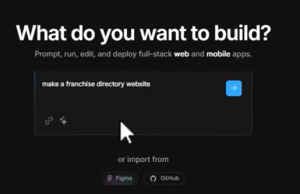
Start by entering broad terms like “franchise” into your keyword tool. Then, filter results that align with:
-
“How to start a franchise”
-
“Best franchises under $50K”
-
“[Franchise name] cost”
-
“[Franchise name] reviews”
-
“Franchise loans”
To avoid irrelevant results (like “Hunger Games franchise”), train your AI tool to focus on investment oriented searches only.

A few example keywords and values:
-
Car wash franchise – CPC: $166
-
Fast food franchise cost – CPC: $115
-
Franchise loans – CPC: $97
-
Franchise opportunities – CPC: $83
Use tools like Gemini or Claude to ask:
“List 50 franchise-related keywords people search before buying.”
This way, your site’s SEO content will match real buyer intent.
Setting Up a High Converting Franchise Directory Site
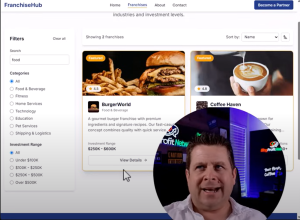
You can use AI tools to help you build a franchise directory that feels like a “baseball card” for each franchise, quick to read, helpful, and visually engaging.
Each listing can include:
-
Franchise Name
-
Initial Investment
-
Franchise Fee
-
Profit Potential
-
Franchise Type (food, service, remote)
-
Owner Involvement Level
-
Link to Application or Info Page

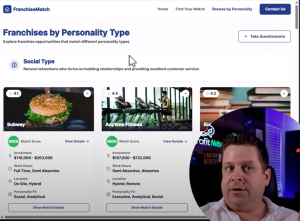
Add a filter tool powered by Bolt or Claude that asks users for:
-
Budget
-
Work style
-
Desired income
-
Personality type
-
Industry interest
This turns your website into an interactive tool that stands out.
Using Programmatic Content for SEO
Programmatic content means your AI helps generate consistent, repeatable page formats based on a dataset.
Examples of programmatic content on your site:
-
100+ franchise review pages (one per brand)
-
“Top 10 Franchises for Introverts” blog post
-
“Franchises under $25K” directory page
-
“How to finance a franchise if you’re broke” article
This works well for:
-
SEO
-
Pinterest images
-
Faceless YouTube videos
-
Press releases
Pro Tip: Always include disclaimers about earnings, and make it clear these are estimates. Mention that “results are not typical or guaranteed.”
Pinterest, YouTube & Faceless Video Strategies
This niche is perfect for faceless content. For example:
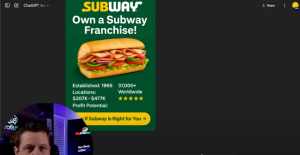
Pinterest:
-
Use info card templates (franchise name + cost + income potential)
-
Link pins to your directory posts or franchise selector
YouTube:
-
Create YouTube Shorts with voiceover + info card animation
-
Post explainer videos about top franchise picks
-
Embed your affiliate links in the description
TikTok:
-
Share one franchise fact per video
-
Highlight weird or low-cost franchises
-
Encourage viewers to visit your website for the full list
Create a series: “Franchise Friday” — a new franchise spotlight every week.
Monetization Methods: Paid Ads, Affiliates & Courses
Let’s talk money.
Here’s how you make $ with a franchise directory site:
1. Programmatic Ads (AdSense or Ezoic)
-
Franchise keywords = high CPC
-
Some clicks can be worth $5–$25+
2. Affiliate Links
-
Franchise loan providers (e.g., Guidant Financial)
-
Franchise education platforms (e.g., courses from Coursera or others)
-
Online business brokers or consultants
3. Your Own Products
-
A $29 Franchise Starter Guide (PDF or mini-course)
-
A $299 Franchise Selector Tool
-
1-on-1 franchise consulting calls
Why This Strategy Works (Even If You’re Starting Fresh)
Here’s what makes this niche low risk and high reward:
-
It’s evergreen (franchise interest doesn’t go away)
-
You don’t need much traffic to profit (targeted traffic = $$$)
-
You can scale with AI: blog posts, videos, social content
-
Someone in the video example had a site built, didn’t touch it for 2 years—and it still ranks!
What You’ll Need to Succeed:
-
Patience (it’s not a get-rich-quick method)
-
Consistency (content, SEO, social)
-
Creativity (with AI tools and visuals)
Franchise Selector Tool Idea
Using AI like Claude or Bolt, you can build a tool that lets visitors:
-
Enter their budget
-
Pick work preferences (remote vs on-site)
-
Choose a target income
-
Select industry interests
-
Answer a few personality questions
The tool then recommends franchises that match those inputs.
Monetization idea: gate the results behind an email opt-in for list building. Then upsell a franchise starter kit or affiliate offer.
Final Thoughts + Next Steps
This franchise directory niche is more than just an idea—it’s a real, scalable, and monetizable system that can generate income from SEO, ads, affiliate programs, and digital products.
Let’s recap what you need to do:
Research keywords with buyer intent.
Build a clean directory-style WordPress site.
Use AI to generate valuable franchise info content.
Distribute through Pinterest, YouTube, TikTok.
Add monetization layers (ads, affiliate links, your own tools).
Focus on long-term, realistic results.
Have you tried building a directory site before? Drop your questions or insights in the comments. And don’t forget to share this article if you found it helpful!
Build a $100K No Code Software Business With Gemini 2.5
Learn how to build a $100K no code software business using Gemini 2.5 Canvas and WordPress plugins. No coding required. Just a smart strategy.
The Fastest Way to $100K Online?
What’s the quickest path to making $100,000 per year online, especially without any coding experience? After 25+ years in the online business world, the answer still holds: product based businesses, particularly in the software and plugin niche, offer one of the fastest, most scalable routes.
And now, with tools like Gemini 2.5 Canvas, you can build your tools, no programming needed.
In this detailed guide, we’ll walk through exactly how to launch a no code WordPress plugin business using Gemini 2.5. You’ll learn how to:
-
Create plugins that solve real problems
-
Use these tools to generate leads or income
-
Monetize via affiliate links, upsells, and paid versions
-
Promote, brand, and optimize your new software product
Let’s dive in.
Why a No Code Software Business Works in 2025
Before we get into the build, here’s why this strategy is worth your time:
-
WordPress powers over 43% of all websites that’s 500+ million sites and counting.
-
There are over 70,000 plugins available on WordPress.org, but many are outdated, basic, or missing real time features.
-
With tools like Gemini 2.5 Canvas, creating a functional, marketable plugin is easier than ever, no programming knowledge required.
Whether your goal is to build a list, drive affiliate sales, or sell the plugin outright, this approach gives you a scalable entry point.
Step 1: Start With a Simple Need (MVP Approach)
Start small. Identify a basic but useful need in the WordPress community.
For example:
-
Real time visitor tracker
-
404 error logger
-
Analytics dashboards
-
URL shortener with tracking
-
Affiliate link organizer
These tools might seem simple, but they solve real problems and can be expanded with features and upsells.
Pro Tip: Use sites like wordpress.org/plugins and keyword tools to spot under-served plugin ideas with real search demand.
Step 2: Use Gemini 2.5 Canvas To Build a Plugin
Gemini 2.5 Canvas allows you to build plugins just by describing what you want. No code knowledge required.
Example: Creating a Real-Time Visitor Tracker Plugin
Prompt: “Create a WordPress plugin that shows real-time visitors, 404 error pages, and basic charts on the dashboard.”
Gemini then generates:
-
A PHP plugin file
-
HTML/CSS components
-
Instructions for CPanel install
🎯 Image suggestion: Screenshot of the dashboard showing live visitors and pie charts.
ALT text: real-time visitor tracking plugin WordPress Gemini 2.5
Once built, upload the plugin to your WordPress file manager under /wp-content/plugins/.
Step 3: Test and Improve the Plugin
Testing is critical. After installation, use these steps:
-
Visit your site from different browsers/devices.
-
Trigger 404 pages to verify error logging.
-
Watch Gemini output for real-time feedback and tweak code where needed.
You can request enhancements from Gemini like:
-
Add pie charts for referral sources
-
Enable multi-site tracking
-
Show top-performing URLs
-
Add a maximize button or view filter
Use this iterative approach to transform your MVP into a premium plugin.
Step 4: Monetize Your Plugin
Once you’ve built and tested your tool, it’s time to monetize:
Option 1: Sell the Plugin
-
$7 for basic
-
$27 for pro with support
-
$97 for multi-site or agency license
Option 2: Use as a Lead Magnet
-
Offer it for free in exchange for email addresses
-
Use internal banner ads or upsells to earn revenue
Option 3: Affiliate Marketing
Use the plugin to drive traffic to related offers:
-
Web hosting (earn $50–$150 per signup)
-
SEO tools
-
AI content services
Example: A URL shortener plugin could promote your affiliate link for Bluehost or HostGator.
Step 5: Promote It Smartly
You can promote your no code plugin in several powerful ways:
-
Press Releases: “New AI-Powered Plugin Helps WordPress Users Track Visitors in Real Time”
-
YouTube Tutorials: Demo the tool in action
-
Blog Posts: Highlight benefits and keyword-rich content
-
Affiliate Program: Offer commission for referrals
-
Bundle Offers: Give it away with a course or toolkit
Step 6: Brand Your Plugin
Branding makes your plugin feel legit. Here’s how:
-
Add your domain name, plugin name, and color scheme
-
Include banner ads or links to your other products or offers
-
Embed a dashboard widget so users always see your brand
-
Insert a “powered by [your site]” line in the footer
Example prompt for Gemini:
“Please brand this plugin for aiprofitscoop.com with banner ad areas and user instructions.”
Turn One Plugin Into a Whole Business
Once your first plugin is built and working, you can:
Upsell premium versions
Build a membership around your tools
Offer done for you setup services
Launch a course teaching others to do the same
This is the foundation of a 6-figure business, build once, sell repeatedly.
Build Smart, Scale Fast
Starting a no code software business with Gemini 2.5 isn’t just possible, it’s profitable.
You don’t need coding skills. You don’t need a team. You just need:
-
A simple plugin idea
-
A minimum viable product
-
Testing and feedback
-
Clear monetization strategy
-
Smart branding and promotion
In today’s AI-powered world, tools like Gemini let creators like you jump straight into building real digital assets. Whether you’re looking to earn your first $1,000 or scale to $100K+ per year, this method can be your shortcut.
From Zero to $5K: How I Used ChatGPT + Manis AI to Launch a Profitable Blog Fast

If you’ve ever wondered whether AI can really help you build a profitable business online, you’re in the right place. Today, I’m pulling back the curtain on how I used Manus AI, a powerful content creation tool powered by ChatGPT, to generate over 50 SEO-optimized blog posts in just minutes. This isn’t about hype or magic software that spits out cash. It’s about a strategy, a game changing system that combines automation with smart monetization.
Let’s dive in.
The Strategy Behind the $5K Manis Blog Build
Step 1: Start With a Money Backed Idea
First off, this isn’t just about writing articles. It’s about publishing content that attracts traffic and converts. The $6,000 I showed came from my affiliate commissions in the web hosting niche, where I recommend trusted hosting services.
But don’t let that number fool you, most people trying to make money online make $0. The secret isn’t just content. It’s a strategy.
I used a domain I purchased at auction for around $50 that already had existing rankings in economics-related topics. This gave me a head start in Google’s eyes.
Step 2: Use Manus AI to Automate 50 Blog Posts
I told Manis:
- Create 50 unique blog posts
- Between 500 and 2500 words each
- Focus on economics topics (my niche)
- Include a “recommended reading” section for internal linking
- Output in Word document format with exact filenames (for bulk upload!)
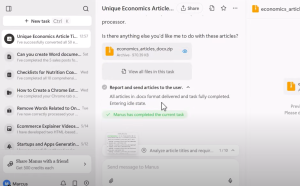
In about 90 minutes, Manus delivered all 50 articles. Completely hands off. And better yet, they passed plagiarism tests and came formatted for WordPress import.

From Content to Cash: Making AI Articles Make Money
Step 3: Upload with Bulk Plugin
Using my WordPress bulk upload plugin, I dragged and dropped all 50 Word documents into the tool. Within seconds, they were live as draft blog posts.
The key here? Each article had a filename that matched a previously ranking URL (called a slug). That ensured SEO continuity and minimized 404 errors.
Step 4: Align Each Article With a Monetization Path
Let’s say one of the articles is about “How to Budget Effectively.” I use that to:
- Link to credit-building tools
- Promote affiliate offers like budgeting templates, credit report tools, or educational apps
Now every blog post has a potential revenue path. This is where most people miss the point. It’s not about content volume. It’s about strategic monetization.
SEO Isn’t Dead. It’s Changing.
Google and Bing are evolving to show AI answers first. That’s called zero click search. But that doesn’t mean blogs are useless.
We now target:
- Featured Snippets
- YouTube embeds
- Pinterest pins
- Internal navigation
Using tools like Ahrefs, we can analyze search features and position our content accordingly.
Building on the Base: Content, Offers, and Repurposing
Here’s where it gets juicy. Once the base 50 posts are live:
- I build “money posts” that link to affiliate offers
- I add value by updating existing articles with more tools and examples
- I repurpose posts into:
- Pinterest graphics
- YouTube scripts
- Faceless videos
- Lead magnets
With Manus, I can also ask for help:
- “How should I monetize this post?”
- “Give me video ideas based on this article.”
It becomes an ecosystem of AI-powered growth.
Real Talk: Will This Make You $6,000?
Let’s be honest. Probably not at first. Most people give up before they see results.
But can this system help you build something real? Absolutely.
- If you create 100 blog posts targeting high-paying affiliate niches…
- If just one reader a day signs up for a $200 affiliate offer (like web hosting or credit cards)…
- That’s $6,000/month.
This is how Marcus thinks. And this is how I teach my students to think. It’s not about “fast money.” It’s about stacking assets that compound.
Quick Recap: Your AI Money-Making Blueprint
- Use Manus AI to generate 50–100 SEO-optimized blog posts
- Upload them with the bulk plugin
- Tie each post to an affiliate offer or email capture
- Update posts with value and CTAs
- Repurpose into YouTube, Pinterest, and social media
- Watch your traffic grow and start converting
Tools Mentioned
- Manis AI: content creation & strategy
- Ahrefs : keyword and SEO research
- ChatGPT/Gemini : repurposing, rewriting, monetization prompts
FAQ
1. How much does Manus AI cost?
The Pro plan used here is $200/month and allows around 500 blog posts.
2. Can I do this with a new domain?
Yes, but using an aged or expired domain with rankings helps.
3. Do these articles pass AI detection?
Most articles had 5% or less AI detection and 0% plagiarism.
4. What niches work best?
Finance, education, health, and tech have high affiliate potential.
5. Is this really passive income?
Only if you put in the work first will this be automation + strategy, not magic.
Google Zero & AI: The $1 Trillion SEO Shift

Discover how Google Zero and AI are changing SEO forever. Learn how to rank, monetize, and thrive in the new search era with tools, branding, and intent-driven content.
Welcome to the Future of Search
Hey there, it’s Marcus, and let me tell you, we are on the edge of something massive. Like a trillion-dollar mass. If you’ve been hearing whispers about Google Zero, AI taking over SEO, and the so called “death” of search as we know it, you’re not alone. But here’s the kicker: this shift? It’s a goldmine. The people who understand what’s happening and how to respond are going to clean up absolutely.
In this article, we’re going to break it all down. You’ll learn:
- What Google Zero actually is
- How AI is changing search behavior
- Why SEO is far from dead (but different)
- How to position yourself to make serious money
- Step by step strategies for adapting and thriving
- Tools and tricks to get ahead of the curve
Let’s dive in bada bing bada boom.
What Is Google Zero?
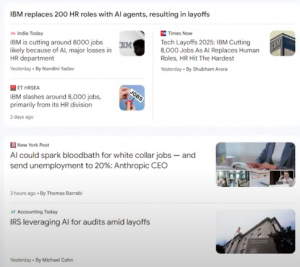
“Google Zero” refers to a zero click search engine, meaning people get their answer directly from Google (via a snippet or AI-generated content) and never click through to any actual website.
Here’s the catch: you don’t get traffic when users don’t click. But Google still makes money. And that’s the core shift we’re facing.
Examples of Zero-Click Content:
- Featured snippets
- AI overviews
- People Also Ask boxes
- Instant answers (e.g., “How tall is Mount Everest?”)
- Maps and local packs
- Video previews
- Rich cards and knowledge graphs
AI is now able to process user intent, scrape the web (including your site), and spit out an answer, so no click is required. And Google’s fine with that because they make billions from ads, not from you getting traffic.
Fact: Google Search generated $175 billion in 2023 alone. Why? Because they sell your attention. Not your content.
This trend has been growing since the early 2010s, but AI supercharged it. Instead of just seeing a blue link, users now see interactive previews, chatbot answers, shopping carousels, and video players, all designed to keep people on Google’s page.
But Wait, Does That Mean SEO Is Dead?
Nope. It just means SEO is evolving, and if you shift with it, you can still make money. Tons of it. The rise of AI doesn’t erase opportunity; it multiplies it for those who understand how to pivot.
Think about this: most people are trying to rank the old-school way. They chase backlinks, keyword stuff, and ignore intent. But Google is changing the rules. They’re looking at how users behave, what keeps them engaged, and which answers truly help.
So if you create better experiences, more accurate answers, and value-driven tools, you win.

The Trillion Dollar Shift Is Happening Now
Let’s talk about what this means for YOU.
Google is becoming an answer engine, not just a search engine. Its AI reads billions of web pages, extracts information, and delivers results in a split second and it’s getting smarter.
Major players like Amazon, Meta, Microsoft, and OpenAI are all betting on similar models. Attention is currency, and whoever controls how people get answers controls the money.
This shift is why:
- ChatGPT became a household name overnight
- Microsoft invested billions into OpenAI
- Google rushed to release Bard and integrate Gemini into Chrome and Android
You need to think like an owner in this AI land grab.
AI + SEO: Understanding the New Relationship
Search is no longer just about queries. It’s about context.
Google’s AI Understands:
- Where the user is located
- What device they using
- What they’ve searched before
- How do they behave after clicking
And yes, it uses that data to personalize results.
What does this mean for SEO?
- It’s no longer about just ranking for a term
- It’s about being the best result for that user, in that moment
You can win in this environment by:
- Answering real questions
- Solving real problems
- Giving users tools and paths to explore deeper
It’s about intent, context, and experience.
How to Spot Opportunities in the AI Era
Marcus showed us in the video how to use Ahrefs to analyze clicks per search (CPS), a critical metric.
Low-CPS = zero-click High-CPS = opportunity
If you find a keyword with 30+ CPS, that’s a gold mine. This means people click multiple times to get what they want.
Examples:
- “Coupon codes” : High CPS, because they rarely work on the first try
- “Vin check”: High CPS, because users want accuracy
- “AI email writer”: High CPS, tool-driven intent
Look For:
- Tools
- Checklists
- Comparisons
- Reviews
- Calculators
- Visual explainers
You win the click if you give the user something AI can’t easily give in one sentence.
The Winning Formula for Modern SEO
Want to win in the new era? You need a strategy.
1. Pick the Right Niche
Go after:
- Local intent
- Transactional intent
- Emotional pain points (e.g., debt, health, addiction)
- Emerging markets (AI, remote work, sustainability)
2. Build Tools
Examples:
- Mortgage calculators
- SEO checkers
- Budget planners
- Visual AI avatars
- Font pairing tools
3. Get a Solid Domain
Marcus always emphasizes domain power. Get something short, descriptive, and brandable.
4. Structure Like an AI
Think about how AI reads your site:
- Clear titles and headings
- Schema markup
- Internal links
- Bullet points and short paragraphs
5. Brand It
When people remember you, they search for you. This bypasses Google’s control and gives you direct traffic, the most valuable kind.
Monetization in the New Era
Let’s talk about the fun part making money.
Affiliate Marketing
Focus on:
- Tools people need
- High-conversion verticals (finance, health, business, tech)
- Comparison pages and roundups
Info Products
Teach people how to:
- Start side hustles
- Use AI tools
- Automate workflows
- Save money or build habits
Services
Offer:
- Site audits
- SEO AI implementation
- AI content strategy
- Consulting for Google-proof branding
Display Ads
Still profitable when:
- You target low-competition, high-volume terms
- Build informational content clusters
- Have long dwell time on your pages.
Own Your Future
You’re not at the mercy of Google. You’re building something real.
The future of SEO is:
- Branded
- Tool-driven
- Trust based
- Experience-optimized
If you shift now, you’ll ride the trillion dollar wave. Wait too long, and you’ll miss the boat.
Don’t build a website. Build a solution. Build a brand. Build a system.
And remember the ones who adapt are the ones who profit.
Let’s make it rain.

Deepseek Ai + WordPress = $300 Day Method

Learn how to make $300 a day using Deepseek AI with your WordPress blog. This is a full tutorial with monetization strategies, tools, and prompts!.
Unlock the Power of AI Blogging: From $0 to $300/Day
Welcome to the ultimate guide where we break down how to turn a struggling WordPress blog into a money-making machine using the powerful combination of Deepseek AI and strategic blog optimization. Whether you’re starting from scratch or already have content that’s getting traffic but isn’t converting, this tutorial will walk you through the exact process of how to use Deepseek AI, ChatGPT, Google Gemini, and other tools to:
-
Analyze your content
-
Discover hidden monetization opportunities
-
Create AI-powered tools and prompts
-
Build affiliate funnels
-
Engage users through interactivity and design
If you want to learn how to build a site that doesn’t just rank—but actually makes money—read this post from start to finish.
Why Most Blogs Fail to Make Money (And How You Can Win)
Most bloggers get stuck in the traffic trap. They write dozens of posts, some get clicks, but the earnings are abysmal, often less than 20 cents a day. The missing ingredient? Intent based monetization. By understanding what your visitors are actually looking for—and using AI to meet that need—you can significantly boost conversions.
Deepseek AI steps in as a game-changer. It reads your blog content, decodes user intent, and helps craft offers, tools, and design elements that transform casual readers into buyers or subscribers.
Step 1: Start With What You Have Analyzing Existing Blog Traffic

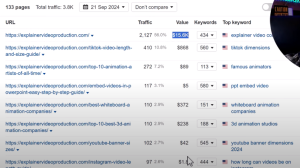
Using a real example, Marcus fires up one of his blogs built around “explainer videos.” The site had over 3,000 monthly visits at one point but was making little to no money. By analyzing rankings and traffic data with AHREFs, he identified high-value keywords like:
-
“Best whiteboard animation companies”
-
“YouTube banner size”
-
“Instagram video size”
These keywords weren’t being monetized. The site had content, but no conversion strategy.
Pro Tip: Install a live chat plugin to monitor user behavior in real time. This lets you see where people land, how they move through your site, and what posts are getting attention.
Step 2: Use Deepseek AI to Read Blog Posts and Extract Intent
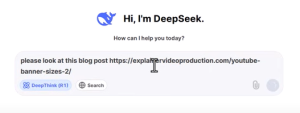
With Deepseek AI, Marcus pastes URLs of blog posts to analyze user search intent and emotional triggers. For instance, someone searching for “YouTube banner size” isn’t just curious about dimensions, they likely want to:
-
Start a YouTube channel
-
Improve their brand presence
-
Learn how to monetize video content
Deepseek suggests turning this insight into money by offering:
-
A free YouTube branding guide
-
Affiliate links to design tools (like Canva or Snappa)
-
Custom banner services via Fiverr or in house offers
-
Downloadable templates or interactive tools.
Step 3: Create Conversion Elements With ChatGPT and Gemini
Once you know what users want, build tools and visual assets that make your post irresistible:
Interactive Tool Example: YouTube Banner Prompt Generator
Marcus created an HTML tool where users input:
-
Channel name
-
Color scheme
-
Style
-
Objective
And get a custom banner prompt they can use in tools like DALL·E or Midjourney.
Suggested placement: Middle or bottom of the post.
Alt text: “YouTube banner prompt generator tool free tool for channel branding optimization”
Banner Ad Example: “Bad Branding = Lost Money”
Using ChatGPT’s image generation, Marcus created click worthy banners with headlines like:
-
“Bad Branding = Lost Sponsors”
-
“Fix It Now, Free Branding Blueprint”
-
“Get Custom Banners for Your Channel in Minutes”
These banners linked to opt in pages, affiliate offers, or free toolkits each with clear CTAs.
Step 4: Build Lead Magnets and Opt-In Pages That Convert
You don’t need complex funnels. Marcus created simple WordPress pages with:
-
Headlines based on Deepseek’s suggestions
-
Eye catching banners
-
Bullet points tied to visitor intent
-
A simple opt-in form using Aweber or similar tools
Smart Tip: Include benefits like:
-
“Custom banners for your YouTube channel”
-
“Free tools and templates”
-
“Growth tips to monetize your audience”
Step 5: Build HTML Tools That Rank, Convert, and Retain Traffic
Marcus demonstrates how tools like domain estimators or animation prompt generators can:
-
Keep visitors on your site longer
-
Get shared across social
-
Build your email list
Example Tools Built in the Tutorial:
-
YouTube Banner Prompt Generator
-
Free Animation Software Finder
-
AI Animated Video Prompt Generator
All of these tools included:
-
Embedded affiliate links
-
Opt in forms
-
Copy paste prompts for Midjourney, DALL·E, or Runway
Step 6: Add Monetization to Each Post
Use this framework for every post that gets traffic:
-
Analyze the search term
What do users really want? Why are they searching? -
Add banners or tools
Offer a free tool or lead magnet that relates to their query. -
Use affiliate links smartly
Tools like Fiverr, Canva, Snappa, or AI platforms have great commissions. -
Prompt opt-ins before accessing tools
Simple gating strategy boosts email signups. -
Track everything
Use live chat tools, Google Analytics, and Deepseek insights to monitor what works.
Make It a Business, Not Just a Blog
Marcus emphasizes that each post on your blog isn’t just content, it’s a mini business opportunity. If a post ranks for “free animation software,” don’t just list tools. Add:
-
A prompt generator for AI video creation
-
Affiliate links to paid versions or upgrades
-
Opt in to a free animation starter kit
-
Pre built examples or case studies
The goal is to build a full-stack experience that engages, monetizes, and retains your traffic.
From Traffic to Profit with Deepseek + WordPress
This tutorial showed exactly how to take your WordPress blog and supercharge it with Deepseek AI, ChatGPT, Google Gemini, and smart affiliate strategies. By building interactive tools, inserting high converting CTAs, and aligning every blog post with searcher intent, you can finally break the cycle of low-earning content.
Don’t wait for passive ad income, build value, gather leads, and sell smart.
Start transforming your blog today.
Google VEO 3 Money Making Strategies: This Is INSANE!
Discover how to make money with Google VEO 3 using AI-generated videos, faceless content, and product promotion strategies that actually work.
The AI Video Revolution Is Here
If you’re looking for new ways to generate online income, Google VEO 3 might just be your next secret weapon. This cutting-edge AI video generator has taken the content creation world by storm and for good reason. In this post, we’ll dive into how to make money with Google VEO 3, including real-world examples, best practices, and money-making strategies you can start using today.
Whether you’re running a faceless YouTube channel, selling affiliate products, or looking to create viral TikToks, the possibilities are endless.
What Is Google VEO 3?
Google VEO 3 is an AI-powered video generation tool that lets users create cinematic, animated, or stylized videos using text prompts. It combines visual consistency, voice generation, and advanced scene creation to help you develop high-quality video content, without appearing on camera.
Key Features:
-
Text to video generation
-
Pro and experimental video quality modes
-
Customizable characters, themes, and audio
-
Watermarked video output for transparency
-
Pricing starts at $124 for a 3 month trial, then $249/month
How to Make Money With Google VEO 3
1. Create Viral Content for Affiliate Offers
The creator behind the video demo uses VEO 3 to promote a ClickBank product reusable paper towels—through dramatic, engaging videos. One example: a 1920s-style commercial showcasing how cheap paper towels cost you money and harm the environment. The idea? Hook viewers with visuals, then send them to an affiliate link for purchase.
Tips:
-
Use shocking or humorous prompts
-
Highlight pain points your product solves
-
Add calls to action in the video and caption
2. Build Faceless YouTube Channels
Faceless content is a booming trend on YouTube. Google VEO 3 helps you create animated explainer videos, street interviews, and dramatic mini-docs all without needing to film yourself.
Examples You Can Create:
-
ASMR videos
-
Street interviews (e.g., “How much do you pay for car insurance?”)
-
Explainers (e.g., “Why your paper towels are costing you $1,000 a year”)
With voice, music, and cinematic quality included, these videos are prime for monetization via YouTube AdSense, affiliate links, or even lead generation.
3. Sell B-Roll and Video Promos
If you’re skilled with prompts, you can produce highly usable B-roll clips for clients. Google VEO 3’s ability to generate consistent, animated scenes makes it a viable alternative to expensive stock footage subscriptions.
Monetization Ideas:
-
Sell B-roll to video editors
-
Create animated intros for small businesses
-
Offer social media video services on Fiverr
Paper Towel Profits
One standout demo involved creating a 1920s-style commercial for a “green” reusable paper towel. After multiple prompt refinements and trial and error, the final output featured a dramatic call to action, “Get the free paper towel report at DryTowels.com,” proving that AI video can generate leads and sales when paired with a strong product.
Prompt Engineering Tips for Better Videos
To get the most from Google VEO 3, you need to master prompt writing. Here are a few tested suggestions:
Best Practices:
-
Use dramatic or emotional language (e.g., “You are being lied to!”)
-
Reference historical styles for a unique twist (e.g., “1920s-style commercial”)
-
Aim for pro mode for better visual quality
-
Focus on one clear message per video
Is Google VEO 3 Worth the Investment?
If you’re serious about video marketing, affiliate sales, or building an online presence with AI content, Google VEO 3 offers game-changing capabilities. It’s more than a novelty; it’s a tool that can power full monetization systems if used creatively and ethically.
$50K Per Lead Niche Market: How Asbestos Legal SEO Makes Money

Discover how the $50K per lead mesothelioma niche works. Learn about traffic, SEO strategies, and ethical ways to profit from high paying legal markets.
What If One Click Could Be Worth $159?
Imagine earning $50,000 from a single lead or $159 per click. Sounds outrageous, right? But it’s not fiction. This guide dives into the high paying mesothelioma legal niche. Not to push you into it, but to show you the mechanics behind ultra lucrative SEO and affiliate opportunities. We’ll break down the traffic strategies, keyword insights, ethical concerns, and smarter alternatives you can apply today.
The Big Picture: Understanding High Value Niche Marketing
What Makes a Niche Worth $50K per Lead?
The mesothelioma/asbestos lawsuit market is one of the most profitable legal niches due to enormous legal payouts. Law firms are willing to pay top dollar for leads because each new client could bring them millions in settlements.
Key numbers:
-
CPC (Cost Per Click) can reach $159+
-
Lead payouts can hit $50,000
-
Organic YouTube channels in the niche are seeing 2,600+ views/day
Important: These figures are not typical and come with high risk. If you aren’t a lawyer or legal marketer, this post is about learning the processnot jumping blindly into the niche.
How the System Works: From Ads to Earnings
Ads and SEO in Legal Niches
-
Facebook Ads: Clever campaigns frame lawsuits as “unclaimed money opportunities” rather than legal jargon, increasing engagement.
-
Google Ads: A broad term like “tax write-offs” might pay $1/click, while a related niche like “donate car for tax credit” can fetch $34/click.
This example proves one point: reframing information = more money.
Why Legal Leads Pay So Much
Firms dealing with asbestos cases spend big on:
-
PPC campaigns
-
SEO services
-
Directory placements
-
Phone-qualified lead forms
The return? A qualified legal lead might be worth tens of thousands.
Ethical & Strategic Guidelines for Marketers
What You Should Not Do
-
Give legal or health advice
-
Mislead or overpromise
-
Collect sensitive lead data without compliance
What You Can Do
-
Build informative content like “asbestos in your home” or “timeline for class action lawsuits”
-
Create resource directories or explain legal processes
-
Use education focused content (inform, educate, don’t advise).
AI + SEO Strategy: Creative, Compliant Traffic Ideas
ChatGPT and keyword tools suggest non health, non legal angles to drive traffic:
H3: Low-Risk Content Ideas
-
High settlement examples
-
Timeline of asbestos lawsuits
-
State by state legal filing guides
-
Famous buildings known for asbestos
-
Jobs with known asbestos exposure
-
Selling a house with asbestos (process guides)
These serve the niche without crossing legal or ethical lines.
Alternative Niches: Safer, Still Lucrative
Don’t feel ready for legal marketing? Try these high paying niches with easier entry:
-
Structured Settlement Loans: $62 CPC
-
Invoice Factoring : $50 CPC
-
Merchant Accounts : $22 CPC
-
Business Loans: Up to $30 CPC
-
CRM Software: Multiple affiliate programs with high commissions
These markets still use the “educate > inform > monetize” strategy.
Example: The $159 Click Breakdown
Let’s say you’re blogging about tax deductions. You mention:
-
How donating a car can be a write off
-
Then link to a partner who processes car donations
With SEO + affiliate setup, a well placed post can trigger $30+ clicks even without selling anything.
Learn the Process, Apply it Wisely
You don’t need to jump into the asbestos lawsuit space to make money. What you do need is a sharp eye for:
-
Where the money is flowing
-
How search engines reward useful, compliant content
-
How to reframe basic info into monetizable insights.
The $2.7 Billion AI Opportunity Google IO Just Revealed

Discover the hidden $2.7B money making opportunity Google IO exposed through AI search. Learn how to leverage it for online income.
Why Google IO 2025 Was a Game Changer for Marketers
At Google IO 2025, a subtle but profound shift was revealed AI-driven search is here, and it’s about to change everything. Not just in how users interact with Google, but in how online entrepreneurs, bloggers, and affiliate marketers make money. This blog post breaks down what was announced, how it affects you, and how you can tap into this trillion dollar shift.
What Is AI Aenic Search and Why Should You Care?
Aenic Search = AI Does the Searching for You
Google introduced AI Aenic Search, which means AI performs deep searches on your behalf removing the need to click or even think of keywords. The user gives a prompt, and the AI delivers refined results instantly. The Rise of Zero-Click Searches
With AI giving instant answers, we’re seeing a rise in zero click searches. When users get what they need without ever visiting a site, this trend impacts SEO, ad revenue, and affiliate income streams.
Understanding the $2.7 Billion AI Opportunity
Online Ads Make $25,000 Every Second
The internet advertising industry generates about $25,000 every second. AI is now positioned to influence where this money goes.
Google’s Secret Inventory: High Value Keywords
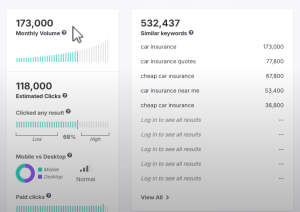
Google’s real goldmine is search queries. Phrases like:
-
“Car insurance”: $23/click
-
“Reverse mortgage”: $22/click
-
“Water damage services”: $34/click
-
“Divorce lawyer near me”: $15/click
Each of these represents search traffic that’s highly monetizable.
From Keywords to Intent: The New Way of Searching
Longer Queries, Deeper Intent
AI search queries are 2–3x longer than traditional searches. For example:
-
Old search: “Mosquito repellent”
-
AI search: “How to get rid of mosquitoes in my backyard without chemicals”
This richer context enables predictive ad placement, tapping deeper into user needs and emotions.
How Predictive Advertising Works with AI
Google’s Query Fan Out Technique
AI expands user intent using Google’s query fan out technique breaking broad queries into specific branches to match monetizable terms.
Example:
“New car prices” fans out to:
-
MSRP breakdowns
-
Dealer invoice comparisons
-
Extended warranties
-
Loan calculators
-
Inventory near the user
Each branch represents potential $5–$25 per click earnings for ad platforms or affiliate sites.
Practical Tips: How to Leverage This Shift
1. Build Tools and Calculators
Google’s AI favors interactive tools (like calculators for loans, alimony, or insurance quotes). These tools increase dwell time, engagement, and monetization.
CTA: Use Gemini or ChatGPT to build simple HTML tools and embed them into your niche site.
2. Target Long-Tail Keywords
The longer and more specific the query, the less competition and higher the intent. Use SEO tools like Ahrefs or SpyFu to mine these goldmines.
3. Stay Ahead with Personal Context and Deep Research
Google’s future plans include personalized AI assistants that suggest ads and content based on user behavior. Build your site and tools now to rank while there’s still room.
Real-World Examples of AI Search in Action
-
Zillow: Dominates house searches thanks to structured data
-
Angie’s List: Earns $13M/month in organic traffic from Google
-
Thumbtack & Yelp: Built billion-dollar businesses on local search
These platforms succeeded by offering tools, listings, and value before AI took over.
🖼️ Image Suggestion: A diagram of the “Query Fan Out Technique” showing one search term splitting into branches with dollar signs at each end.
Alt Text: AI search fan-out technique from Google showing monetizable keyword branches.
What Should You Do Next?
-
Create niche calculators and tools.
-
Build landing pages with long-tail keywords.
-
Monitor Google Trends and Gemini updates.
-
Optimize for AI rankings not just traditional SEO.
AI Search Is the Future. Get In Before the Trillions Flow Elsewhere
Google IO didn’t just unveil cool new tech, it laid out the blueprint for the next trillion-dollar digital shift. AI will now power searches, influence buying decisions, and shape the future of online income.
If you understand the AI fan-out, predictive advertising, and tool-based engagement, you’re already ahead of 90% of marketers.
Call to Action:
Got an “aha” moment from this article? Leave a comment below and share this with someone who wants to make money online using AI.
Turn Digital Courses into Income with Google Gemini and AI Tools

Discover how to tap into the $1.7BN/day AI ads gold rush using smart tools, strategy, and simple steps to boost your online income.
Hey there! Marcus here. If you’ve been wondering how the heck people are making real money using AI tools like ChatGPT, Google Gemini, and other crazy systems, this is the post you’ve been waiting for. Today, I’m going to pull back the curtain and show you how I made $14,000 in just three hours using AI, some digital tools, and a little thing I like to call strategy.
We’re not just talking theory here. I’m going to walk you through what I did, what’s working now, and how you can jump on this gold rush without needing a massive budget or tech skills. So grab some coffee and get ready. This is going to be good!.
What’s the AI Ads Gold Rush and Why It Matters
Right now, there’s over $1.7 billion per day being spent on online ads. That’s not a typo. Every. Single. Day.
Advertisers, affiliate marketers, course sellers, and SaaS companies are all battling for attention. But here’s the kicker: most of them are just throwing money at traffic and hoping it sticks.
You? You’re going to do things differently.
With tools like Google Gemini, ChatGPT, and Manis AI, you can create your own interactive tools, dashboards, and courses that make you look like a total rockstar, even if you’re just getting started.
The Secret Sauce: Strategy + Tools
So the big shift isn’t just the tech, it’s how we use it. Let me say it louder for the people in the back: It’s not about using the tool. It’s about using the tool to build something people actually want.
In my case, I:
- Took an old PLR course
- Used AI to turn it into an interactive, tool-driven dashboard
- Packaged it with value
- Sent it to my list
Three hours later? Boom $14,000 in sales.
Why Most People Make Nothing Online (and How to Avoid It)
Look, I’ve been doing this for 25 years. I’ve seen it all. And the hard truth is that most people trying to make money online don’t make a dime.
Why? Here’s a quick list:
- They rely on hype instead of real value
- They give up after a few weeks
- They chase tactics instead of strategy
But if you flip the script and follow a strategy first approach that uses AI to create real tools, you’re already ahead of 99% of the crowd.
Let’s Break Down the Process
Step 1: Pick a Niche That’s Already Making Money
I don’t care if it’s nutrition coaches, real estate agents, or dog trainers. The key is to go where the money is.
Use keyword tools to:
- Check search volume
- Find questions people are asking
- Understand the demand
Step 2: Find or Build a Simple Product
This could be:
- A PLR ebook
- A short video series
- A basic checklist or worksheet
Then use AI to spice it up!.
Step 3: Add Interactive Tools
This is where the magic happens. I built:
- A domain name helper for coaches
- A pricing calculator
- A social media post planner
- A lead gen site builder
All using Gemini + ChatGPT.
These tools aren’t just fancy. They actually help people take action.
Step 4: Bundle It All Together
I call this the AI Dashboard Method. You’re not just selling an ebook—you’re giving people a working toolkit they can USE.
Step 5: Launch and Promote
Here’s the good part:
- You can launch to a list (like I did)
- Or put it on Gumroad/Udemy for exposure
- Or run low-cost ads
With the tools and value built in, people will actually WANT to buy.
How You Can Start From Scratch
Don’t have a list or product? Here’s how to start today:
- Choose a profitable niche using keyword tools (health, money, and biz are always good bets)
- Find PLR products or write a few short guides using ChatGPT
- Use Gemini to turn them into tools (like calculators, generators, planners)
- Host it on your own domain (shared hosting is cheap—around $6/mo)
- Create a lead magnet or $7 front end offer
Then scale from there.
Final Tips and Warnings
- Don’t skip strategy. Tools are awesome, but they need direction.
- Host on your own platform. Don’t build your castle on rented land.
- Keep it simple. Fancy doesn’t mean better, functionality wins every time.
- Be helpful. The more your tools solve real problems, the more people will buy.
The AI Ads Gold Rush is real. $1.7 billion per day real. And if you’re not in the game, you’re leaving a fortune on the table.
By combining AI-powered tools with smart strategy, you can create real value, help real people, and make real money online.
So stop watching from the sidelines. Build something. Launch it. Test it. Refine it. This is how businesses are built.
👇 If you’re serious about learning how to build your own AI-powered business from scratch, check out my full Simple Sites course. It’s loaded with step by step training, weekly calls, and yes, even the tools.
Go to SimpleSitesBigProfits.com to get started now.
| Platform | Plan Name | Monthly Price | Annual Price | Key Features |
|---|---|---|---|---|
| ClickFunnels | Pro | $297/month | $2,970/year | 10 workspaces, unlimited funnels, courses, members, contacts, pages, domains. |
| Skool | Single Plan | $99/month | $999/year | 1 group per plan, unlimited courses and members, all features included. |
| Teachable | Business | $665/month | $5,988/year | Unlimited courses, students, and coaching products; 20 admin users; 0% transaction fees. |
| Kajabi | Pro | $399/month | $3,828/year | 3 websites, 100 products, 100 funnels, 100,000 contacts, 2 million emails/month. |
| Thinkific | Premier | $499/month | $4,788/year | Unlimited courses and students, advanced analytics, single sign-on (SSO), API access. |
1. Assess and Break Down the Original Content
-
Skim the material (course/ebook/PLR) for key frameworks, formulas, checklists, or action steps.
-
Identify actionable elements—calculators, templates, worksheets, checklists, scripts, trackers, etc.
-
Note where personalization or automation could enhance results (AI suggestions, data entry, progress tracking).
2. Map Content to Tools/Features
-
List out features you can build from the material. (e.g., goal setting → goal tracker, chapter on budgeting → budget calculator, scripts → AI prompt generator)
-
Ask: What would help the user take action or save time?
-
Brainstorm any features that could use generative AI (chat, content, summaries, suggestions).
3. Design the Dashboard Layout
-
Sketch a simple layout: tabs/sections for each tool or content module.
-
Consider a “Start Here” onboarding flow.
-
Visual elements: progress bars, checklists, calculators, chatbots, and resource libraries.
4. Turn Static Content into Interactive Elements
-
Checklists → Clickable, savable checklists
-
Templates → Editable, downloadable templates
-
Formulas/Frameworks → Calculators, scorecards, or wizards
-
Guides/Chapters → Step-by-step workflows or quizzes
-
FAQs → Interactive knowledgebase or AI Q&A
-
Scripts → AI script generators
5. Integrate AI Where It Adds Value
-
Use AI for personalization (custom recommendations, plan builder).
-
Add AI chat to answer questions or provide real-time feedback.
-
Let AI summarize, reword, or create new content based on user input.
-
Use AI for scoring, analysis, or automated reports.
6. Choose the Tech Stack
-
No-code tools: gemini / chagpt / manus
-
Embed AI: OpenAI/ChatGPT API, Claude, or other LLMs.
-
Free Freemium Or Paid
7. Build and Test MVP
-
Start with core interactive features first.
-
Get real user feedback.
-
Tweak the dashboard layout and features based on engagement.
8. Monetize and Launch
-
Lead magnet: Free access to basic tools; upsell premium.
-
Membership: Paid access, recurring SaaS.
-
Bundled with PLR/ebook/course as a high-ticket upgrade or bonus.
9. Add Support and Community
-
AI or human chat for support.
-
Discussion area or forum.
-
Regular updates (content drops, new tools).