One Filter Video = $1,000,000???

One Seo Ranking= $3,200 MONTH?

Stop Making Content – Make THIS Instead!
Simple Grid Site Makes $971K Year?
Hub Site 250K A Year???
Why You Need a Hub Site to Build a Predictable $250k Online Business
Download Your Money Getting Dashboard Here
CLICK HERE TO START YOUR HUB SITE
Could one simple website generate upwards of $250,000 a year? If you have spent any time looking into affiliate marketing, digital publishing, dropshipping, print-on-demand, or user-generated content (UGC), you have undoubtedly seen wild income claims everywhere. The web is overflowing with tactics promising overnight riches. Yet, when you look under the hood of what 90% of beginners are doing, you see a familiar, painful pattern: people work day and night creating content, sharing direct affiliate links across social media, and ultimately making nothing.
For more than 27 years, successful affiliate marketing veterans have relied on one foundational asset that separates struggling beginners from long-term digital media businesses: a hub site. While others endlessly chase changing algorithms on rented platforms, smart operators plant their flag on independent digital real estate that compounds in value month after month, year after year.
With modern artificial intelligence tools like Claude and ChatGPT, building a high-converting hub site no longer takes weeks of custom web development or thousands of dollars in technical fees. You can plan, code, prototype, and launch an entire multi-asset digital hub in mere hours. Here is the blueprint for creating a sustainable home base online, how to select and leverage domains, and the exact steps to build your own profitable digital engine.
The Real Problem: You Do Not Own a Rented Audience
The single greatest trap in the modern digital economy is building an entire enterprise on borrowed land. Whether you rely on TikTok views, YouTube recommendations, Facebook groups, Instagram reels, or organic Google search rankings, you are operating at the whim of third-party landlords. A single algorithm tweak, policy shift, or platform shutdown can wipe out your entire revenue stream overnight.
The Core Principle: A hub site is not a magic money machine. It is a home base for useful work: content, tools, files, offers, and a permission-based audience. Revenue is possible, never automatic.
When you direct people to a social media link in your bio, or paste a raw affiliate redirect straight into an ad, you are renting your presence. If that platform changes its reach rules or bans your affiliate network’s redirect parameters, your traffic vanishes instantly. Furthermore, you lose the opportunity to build brand equity or capture long-term customer value.
A hub site acts as the central sun in your digital marketing solar system. Every social media mention, video tutorial, podcast interview, and guest post should orbit around this singular, dependable home base. By establishing an independent website anchored to a domain you own, you secure four fundamental business pillars:
- Foundation: You build on owned web property rather than surviving at the mercy of platform algorithms.
- Value: You establish a centralized repository for your checklists, web tools, templates, downloads, and tutorials.
- Domain: You control a clean, memorable address that builds trust and retains audience recognition.
- Research: You deploy modern data and AI to evaluate market demand, matching high-intent traffic with relevant solutions.
What Is a Hub Site? (The Digital Folder Metaphor)
The term “hub site” often intimidates newcomers who assume it requires complicated enterprise architecture. In reality, the concept is as straightforward as organizing files on your desktop computer.
At its technical core, a hub site is simply a domain name connected to a dedicated folder on a web server. Inside that folder, you can place anything you want: basic HTML pages, PDF guides, client calculators, interactive forms, downloadable swipe files, or software applications. The web server reads that folder and displays those assets to anyone who enters your domain address in their browser.
Because you control the entire directory, you have ultimate flexibility:
- You can build customized landing pages that collect email addresses for specific promotions.
- You can publish interactive web apps and lightweight tools that solve immediate user problems.
- You can host PDF summaries, cheatsheets, and companion resources to enhance video training.
- You can change your affiliate links on the backend without breaking external links in past videos or articles.
Instead of scattering your digital footprint across dozens of disconnected platforms, your hub houses your tools, educational material, and commercial recommendations under one organized roof. Over time, that single digital property accumulates authority, search equity, and direct type-in audience habits.
The Affiliate Marketing Reality Check: Stop Sending Cold Traffic to Raw Links
Many aspiring entrepreneurs assume affiliate marketing is as simple as: Find an offer → Grab an affiliate link → Post the link everywhere → Collect passive commissions. This approach almost never works.
Sending cold traffic directly to an affiliate offer is the lowest-converting, highest-friction method in digital marketing. Cold visitors do not know you, they do not trust you, and they rarely buy a product the very first second they hear about it. If you direct cold traffic straight to an external vendor’s sales page:
- You get only one chance to close a sale. If the user bounces, they are gone forever.
- You give away the data footprint to the merchant without collecting contact details for yourself.
- You risk account suspensions from major advertising and social platforms that penalize raw affiliate redirects.
- You fail to establish any personal authority or brand recognition.
Instead, look at the professional affiliate marketing flow:
Discovery Channel (YouTube, Search, Ads, Social) → Your Useful Hub Page → Free High-Value Resource / Opt-In → Transparent, Contextual Recommendation
A hub site provides the bridge that makes your recommendations sensible. When someone lands on your hub, they experience your perspective, test your tools, read your insights, and determine the exact fit for their specific situation. If they are ready to buy, they click your tracked link with context and trust. If they are not ready to purchase, they can download a free resource, join your permission-based email list, and allow you to serve them until they are ready.
To streamline this entire setup and access pre-built workflows for tracking and conversions, you can
Download Your Money Getting Dashboard Here
CLICK HERE TO START YOUR HUB SITE
The 9 Essential Jobs of a Modern Hub Site
A properly structured hub site performs nine critical business functions simultaneously. You do not need all nine on launch day, but as your digital asset matures, each component adds stability and leverage to your revenue model.
1. Give People One Clear Destination
Stop scattering different affiliate redirects across every social video, podcast interview, and bio link. Give your audience one clear destination. When you consistently say, “Head over to my site to grab the notes and templates,” your visitors remember the name, return directly through their browser, and look to your brand whenever they face a problem in your niche.
2. Store Files People Actually Want
Rather than letting valuable worksheets, checklists, prompt packs, and templates languish in random Google Drive folders, host them on your hub. If an affiliate program updates its features or a platform changes its rules, you can update your master file on your server once. Every visitor accessing that file from an old video or email automatically receives the latest version.
3. Turn Helpful Ideas into Small Assets
Do not stop at plain-text articles. By pairing basic web hosting with modern AI, you can generate simple, functional browser tools: pricing calculators, prompt formatters, conversion estimators, or searchable databases. An interactive tool that solves an annoying niche problem creates massive user goodwill and encourages repeat visits.
4. Direct Traffic with Intent
Never dump every offer you promote onto a single, cluttered webpage. A hub site allows you to build targeted routing paths based on intent:
- Visitors looking to learn land on in-depth guides and video breakdowns.
- Visitors looking to compare land on side-by-side spec sheets and feature matrix tables.
- Visitors looking to implement land on downloadable checklists and software toolkits.
Matching page intent directly to the user’s specific stage in the buying cycle drastically lifts conversion rates.
5. Grow an Email List Responsibly
Audience lists should be treated as permission to communicate, not owned property. Your hub site serves as the ultimate opt-in engine. When you provide genuine value upfront—through detailed notes, unreleased source code, or custom templates—visitors willingly exchange their email address. Email marketing gives you an unmediated line of communication that platform algorithms cannot throttle.
6. Sell Ethically and Transparently
Trust is your primary asset online. When you recommend digital products, SaaS subscriptions, or training courses, clear affiliate disclosures are essential. A dedicated hub allows you to thoroughly explain both the pros and cons of an offer. If a visitor decides a product is not right for them, the educational content on your hub still delivers value, ensuring they return for future recommendations.
7. Look Established with a Branded Address
Conducting business via generic, free email accounts looks amateur and hurts email deliverability. Operating from an address like hello@yourdomain.com immediately establishes professional credibility. It reinforces your brand identity and keeps your messaging consistent across outreach, customer support, and newsletter broadcasts.
8. Compound Your Work Over Time
On social platforms, content expires rapidly; a post published 48 hours ago is practically invisible. On a hub site, your work compounds. A comprehensive guide written today can be repurposed into a video, broken into a 5-day email sequence, bundled into a lead magnet, and referenced inside product reviews for years to come. One well-researched asset continues to drive traffic and sales indefinitely.
9. Keep the Whole Customer Path Under One Roof
Expensive third-party funnel builders charge hundreds of dollars per month to host basic web pages. With your own hub site, your entire customer journey lives under your direct control: opt-in pages, thank-you screens, delivery portals, review pages, and bonus download areas. Everything remains unified, branded, and completely free from third-party monthly software fees.
Why Domain Names Still Carry Massive Real Estate Value
In an era dominated by apps and social networks, some question whether domain names still matter. The data confirms they remain essential digital infrastructure. The web still operates on domain names that people recognize, trust, and type into address bars.
According to the official Verisign Domain Name Industry Brief, the close of Q2 2026 recorded 401.6 million domain name registrations across all top-level domains (TLDs), with 166.6 million registrations in .com alone. Global domain registrations continue to expand because digital real estate is finite. There is only one exact match for any given web address.
Your domain name is the virtual sign above your business door. While platforms come and go, your domain remains the permanent anchor for your digital identity. Generally, domain acquisition strategies fall into three primary categories:
| Domain Strategy | Best For | Core Advantages | Key Risks / Watchouts |
|---|---|---|---|
| Brand New Domain | Clean slate projects, unique personal brands, modern software tools. | Low cost ($10-$15/yr), zero negative history, total naming freedom. | Takes time to build initial search authority from scratch. |
| History-First Domain | Niche authority blogs, industry resource portals, content hubs. | Existing high-authority backlinks, domain age, historical relevance. | Must audit past spam; subject to search engine expired domain abuse policies. |
| Traffic / Auction Domain | Immediate monetization, targeted product launches, direct lead gen. | Pre-existing type-in and referral visitors arriving from day one. | Higher acquisition costs; requires strict niche alignment to convert visitors. |
Evaluating New Domains
If you choose a brand-new registration, focus on clarity above cleverness. Avoid confusing spellings, hyphens, and numbers. Choose words that roll off the tongue naturally in videos or podcast conversations. Say the name aloud three times: if someone hearing it cannot spell it accurately on the first attempt, discard it and find a simpler alternative.
Evaluating Historical and Auction Domains
Acquiring an expired or auction domain through platforms like SpamZilla can provide an immediate foundation of established authority. However, caution is required. Google’s spam policies explicitly target expired domain abuse, which occurs when an operator buys an expired domain and repurposes it to manipulate search rankings with low-quality, off-topic content.
To safely leverage a historical domain:
- Ensure the domain’s historical topic aligns directly with your intended niche (e.g., do not turn an old medical clinic domain into a cryptocurrency review site).
- Audit historical anchor text and backlink profiles to verify links come from genuine, reputable editorial sources rather than automated spam networks.
- Build comprehensive, high-value content that honors the original topic and provides real utility to incoming visitors.
Using Artificial Intelligence for Smart Domain Ideation
Do not stare at an empty registrar search box hoping for inspiration. Modern language models like ChatGPT and Claude are exceptional brand strategists when provided with targeted prompts. However, always treat AI output as an idea generator rather than a final legal verdict. AI cannot check real-time registrar availability, confirm active trademark registrations, or audit historical backlink profiles.
Prompt 1: Strategic Brand & Positioning Architecture
Use this prompt in ChatGPT or Claude to develop distinct conceptual angles for your hub site:
Act as a practical brand strategist. I am building a hub site for [INSERT AUDIENCE] that helps them [INSERT DESIRED OUTCOME].

Give me 30 domain-name directions in these three specific groups:
1. Clear and descriptive
2. Short and brandable
3. Authority / industry-standard style

Avoid made-up spellings, hyphens, numbers, misleading claims, and names that mimic existing major companies. For each idea, include a concise 5-word positioning angle. Finally, generate 10 two-word keyword combinations I can research for historical domain relevance and backlink fit. Do not claim any name is definitely available or legally cleared.
Prompt 2: Generating Bulk Short .Com Candidates
When you want to evaluate high volumes of short, clean .com domains via bulk registrar search tools, use this structured generator:
Give me 100 short .com domain ideas for [INSERT NICHE].

Requirements:
- Use clear, real English words or intuitive two-word combinations.
- Easy to pronounce, easy to spell, and instantly memorable.
- Strictly no hyphens, numbers, intentional misspellings, or trademark lookalikes.
- Return ONLY the list with one domain name per line (no numbers, bullet points, or commentary) so I can paste the output directly into a bulk domain search tool.
Once generated, take your clean list and paste it directly into bulk search tools on GoDaddy or Namecheap to identify available domains in seconds.
If you want access to advanced AI prompts, technical templates, and step-by-step setup walkthroughs, you can
Download Your Money Getting Dashboard Here
CLICK HERE TO START YOUR HUB SITE
Building Real Assets with Claude and Affordable Hosting
Once you secure your domain name and set up standard web hosting, you have everything needed to ship high-value digital assets. The old barrier of needing to write complex code or hire full-stack developers has disappeared. With Claude, you can plan, write, and prototype interactive web tools in minutes.
The Power of Lightweight Mini-Tools
Consider the difference between reading an article about “How to calculate your affiliate break-even ROAS” versus using an interactive calculator right on the page where you type in traffic costs and commission rates to get an instant answer. A simple interactive tool turns passive readers into active users, increasing bookmarking, social shares, and conversion rates.
Using Claude, you can ask for complete, clean, self-contained single-page applications using standard HTML, CSS, and vanilla JavaScript:
- Interactive Calculators: ROI estimators, loan payoff calculators, calorie deficit planners, or commission projection tools.
- Checklist Generators: Interactive compliance checkers, launch-day audits, or content planning outlines where users can check off completed tasks and print the results.
- Prompt Formatters: Custom front-end generators that allow users to fill out form fields and copy perfectly structured AI prompts to their clipboard.
- Resource Directories: Filterable libraries containing curated software tools, reading lists, or vendor comparison sheets.
Upload the generated HTML file directly into your hosting account’s public folder, and your new tool is instantly live on your domain. No plugins, no bloated frameworks, and no expensive monthly software subscriptions required.
The 5-Day Beginner Action Plan: Launch Your Hub Site This Week
Perfectionism is the enemy of digital progress. Spending months endlessly refining logos, tweaking color palettes, or debating platform choices will not build a business. A live, single-page hub site offering genuine value beats an unlaunched “masterpiece” every time.
Here is an actionable 5-day roadmap to launch your hub site and present your first clear offer this week:
Day 1: Define One Audience and One Core Promise
Clarify your target audience and the specific problem you solve. Fill in this single positioning statement: "I help [Target Audience] achieve [Specific Transformation] without [Primary Pain Point]." If you cannot summarize your business value in a single sentence, narrow your scope until your message is razor-sharp.
Day 2: Select and Secure Your Domain Name
Run the AI ideation prompts detailed above. Pick a clean, memorable, brand-new domain, or conduct a careful audit on an established historical domain using SpamZilla. Run basic trademark clearance checks, purchase your name through a reliable registrar, and connect it to an affordable web host.
Day 3: Publish Your Minimal Viable Hub Page
Keep your initial setup clean and focused. A high-converting one-page hub requires only four core elements:
- A clear headline stating who you help and what they will discover.
- A brief introduction outlining your perspective or framework.
- Your single best resource (a helpful summary, interactive tool, or downloadable guide).
- A simple opt-in form or clear contact link inviting further conversation.
Do not worry about multi-tier navigation menus or complex blog structures yet. Launch a focused, functional home base.
Day 4: Integrate Your First Relevant Commercial Offer
Publish your initial commercial pathway. This could be a focused digital guide, a specialized consulting package, or an affiliate recommendation that directly solves a problem for your audience. Include a clear, transparent affiliate disclosure. Explain precisely why you recommend the solution, who it is built for, and who should avoid it. Honesty builds trust, and trust drives sales.
Day 5 and Beyond: Add Value and Optimize the Journey
With your hub live, direct your audience to your owned web property. Every time you record a video, publish a social post, or answer a question on forums, point people back to your central resource page. Monitor user behavior: Which tools get used? Which resources get downloaded? Gradually expand your hub by adding comparison pages, video notes, and companion tutorials.
Stop Renting. Start Building Real Assets Today.
Affiliate marketing and online publishing are real businesses. Treating them like casual side-hustles—spamming affiliate links across social media profiles and hoping for quick commissions—leads directly to burnout and empty accounts.
Stop pouring all your energy into platforms you do not own. Choose an address, launch your hub, provide real utility to your audience, and give people a compelling reason to return. As your audience learns to trust your domain as their primary resource, your digital real estate will compound into a dependable business asset.
If you are ready to stop guessing and start implementing with structured tools, proven frameworks, and direct walkthroughs, take the next step right now:
Download Your Money Getting Dashboard Here
One Page Websites = Big Profit
JOIN THE OFFER PROFIT CHALLENGE HERE
DOWNLOAD YOUR PROFIT DASHBOARD HERE
One-Page Websites That Make $512,872: The 7 Offer Page Types and Traffic Trigger Framework
When it comes to building an online business and generating life-changing income, most beginners and struggling marketers make things entirely too complicated. They get trapped inside convoluted web designs, spend months tinkering with complex AI automation chains, construct endless blog architectures that nobody reads, and build multi-tier sales funnels featuring dozens of connected apps that inevitably break.
The cold truth about direct response marketing is that complexity kills conversions. In fact, if you look at the real data behind how real businesses actually produce profit online, you will find that less than 10% of total effort produces over 90% of the revenue. This classic 90/10 dynamic means that the vast majority of digital noise—the endless back-office setups, bloated WordPress themes, complex plugins, and sprawling content plans—generates zero dollars. What actually generates revenue is very simple: matching the right single-page offer to the exact intent of the traffic you are receiving.
Today, we are stripping away the tech bloat. We are going to look at how simple one-page websites can generate massive returns—in some cases pulling in as much as $512,872 profit each. By examining the 7 Offer Page Types by Traffic Trigger Framework, you will discover how to align your pages with the visitor’s state of mind, identify high-intent trigger words using search data, and bridge the gap between casual visitors and paying customers.
Income Disclaimer: Results are not typical, implied, or guaranteed. The vast majority of people who attempt to make money online make nothing. Running a profitable online business requires consistent testing, market research, understanding audience intent, and deliberate execution. Setting up a one-page site is not a magic ticket to immediate retirement; it is a direct-response marketing vehicle that works only when properly matched to market demand.
—
The Core Problem: Backwards Marketing and Funnel Overkill
Most marketers approach selling products backwards. They find an affiliate offer or create a digital product and ask themselves: “How can I convince people to buy this?” They then construct massive websites, spin up blogs with hundreds of articles, and try to force-feed their offer to anyone who stumbles upon their link. The result? Months of unpaid labor, zero conversions, and utter exhaustion.
The direct-response approach flips this logic completely. Instead of starting with what you want to sell, you start with what the user is already searching for, feeling, and saying. You ask: “Who is already looking for a solution, what exact language are they using, and what is the single next step they need to take right now?”
Consider the classic direct mail industry. Decades ago, direct response giants relied on the SRDS (Standard Rate and Data Service), which allowed advertisers to purchase highly targeted mailing lists of verified buyers. If someone recently purchased a home, financial service providers and home improvement companies mailed them a targeted, single-page sales letter offering mortgage refinancing or roof repair. There was no bloat. It was a single, compelling message delivered to someone who already had a proven need.
Today, search engines like Google process over 8.5 million searches every single minute. The search engine results page (SERP) leaves an open, transparent digital breadcrumb trail. Searchers literally type their exact problems, budgets, hesitations, and buying triggers directly into the search bar. When you know how to read these signals, you can replace a 100-page bloated website with a single, laser-focused one-page site that does one job: converting that specific searcher into a lead or buyer.
—
The Universal Customer Journey: The Simple 5-Step Model
Every marketing funnel ever built is simply a variation of one linear journey:
Traffic → Capture → Warm Up → Sell → Follow Up
The fatal mistake that keeps most marketers broke is assuming that every visitor needs every step of this journey every single time. That is simply false.
- If a prospect types “best web hosting pricing” into Google, they already know what web hosting is. They don’t need a 20-page ebook explaining how the internet works. They don’t need a 5-day educational email sequence. They are standing at the register with their wallet out, looking for a comparison or discount so they can make an immediate purchase. If you put a lengthy lead magnet between them and the sale, you lose the customer.
- Conversely, if someone searches “why is my roof leaking after heavy rain”, sending them directly to an aggressive, hard-closing checkout page for an expensive roof replacement contract will alienate them immediately. They are cold. They don’t even know if their problem requires a simple patch or a full repair. They need education, diagnostic help, and trust before they commit.
To succeed with one-page websites, you must select your page structure based entirely on the traffic type and the trigger words your prospects use.
—
Traffic Types: Identifying What Your Visitors Are Thinking
Before you build a page, register a domain, or choose an affiliate link, you must diagnose the psychological temperature of your traffic. You can identify this by listening carefully to your prospects’ language in search queries, forum discussions, social media comments, live chat logs, and ad responses.
| Traffic Type | What They Are Thinking or Saying | Ideal Starting Page Type |
|---|---|---|
| Cold | “What is this?” “Can this help me?” “I have a problem, but I don’t know the solution.” | Lead-Capture or Pre-Sell (Warm Up) |
| Curious | “Tell me more.” “Why is this different?” “What makes this work?” | Pre-Sell & Education (Advertorial / Bridge) |
| Warm / Interested | “What do I get?” “How much is it?” “Is this right for me?” | Core Sales Page (Direct Pitch) |
| High Intent | “Can you help me?” “How do I start?” “Can I talk to someone?” | Qualification & Booking Page |
| Existing Customer | “What is the next level?” “What else do I need to succeed?” | Checkout Expansion or Follow-Up |
—
The Trigger-Word Rule: Unlocking Commercial Intent
Every keyword searched on Google or mentioned on social media carries a built-in intent signal. These are known as Trigger Words.
Trigger words tell you precisely where a prospect is located on their buyer journey, completely independent of the niche:
- Early-Stage Trigger Words: Words such as free, how to, template, checklist, guide, beginner, examples, and ideas signal that the prospect is gathering information. They are not ready to pull out a credit card, but they are prime candidates to be captured as an opt-in lead or educated via a pre-sell bridge page.
- Mid-Stage Trigger Words: Words like why, mistakes, not working, vs, compare, alternative, and reviews tell you that the prospect understands their problem, has looked at existing options, and wants clarity on what works best.
- Late-Stage Buying Words: Words such as buy, price, cost, pricing, discount, coupon, promo code, and get started signal that the prospect is solution-aware and ready to transact. These visitors should go directly to a clean, direct-pitch sales or comparison environment.
- High-Touch Intent Words: Words like apply, book, call, consultation, demo, audit, agency, custom, and enterprise indicate that the user has a serious budget and requires personalized validation before transacting.
When you master trigger words, you can find massive pockets of low-competition, high-value search traffic in hyper-profitable niches.
Ready to master offer construction and implement these single-page frameworks in real-time? Join Todays Make An Offer Training – In Ai Profit Scoop Elite.
—
Case Studies in Keyword Research: Extracting Untapped Niches
To demonstrate how simple this process is in real-world conditions, let’s explore three keyword experiments using direct response research techniques:
1. The “Affordable” Trigger in Health & Fitness
If you plug the trigger word “affordable” into a keyword tool and filter for strict matches, you immediately uncover consumer segments actively looking to spend money, but seeking value. For instance, the phrase “gym membership affordable” receives over 301,000 searches per month. When you aggregate related long-tail variations—such as “which gym is affordable,” “affordable gym memberships near me,” and “cheap fitness memberships”—the addressable market easily reaches nearly half a million monthly searches.
Because the competition for these specific phrases is dramatically lower than the hyper-competitive parent keyword “gym”, a simple one-page comparison or choice page listing affordable local gym offers or home gym equipment kits can capture massive traffic with minimal SEO overhead.
2. The “Alternative” Trigger in Financial Planning
Financial services represent some of the highest-paying affiliate and advertising markets online. Keyword terms like “financial planner” or “financial advisor near me” command cost-per-click (CPC) rates exceeding $10.98 per click on Google Ads, with parent terms requiring tens of dollars per click. However, if you examine search behavior through the trigger lens using the word “alternative”, you find gems like “alternative retirement plan” pulling in over 165,000 monthly searches with virtually zero advertiser competition.
Affiliate networks offer payouts ranging from $75 to $140 per verified lead for retirement solutions (like IRA financial services and Empower). If you direct visitors searching for retirement alternatives to a simple one-page quiz or choice page asking: “Which retirement account do you currently hold: 401(k), IRA, or Roth IRA?”, you can bridge their confusion and refer them to high-ticket affiliate programs that pay out substantial fees.
3. Modern Trends: The “Vibe Coding” Opportunity
Market opportunities appear constantly whenever technology shifts. Recently, the phrase “vibe coding” emerged across tech forums, capturing over 110,000 monthly searches almost overnight. People using AI tools to build apps without standard programming skills are flooding search engines with terms like “vibe coding platforms” and “what is vibe coding.”
Software-as-a-Service (SaaS) affiliate programs in the coding space (such as Lovable, Cursor, and Claude AI subscriptions) pay handsome recurring commissions, with some developer-focused tools paying up to $112 per referral. A single-page site with a choice-router asking: “What do you want to build today? (1) iPhone App, (2) Android App, (3) SaaS Platform, or (4) Chrome Extension” can immediately funnel searchers into the exact AI tool suited for their project via an affiliate link.
—
The 7 Offer Page Types: Full Breakdown and Strategy
Now that you understand the underlying traffic triggers, let’s explore the 7 specific one-page website architectures that you can deploy to monetize this traffic immediately.
—
01. Lead-Capture Pages
Main Job: Turn cold or early-interest traffic into an identifiable, contactable lead.
Visitor Mindset: “I want help, ideas, a shortcut, or something useful before I make a serious commitment.”
Traffic Triggers: free, how to, template, checklist, examples, ideas, guide, quiz, beginner
Core Message: “Get a quick win before you make a bigger decision.”
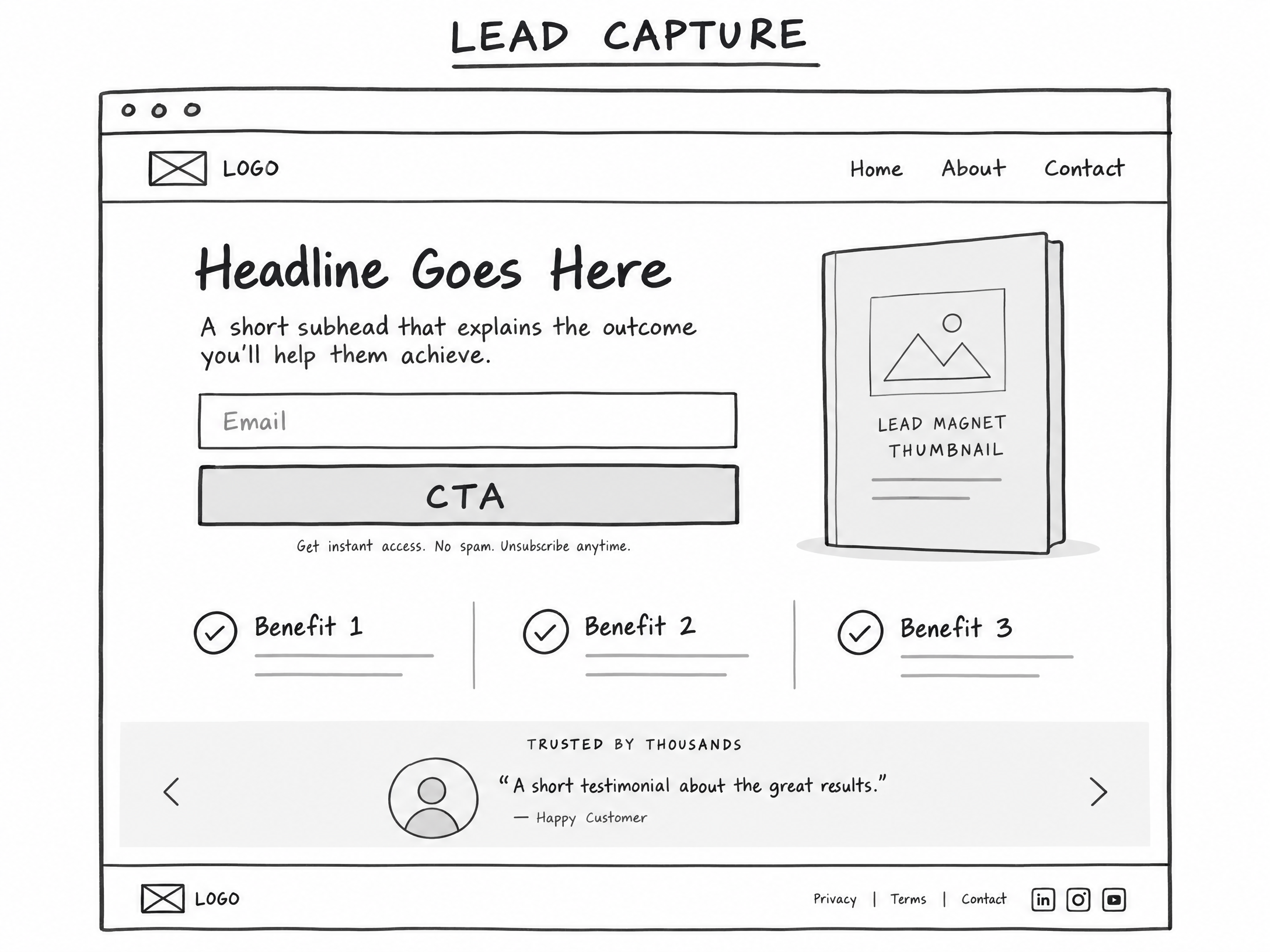
The Lead-Capture page is built for speed and zero cognitive friction. Its singular goal is an exchange of value: the visitor provides their email address or phone number in exchange for an immediate, tangible asset.
Core Variations:
- Opt-In / Lead Magnet: A one-page PDF, cheat sheet, Excel spreadsheet, or swipe file that solves one narrow problem. (Example: “The 5-Point Leaky Roof Emergency Checklist” or “Alternative Retirement Plan Tax Matrix”).
- Webinar / Workshop Registration: A direct registration page for a live or automated training session.
- Interactive Quiz / Assessment: A multi-question diagnostic tool that promises personalized results upon entering contact information.
- Waitlist / Early Access: A minimalist pre-launch page designed to gauge demand and capture hungry prospects prior to an offer going live.
Wireframe Blueprint:
- Clear, Benefit-Driven Headline: Explicitly state the exact payoff of the lead magnet (e.g., “Download the Free 2024 Alternative Retirement Guide”).
- Subheadline: Agitate the pain point and introduce the quick-win mechanism.
- Visual Mockup: A clean graphic representation of the download, checklist, or template.
- Form & Call-to-Action (CTA): A clean, single-field or two-field form (Name + Email) with a high-contrast submission button (e.g., “Send Me The Guide Now”).
- Micro-Proof / Disclaimer: Privacy assurance and mandatory affiliate/earnings disclaimers.
—
02. Pre-Sell & Education Pages (Bridge / Advertorials)
Main Job: Build understanding, relevance, curiosity, and trust before presenting the commercial offer.
Visitor Mindset: “Why is this happening to me? Why have other solutions failed? What makes this approach different?”
Traffic Triggers: why, mistakes, not working, does it work, different, results, reviews, case study
Core Message: “Here is why the old way falls short—and why this new approach may work better.”
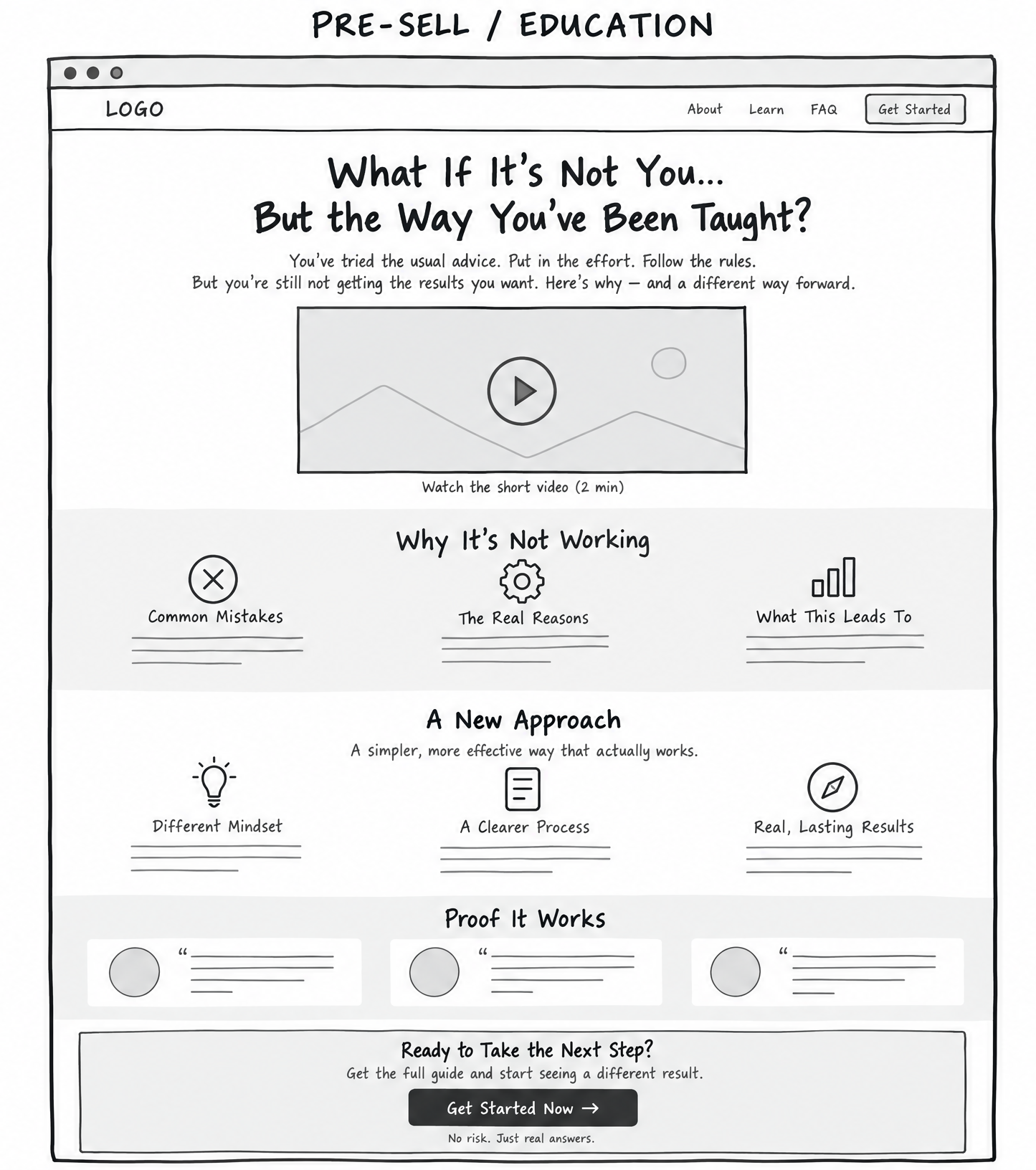
Most affiliate marketers send cold traffic directly to an affiliate sales page and wonder why their conversion rate is zero. Affiliate product pages are designed for warm prospects who already understand the core concept. If your visitor has lingering doubts or misunderstandings, you must bridge that gap yourself using a Pre-Sell page.
As the classic direct-response saying goes: “You can’t just sell; you have to finesse them a little bit.” The Pre-Sell page reframes the problem so that the offer becomes the obvious, inevitable solution.
Core Variations:
- Bridge Page: A short page (often with a 2-to-3-minute video) explaining: “You are searching for X. Here is why X alone won’t work, and why you should look at product Y.”
- Advertorial: An editorial-style story or article that reads like an objective breakdown, deconstructing common mistakes before introducing the tool or method.
- Pre-Sale Video Sales Letter (VSL): A video-centric page focusing on the hidden mechanism behind a persistent problem.
Wireframe Blueprint:
- Editorial Headline: Curiosity-driven and educational (e.g., “Why Traditional 401(k) Plans Are Underperforming in 2024—And The Alternative Savvy Investors Are Using”).
- The Agitation / Old Way Breakdown: Discuss why conventional methods, common advice, or standard tools frequently disappoint.
- The Discovery / New Mechanism: Introduce the breakthrough concept or framework without hard-selling the product brand yet.
- The Recommendation & Bridge: Explain that tool/service XYZ is the premier execution vehicle for this new approach.
- The Transition CTA: A prominent button leading directly to the affiliate or core checkout page.
—
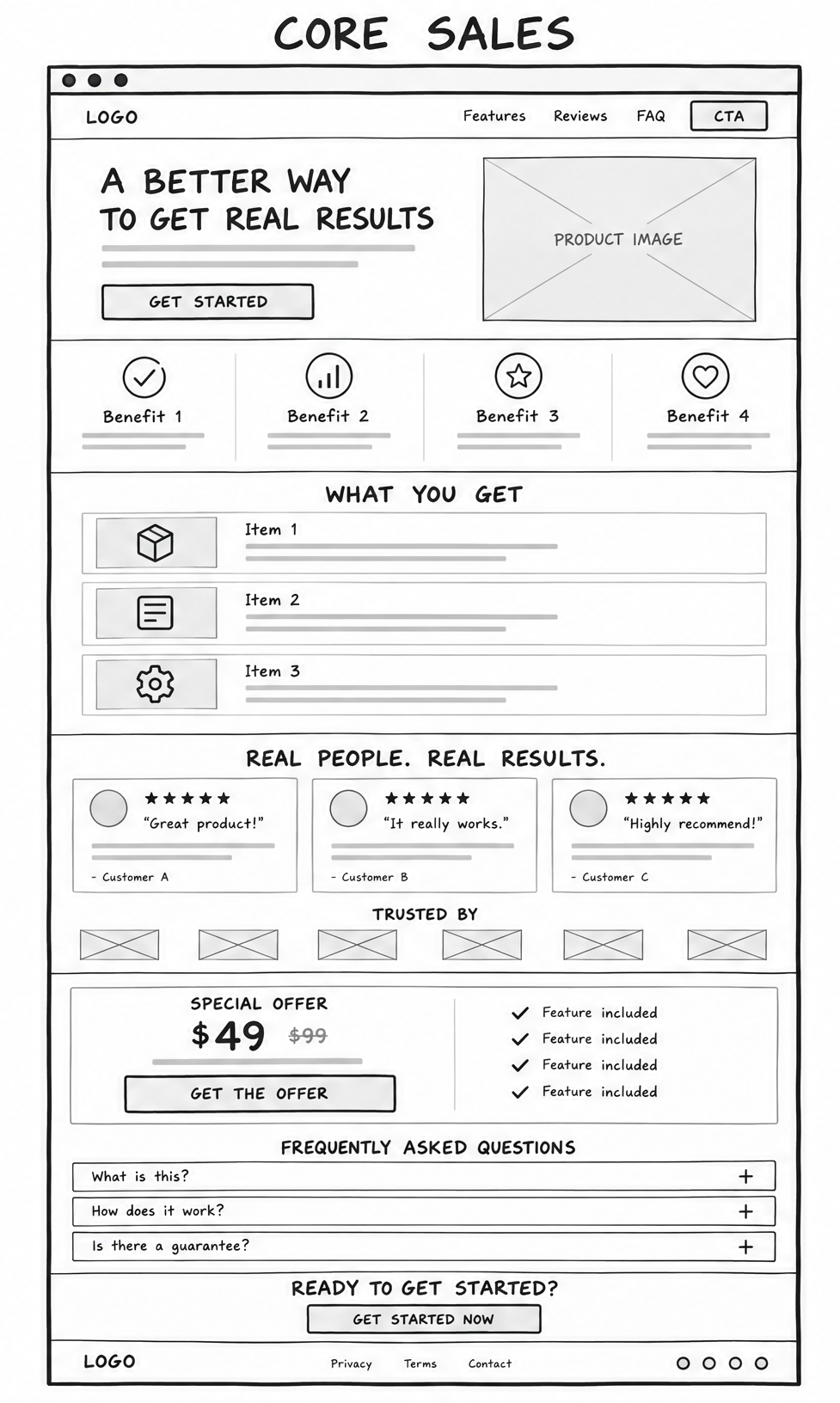
03. Core Sales Pages
Main Job: Turn warm, solution-aware, or purchase-ready traffic into a paying customer.
Visitor Mindset: “What do I get? Is this right for me? What does it cost? Can I trust this vendor?”
Traffic Triggers: buy, price, cost, pricing, best, get started, features, comparison, discount
Core Message: “Here is the result, the proof it can work, and exactly how to start.”
When visitors search for commercial buying words, you must cut straight to the point. Putting educational fluff in front of a buyer ready to purchase only creates friction. Core sales pages lay out the offer terms clearly, eliminate risk, handle objections, and provide a clear checkout pathway.
Core Variations:
- Short-Form Sales Page: Highly effective for low-ticket impulse buys, software tools, or warm traffic already familiar with the creator. Sometimes under 100 words can outperform a massive page if the offer clarity is pristine.
- Long-Form Sales Page: Necessary for higher-priced digital courses, complex consulting, or markets requiring deep proof elements, detailed breakdowns, and extensive FAQ handling.
- Product Detail Page (PDP): Clean ecommerce layout featuring product visuals, specifications, pricing tiers, customer reviews, and immediate purchase buttons.
- Sales VSL: A structured video presentation backed by written summary points, customer testimonials, and an unmissable buy button.
- Tripwire Page: A low-cost offer (typically $7 to $27) placed immediately in front of a new lead to transform them from a freebie seeker into a paying buyer.
Wireframe Blueprint:
- Direct Value Proposition: Clear statement of the offer and core promise.
- Product Features vs. Real-World Benefits: A bulleted list showing exactly what the buyer receives and the specific outcome each component produces.
- Social Proof & Validation: Real results, case studies, or user reviews demonstrating successful implementation.
- Transparent Pricing & Guarantees: Plain explanation of the price, payment options, and the money-back guarantee to reverse financial risk.
- Direct Checkout / Access CTA: Clear, unmissable buy buttons placed strategically above and below the fold.
Want step-by-step guidance on creating high-converting sales and bridge pages? Join Todays Make An Offer Training – In Ai Profit Scoop Elite.
—
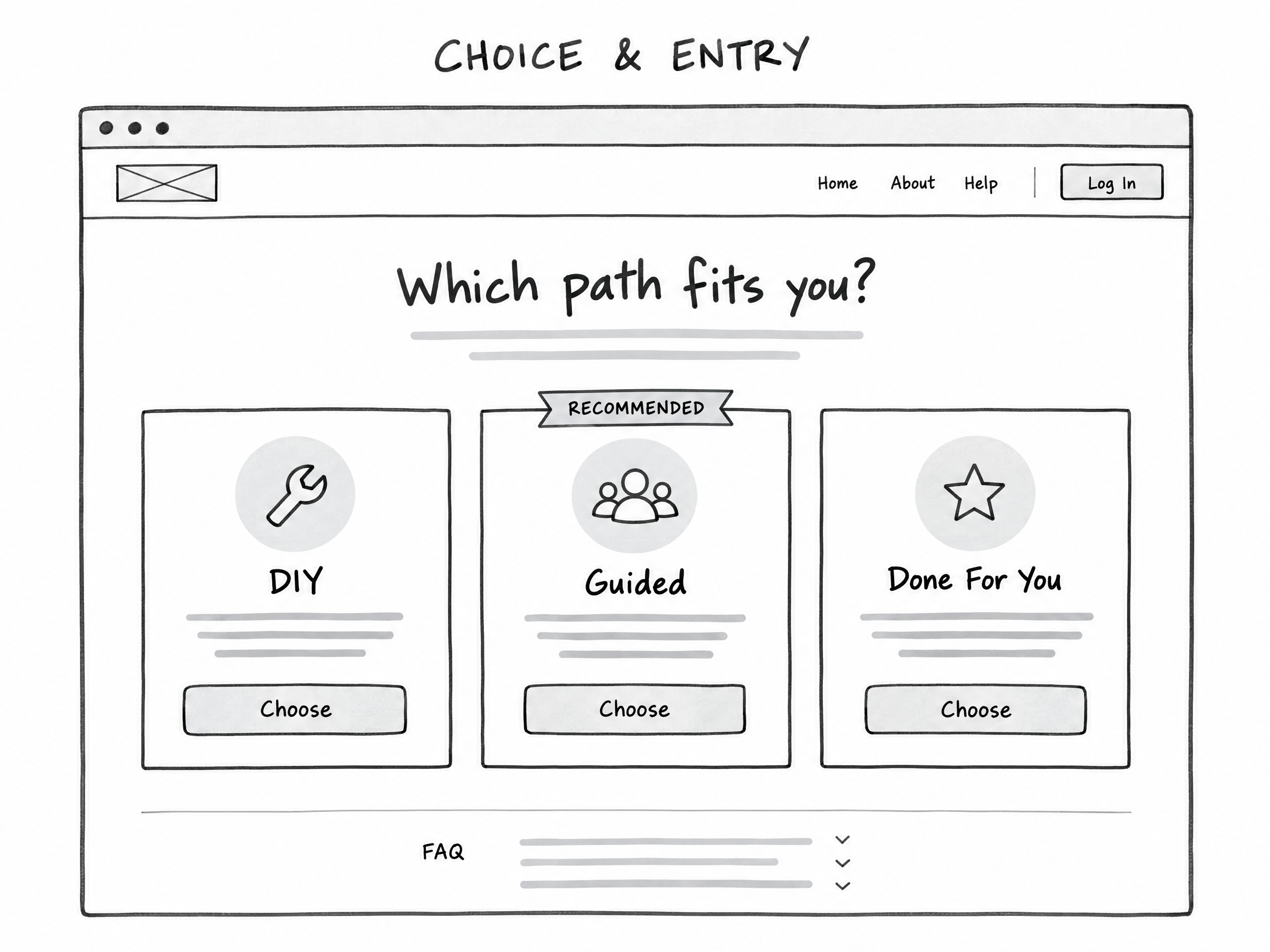
04. Choice & Entry Pages
Main Job: Route mixed traffic to the exact offer, package, or pathway that fits them best.
Visitor Mindset: “Which option is right for me? I have specific needs, goals, budget, or experience level.”
Traffic Triggers: which, best for me, options, compare, DIY, done for you, plans, packages, team
Core Message: “Choose the path that matches where you are right now.”
Choice & Entry Pages are among the most lucrative, under-utilized page styles in the entire marketing landscape. In real-world testing, these pages routinely achieve incredible click-through rates—frequently reaching 99% or higher.
Why do they work so well? Because they avoid pushing an aggressive purchase immediately. Instead, they present the visitor with an interactive choice. The psychological principle is clear: people hate being sold to, but they love choosing their own solution.
Core Variations:
- Choice / Router Page: Presents 2 to 4 interactive boxes or buttons segmenting visitors based on their current stage, budget, or goal (e.g., “I want to do it myself” vs. “I want a done-for-you service”).
- Splash / Welcome Entry Gate: Minimalist entry page designed to route visitors by operating system, geographic region, experience tier, or language before presenting an offer.
Wireframe Blueprint:
- Orientation Headline: A simple, inviting question (e.g., “Which Path Fits You Best?” or “What Type of Retirement Account Do You Currently Own?”).
- Sub-Prompt: Instruct the visitor to click the option matching their situation to view the recommended solution.
- Interactive Option Cards:
- Option A: Path 1 (e.g., DIY / Beginner / Low Budget).
- Option B: Path 2 (e.g., Guided / Intermediate / Moderate Budget).
- Option C: Path 3 (e.g., Done-For-You / Advanced / Enterprise).
- Conditional Redirects: Each card routes directly to an affiliate offer or landing page custom-tailored to that specific selection.
—
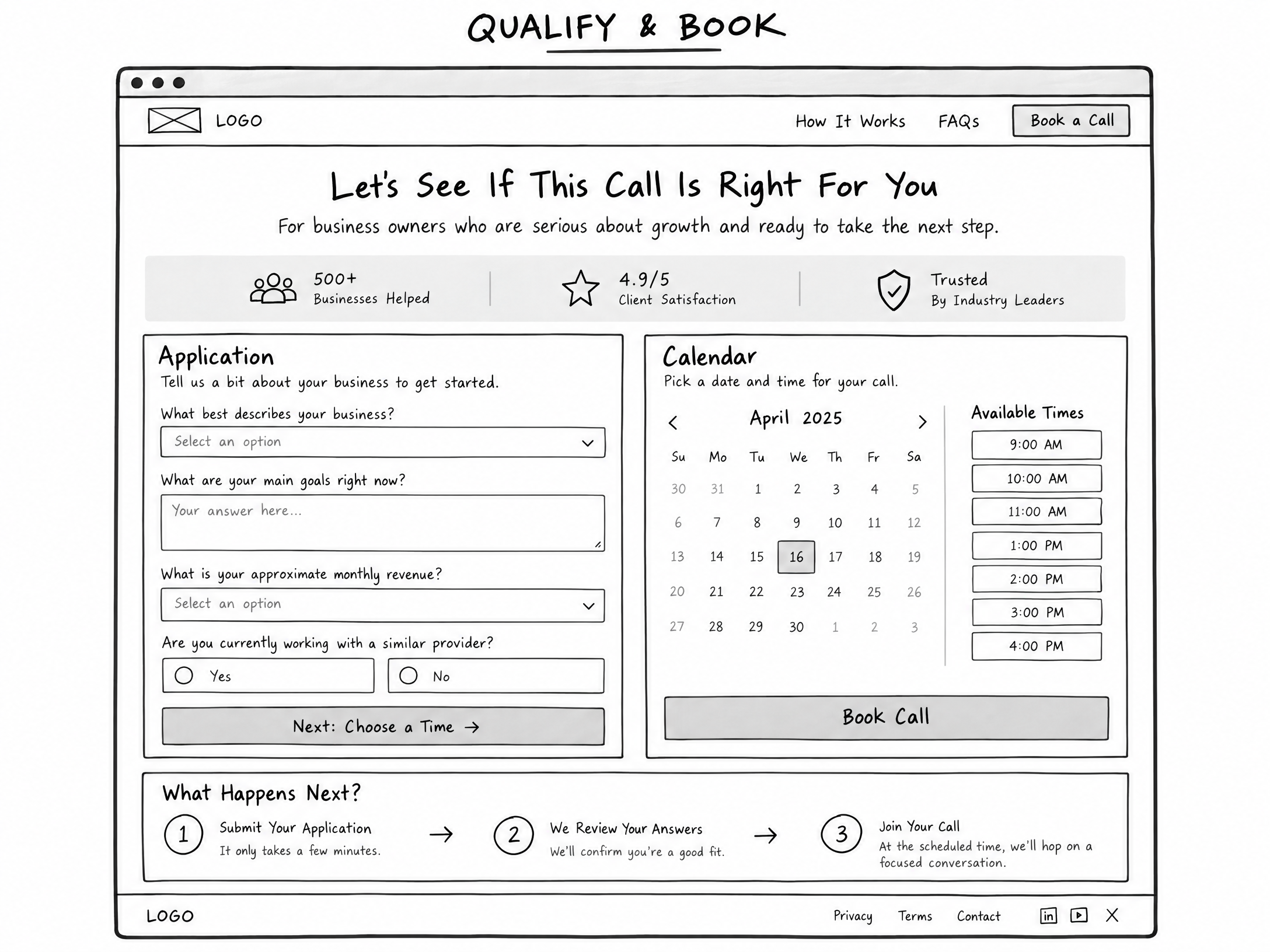
05. Qualification & Booking Pages
Main Job: Turn high-intent traffic into a qualified conversation, structured application, software demo, or closed sales call.
Visitor Mindset: “Can you help me specifically? Do I qualify for this program? Can I speak with an expert?”
Traffic Triggers: apply, book, call, consultation, demo, audit, agency, custom, enterprise
Core Message: “Let’s see whether this is the right fit and identify the best next step for your situation.”
High-ticket consulting, agency services, custom enterprise software, and localized B2B deals are rarely sold through a simple “Add to Cart” button. Buyers in these high-value categories demand personal validation. Qualification pages filter out tire-kickers and ensure your sales team (or your calendar) only interacts with serious prospects who possess the budget and authority to buy.
Decades ago, agency owners generated massive close rates simply by offering a “Free Website or SEO Audit.” The prospect submitted their URL and email, received a customized analysis, and was then presented with an agency service contract. The close rates on these structured applications remain exceptionally high because value is delivered upfront.
Core Variations:
- Application Page: Collects vital business metrics (revenue, team size, primary bottleneck) before allowing a prospect to proceed.
- Booking / Consultation Page: Integrates a calendar scheduling tool directly on the page, allowing qualified visitors to book an immediate strategy session or product demonstration.
Wireframe Blueprint:
- Professional Headline: Focused on mutual evaluation (e.g., “Apply For A 1-on-1 Growth Consultation” or “Request Your Comprehensive 2024 Portfolio Audit”).
- Expectation Framing: Clearly explain who this is for, who it is NOT for, and what will happen during the conversation.
- Multi-Step Form / Qualifying Fields: Questions assessing budget, timeline, and goals.
- Embedded Scheduler: Instant calendar booking interface enabled once preliminary criteria are verified.
- Authority Credentials: Trust badges, executive bios, and industry accreditations.
—
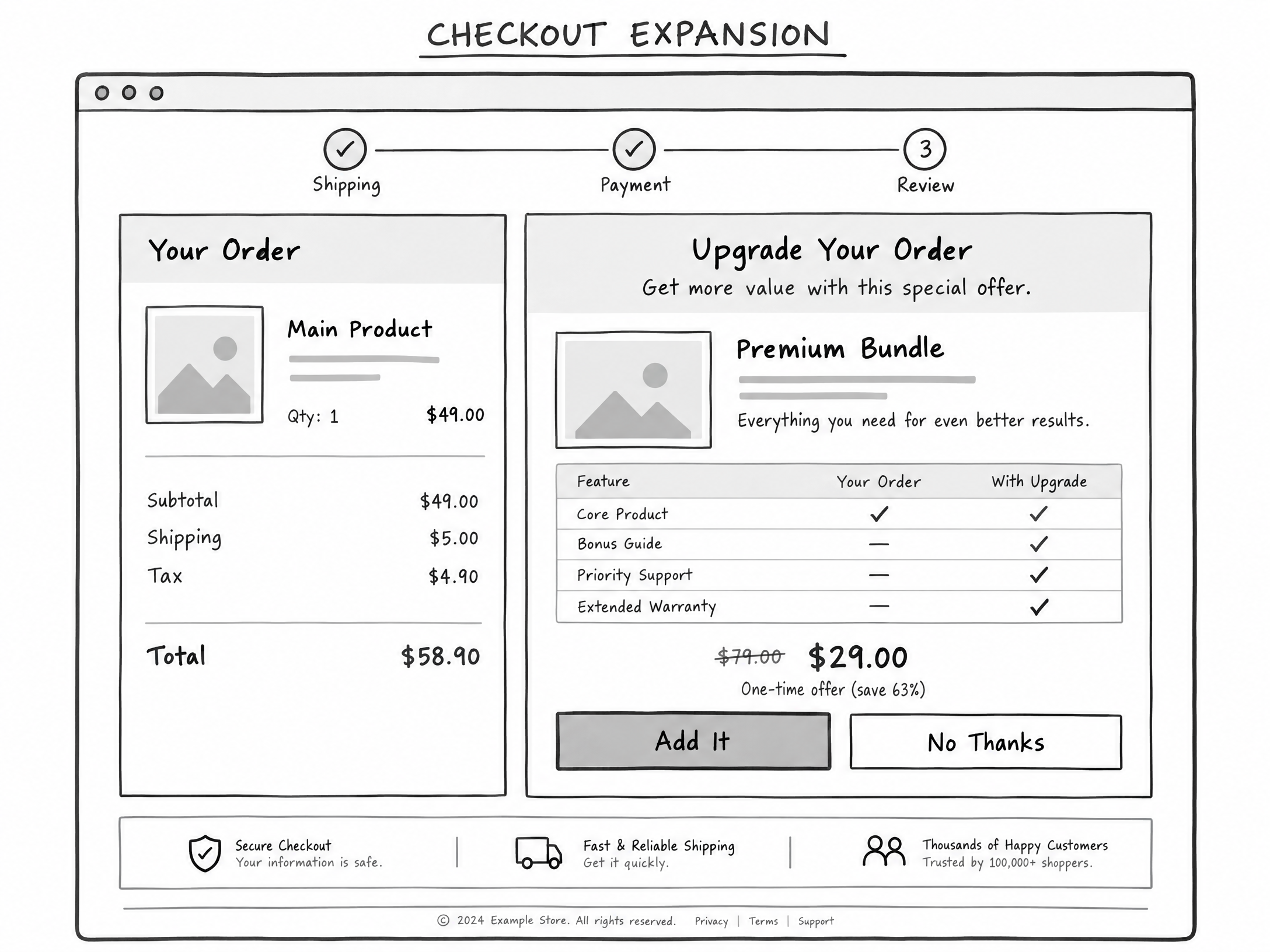
06. Checkout Expansion Pages
Main Job: Give an existing buyer the most relevant, immediate way to improve, accelerate, or extend their purchase.
Visitor Mindset: “What else do I need to get this done? Can I get extra support? Is there an upgraded version that works faster?”
Traffic Triggers: add, upgrade, bundle, more, advanced, bonus, support, annual
Core Message: “Make your result easier, faster, more complete, or more valuable.”
The easiest customer to sell is someone who has literally just pulled out their credit card and verified that they trust you. Amazon built an empire on Checkout Expansion through features like “Frequently Bought Together” and “Add an Extra Memory Card to Your Camera Order.”
Yet, countless online entrepreneurs abandon their buyers the moment the initial checkout form clears. By offering an immediate, logically connected expansion, you can dramatically increase your Average Order Value (AOV) and transform a break-even marketing campaign into a wildly profitable machine.
Core Variations:
- One-Click Upsell (OTO): A complementary software add-on, advanced implementation template, annual licensing discount, or personalized coaching module presented immediately after payment.
- Downsell Page: A lighter, lower-cost, or split-pay alternative offered only if the prospect declines the primary upsell.
- Order Bump: A high-converting check-box added directly on the checkout form itself (e.g., “Check this box to add the complete audiobook and digital flashcards for just $17”).
Wireframe Blueprint:
- Progress Confirmation Notice: State clearly: “Wait! Your order is being processed. Do not close this window…”
- Congruent Value Proposition: Position the upgrade not as more work, but as a speed enhancer (e.g., “Want To Cut Your Implementation Time In Half With Our Pre-Built Templates?”).
- Short Video or Breakdown: Explain why this asset completes the item they just purchased.
- One-Click Billing Button: Clean, frictionless button that charges the existing payment method on file.
- Polite Decline Link: A clear, text-based option to decline (e.g., “No thanks, I prefer to build the templates manually”).
—
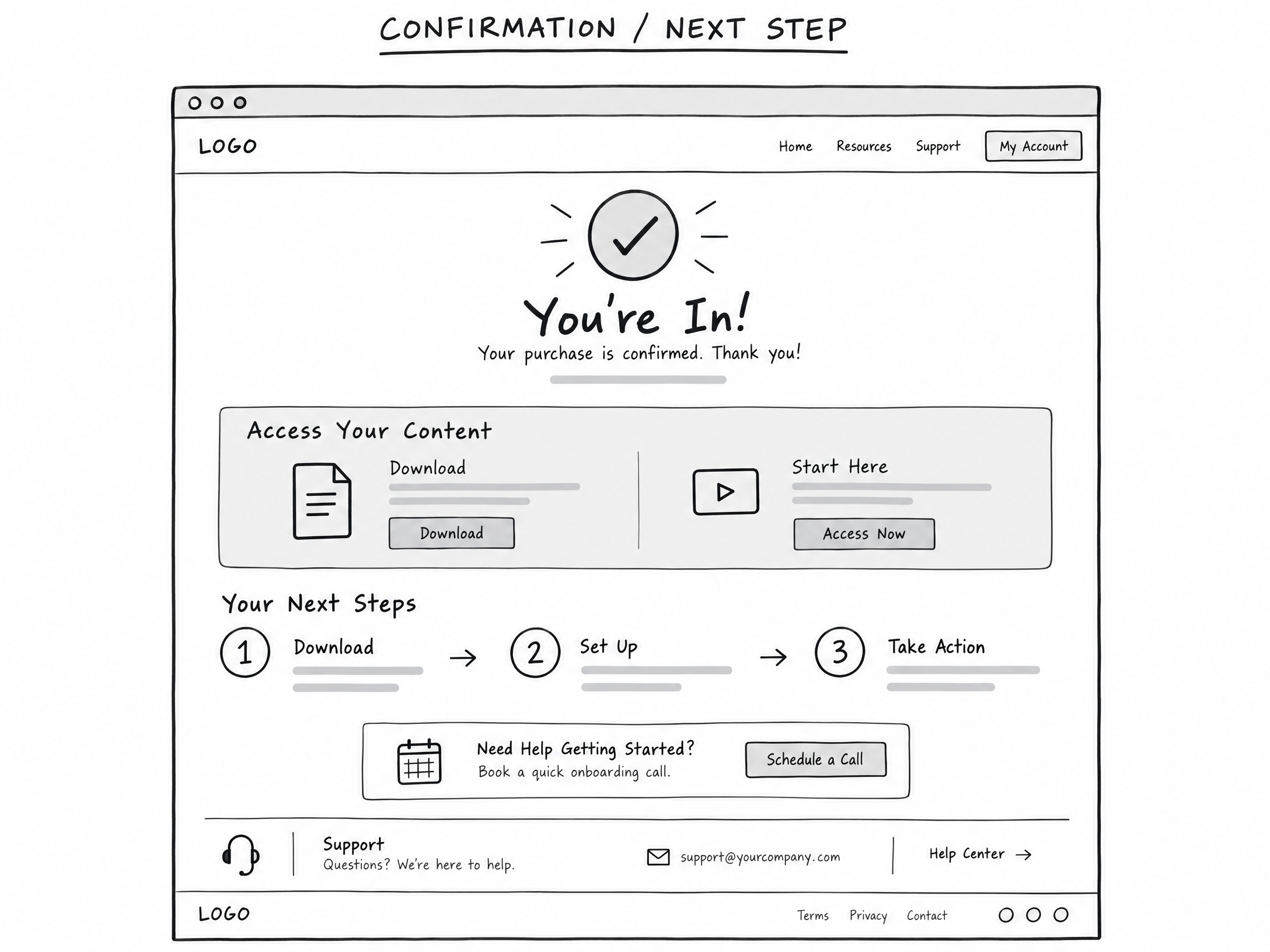
07. Confirmation & Next-Step Pages
Main Job: Confirm the user’s action and tell the new lead or customer exactly what to do next.
Visitor Mindset: “What happens now? Where do I access my purchase? How do I get started right away?”
Traffic Triggers: confirmation, access, download, start, next steps, onboarding, calendar, login, welcome
Core Message: “You are in—here is exactly what happens next.”
The Confirmation or Thank-You page is routinely the most neglected, under-monetized page in internet marketing. When someone opts into your list or completes an order, their attention level is at an absolute peak. They are actively waiting for instructions.
If you simply display a generic message that says “Thank you, check your email,” you have wasted the most attentive moment of your customer relationship. Instead, a well-engineered Confirmation Page verifies the transaction, establishes clear onboarding expectations, and immediately directs the user toward the next logical step (such as joining a community, watching a quick-start video, or reviewing a congruent affiliate tool).
Core Variations:
- Thank-You & Bridge Page: Confirms the free opt-in, delivers the download link, and immediately introduces a related low-cost or affiliate offer on the lower half of the page.
- Confirmation / Resource Access Page: A clean member orientation area delivering access credentials, software downloads, and orientation instructions.
- Post-Purchase Quick-Win Onboarding: A structured checklist guiding the customer to achieve their first tangible success within 15 minutes of purchasing.
Wireframe Blueprint:
- Clear Success Confirmation: Explicitly state: “You’re In! Your registration/order has been successfully confirmed.”
- Access Details: Direct buttons to download the file, join the community, or launch the software immediately.
- The Next Immediate Action: Step-by-step instructions (e.g., “Step 1: Save this URL. Step 2: Watch the 3-minute setup video below. Step 3: Register for our live coaching session.”).
- Secondary Offer Integration: A congruent tool recommendation that complements their recent action.
—
Fast Matching Guide: Connecting Mindset to Architecture
To help you choose the right page style without hesitation, refer to this quick diagnostic matching guide:
| Visitor Thought / Inquiry | Offer Page Solution | Direct Action Taken |
|---|---|---|
| “I need ideas, shortcuts, or help.” | 01. Lead-Capture Page | Deliver free tool, template, or guide. |
| “Why is this not working for me?” | 02. Pre-Sell & Education | Deconstruct old failures; bridge to new way. |
| “How much is it? What is included?” | 03. Core Sales Page | Present direct terms, proof, and buy buttons. |
| “Which option should I choose?” | 04. Choice & Entry Page | Route user through self-selected segmentation. |
| “Can we talk? Is this for me?” | 05. Qualification & Booking | Qualify parameters; schedule call or demo. |
| “What else should I add to my order?” | 06. Checkout Expansion | Provide congruent upsells, downsells, or bumps. |
| “What do I do now?” | 07. Confirmation & Next-Step | Confirm action; deliver immediate quick win. |
—
The Shortest Version: 7 Core Directives
If you want to boil down this entire framework into a single checklist you can review in 30 seconds before launching any campaign, here it is:
- Capture people who are interested, but not yet ready to buy.
- Warm up people who require foundational education or trust-building.
- Sell people who have already decided to solve their problem today.
- Route people who need assistance choosing the right tier or path.
- Qualify people who require a high-touch, customized relationship.
- Expand the order for verified buyers while their wallets are open.
- Guide every new lead or customer directly to their next milestone.
—
Ethical Marketing and Product-Market Congruence
Direct response copywriting is a powerful discipline. When you master the art of identifying exact search triggers and matching them to one-page sites, you can move traffic at scale. With this capability comes direct responsibility.
Every affiliate offer, service package, or digital product you promote must be vetted thoroughly. Ensure that the marketing claims you make are accurate, transparent, and completely compliant with legal disclosures. Include clear earnings disclaimers, privacy policy links, and terms of service across every single-page site you launch.
Remember: lasting, sustainable wealth is built on solving real problems for real people. When you bridge the gap between a consumer experiencing confusion and an authentic solution that relieves that pain, everyone wins. The business owner gets a customer, the customer solves their problem, and you generate healthy profits.
—
Conclusion: Stop Building Websites. Start Making Offers.
The vast majority of marketers struggle online not because they lack passion, intelligence, or technical prowess, but because they expend enormous effort on things that simply don’t generate revenue. They write articles that don’t convert, build funnels that confuse visitors, and hide their offers behind layers of unnecessary technical overhead.
Making money online does not require a sprawling website with hundreds of pages. It requires clarity, intent recognition, and an offer that solves a verified problem. When you identify where your prospects are in their journey, listen to their specific trigger words, and present them with a clean, single-page architecture designed for their mindset, success becomes a repeatable, mathematical process.
Stop overcomplicating your business. Stop spinning your wheels on useless complexity. Identify your traffic trigger, choose one of these seven page types, and launch your offer.
Take action today: Join Todays Make An Offer Training – In Ai Profit Scoop Elite
The FASTEST Easiest Way To Make Money
Join Todays Make An Offer Training – In Ai Profit Scoop Elite.
Easy Mode? How to Go From Zero to Real Profit by Making Offers People Actually Want
You have seen the thumbnails before. A massive dollar amount in glowing neon green, the words “Easy Mode,” and a slick graphic promising that making $600 a day or $51,800 in less than two weeks is simply a matter of clicking three buttons on your laptop. It feels like one video, one magical trick, or one newly discovered AI tool will finally unlock the hidden shortcut to online wealth.
I have been building businesses on the internet for over 27 years. Over that time, I have watched thousands of guru videos, evaluated countless trending business models, and personally tested hundreds of make-money methods. And if you have ever sat through one of those videos feeling deep down that they are leaving something critical out—you are 100% right.
They make the outcome look easy. They rarely explain the fundamental skill that turns a raw idea into a direct offer someone actually wants to buy.
Recently, in a video of my own, I broke down how I generated $51,800 in under two weeks. The truth is that roughly 90% of the production work was handled using modern AI tools—creating the slideshow, outlining the web pages, structuring the sales copy, and formatting the digital assets. But here is the secret that most internet marketing tutorials will never admit to you: the 90% of the work done by AI was not what actually made the money.
The AI was merely the production engine. The engine is useless without fuel and direction. What actually generated every single dollar of that $51,800 was the missing 10%—the exact strategic foundation that gurus skip over because it requires thinking, precision, and understanding human psychology.
In this comprehensive guide, we are stripping away the fluff, cutting past the hype, and showing you the mechanical reality of how real online income is generated. You will learn how to identify real human problems, how to structure high-converting direct offers, and how to position those offers in front of people who are already desperately searching for a solution.
The Illusion of the “Easy” Business Model
Turn on social media today and you will be inundated with creators telling you to jump on the next big wave:
- Dropshipping trending products from overseas suppliers
- Print-on-demand custom t-shirts, mugs, and phone cases
- Software as a Service (SaaS) and white-label CRM platforms
- Master Resell Rights (MRR) and generic digital courses
- Faceless TikTok and YouTube automation channels
- Etsy digital downloads and printable planners
Here is an uncomfortable truth: all of these business models can work. Dropshipping works. Affiliate marketing works. Print-on-demand works. Selling specialized digital products works. But none of these business models work simply because the model exists.
Just yesterday, I watched a video claiming that making $600 a day was “effortless.” The creator sat back in his chair, leaned toward the camera, and laid out an entire business strategy in four tidy bullet points:
- Pick one method: Sell a digital skill or open a Shopify storefront.
- Automate fulfillment: Plug in an app to deliver the product automatically.
- Post daily: Put out content every day on social media.
- Target one customer: Focus on a single demographic.
That is not a business plan. It is a hollow collection of business buzzwords. It sounds actionable because the words are familiar, but there is zero operational substance that you can actually execute when you open your computer tomorrow morning.
It is the equivalent of someone walking into an auto repair shop with a car that will not start, and the mechanic casually saying: “Just put the key in the ignition, turn it, and drive down the highway!” The advice completely ignores the fact that the engine is broken under the hood. When you start an online venture without knowing how to craft an offer, you are starting with a vehicle that is fundamentally broken from the very first minute.
The Missing Link: Spotting Problems and Making Offers
Why do millions of viewers watch high-production tutorials on dropshipping or AI digital products, follow every step to the letter, and end up with zero sales? Why does an income disclaimer exist on every legitimate financial and marketing resource?
The vast majority of people who buy educational courses, install software tools, and attempt online marketing make little to no money. They fail not because they lack dedication, but because they focus entirely on the vehicle (the product or the platform) rather than the destination (solving an urgent problem for a specific group of people).
Every successful marketer and business owner in the world is doing one specific thing daily: they choose an audience, identify an urgent pain or desire, shape a believable promise, and package it into an offer that commands attention.
Making an offer is the bridge between human desire and financial transaction. If you master the ability to spot a painful problem and present a believable, friction-free solution, the platform you use—whether it is an affiliate link, a WordPress landing page, an Etsy store, or an automated email sequence—becomes secondary.
If you want to master this fundamental skill and watch real-time demonstrations of how to build and launch high-converting campaigns from scratch, you can Join Todays Make An Offer Training – In Ai Profit Scoop Elite.
Step-by-Step: How to Find a High-Intent Market
The biggest mistake aspiring entrepreneurs make is starting with a product. They spend weeks designing an ebook, tweaking a Shopify theme, or generating AI graphics for t-shirts before they have identified a single person who wants to buy what they are creating.
Do not start with a product. Start where people are already struggling to solve a painful, expensive, or irritating problem.
A legitimate market is not “everyone who could potentially benefit from this.” A market is a defined group of people experiencing a specific situation, desiring an unambiguous result, and feeling enough urgency to spend money to solve it right now.
1. Hunt for Repeated, Unresolved Frustrations
People broadcast their pain points every single day across the internet. Instead of guessing what to sell, spend an afternoon observing conversations where real users congregate:
- Reddit discussion threads: Look for posts beginning with “How do I fix…”, “Why is it so hard to…”, or “I am sick and tired of…”
- Niche Facebook groups: Pay close attention to the questions that community members ask repeatedly week after week.
- Amazon and software product reviews: Filter reviews by 2-star and 3-star ratings. What did the existing products fail to deliver? Where did customers feel abandoned?
- Job boards and freelance platforms: Look at what tasks business owners are desperately trying to hire contractors to handle.
2. Verify That the Market Is Already Spending Money
Never try to create demand out of thin air. You want to enter markets where wallets are already open. Look for evidence of active spending:
- Are companies actively running paid Google or Meta ads for these search queries?
- Are customers already paying monthly software subscriptions to tackle the problem?
- Are they hiring consultants, technicians, or service providers?
- Are they spending hours cobbling together clumsy, free workarounds because no straightforward solution exists?
3. Hyper-Target the Specific Individual
Broad targeting is the fastest route to financial failure. Marketing to “small business owners” is far too generic; a restaurant owner has entirely different daily headaches than a local roofing contractor.
Compare these two targets:
- Generic: “I help local businesses get more customers.” (Nobody pays attention to this because it sounds like generic spam.)
- Hyper-Specific: “I help independent roofing contractors whose inbound phone leads go cold after the first call.” (A roofing contractor immediately recognizes their own daily operational pain.)
4. Map the “Before and After” Transformation
Every commercial transaction represents a journey between two points: where the customer is right now (the painful “Before”) and where they desperately want to be (the relieved “After”). The distance between those two points is your economic opportunity.
Document their exact reality:
- The Frustrating Before: What is actively causing them stress, costing them money, or wasting their personal time today?
- The Desired After: What does an ideal week look like once this headache is permanently removed? What is the measurable financial or emotional payoff?
5. Adopt Their Exact Vocabulary
High-converting sales copy is not written using clever advertising slogans or MBA textbook terminology. It is assembled directly from the words, phrases, and metaphors that the target audience uses when venting their frustrations.
If someone searches for “how to fix a cracked concrete driveway,” do not pitch them an “advanced infrastructural polymer substrate application.” Pitch them a simple, durable way to fill the cracks in their driveway before the cold weather ruins the concrete.
The Simple Market Test:
If you cannot clearly and concisely complete this sentence, your target audience is still too broad:
“I help [specific person] get [specific outcome] without [major frustration or common obstacle].”
The Mechanics of Direct Keyword Intent: Real Market Examples
To demonstrate how this works in practice, let us examine real market data gathered using specialized keyword discovery tools like Keyword Sniffer. When you analyze search behavior, you begin to see the difference between general browsing and high-intent commercial urgency.
Example 1: The “Faster Internet” Niche
Consider the keyword phrase: “faster internet”.
In the United States alone, over 5,400 people every month type this exact query into Google. If you expand the query to related phrases, the search volume surges:
- faster internet provider: Over 12,100 monthly searches (High commercial intent; users are looking to cancel their current provider and purchase a new service).
- faster internet speed: Over 6,600 monthly searches (Frustrated users diagnosing bottlenecks in their current setup).
- routers for faster internet: Hundreds of searches per month with low advertising competition (Users with credit cards ready to buy hardware immediately).
When someone searches for “routers for faster internet,” they are not reading entertainment articles. They are experiencing streaming buffering, dropped Zoom meetings, or gaming lag right now. They want a practical fix.
Look at the affiliate and lead-generation monetization opportunities waiting in this market:
- AT&T Fiber Home Internet: Pays an estimated $50.00 to $120.00 per valid activation.
- Verizon Fios Gigabit Connection: Pays up to $60.00 to $100.00 per completed installation.
- T-Mobile 5G Home Internet: Pays up to $70.00 per new service activation.
- Wi-Fi 6 Mesh Router Systems (via Amazon Associates): Physical hardware commissions for home network upgrades.
- Home Network Speed & Security Guides (via ClickBank): Digital optimization products paying 50% to 75% commissions (averaging $30.00 to $40.00 per digital sale).
By connecting a user searching for “faster internet” directly with a landing page that recommends the exact fiber provider available in their zip code or a curated router setup, you are providing genuine value and earning substantial commissions without having to build a telecommunications company.
Example 2: The “Cracked Driveway” Niche
Let us look at a completely different, unglamorous problem: home driveway maintenance.
If you own a home in an area with freezing winters or intense summer heat, ground shifting causes concrete and asphalt driveways to crack. Left untreated, water penetrates the cracks, freezes, expands, and completely destroys the foundation, resulting in a repair bill that costs tens of thousands of dollars.
Search data reveals massive monthly demand around this exact headache:
- driveway repair: Over 8,100 monthly searches, with advertisers paying an astonishing $16.73 per click to acquire these customers.
- cracked driveway: Over 2,400 direct problem-awareness searches per month.
- seal driveway: Over 9,900 monthly searches from homeowners seeking preventative maintenance supplies.
- asphalt paving: Over 14,800 monthly searches looking for local professional paving estimates.
How do you monetize this demand? You do not need to operate an asphalt truck. Look at the affiliate and lead-generation offers available:
- Local Driveway Contractor Lead Generation: Specialized networks pay $20.00 to $60.00 simply for connecting a qualified homeowner looking for a repair quote to a licensed local contractor. You do not even have to sell a physical product; you simply provide a free quote form.
- Home Improvement Contractor Quotes: Networks like Impact pay $15.00 to $45.00 per phone-verified submission.
- Heavy-Duty Crack Filler and Driveway Sealers: Physical products on Amazon, Home Depot, or ShareASale paying recurring commissions.
- DIY Concrete & Masonry Repair Guides: Digital manuals on ClickBank selling for $27.00 to $47.00 with 75% payout structures.
Notice what is happening here: we did not brainstorm a clever product and try to convince people they needed it. We found thousands of people whose concrete is actively cracking, and we aligned our business with the exact solutions they are already seeking.
How to Construct a Direct, Friction-Free Offer
Once you have identified the market and the specific problem, you must present your solution in the form of a Direct Offer.
An offer is not your website layout, your company logo, or a laundry list of software features. An offer answers one question in the prospect’s mind:
“Why should I pay attention to this, right now?”
The Four Pillars of an Irresistible Direct Offer
- Explicit Audience Identification: Call out the exact person you are speaking to immediately so that unqualified visitors leave and the ideal customer thinks, “This was made specifically for me.”
- Lead with the Outcome: Do not focus on the technical tasks you perform. Focus on what materially changes in their life or business after they take action.
- Provide a Believable Mechanism: Explain the practical vehicle that makes the transformation possible—whether that is an automated script, an audit checklist, a curated template, a 5-step video training, or an affiliate tool setup.
- Eliminate One Obvious Point of Friction: Make the next step low-risk, effortless, and clear. Avoid complicated checkout flows or confusing commitments.
The Master Offer Template
Whenever you write a headline, a landing page introduction, or a social media hook, use this structure:
I help [specific person] achieve [specific result] through [your practical mechanism], without [the obstacle or pain they hate and fear].
If you want [result], [take this clear, simple next step].
Compare this targeted structure to the generic claims you see online every day:
- Generic & Ineffective: “We provide advanced AI solutions and digital transformation for modern small enterprises.”
- Direct & High-Converting: “I help independent carpet cleaners turn missed phone calls into booked jobs using an automated text-back system, without hiring another office assistant. If you want to see how this works, send me a message with the word ‘CALLS.’”
Real-World Direct Offer Blueprints
Notice how each of these examples clearly identifies who it is for, what will change, and the exact next step:
- For Personal Trainers: “I will take your client transformation photos and turn them into 12 short-form videos you can publish this month to attract coaching clients. Message me ‘CONTENT’ to see three video concepts.”
- For E-commerce Store Owners: “I will inspect your Shopify checkout process, identify the three conversion leaks costing you sales, and send you a private 5-minute video teardown. Comment ‘TEARDOWN’ below.”
- For Real Estate Agents: “I will take one of your current property listings and convert it into 10 localized neighborhood clips designed to generate inbound seller leads. Send a direct message with ‘LISTING’ to get the first three script hooks.”
- For Freelance Designers: “I will review and rewrite your portfolio headline so new prospects understand exactly what you offer within 10 seconds. Send me your current homepage link and I’ll send you the revisions.”
- For Pet Groomers: “I will implement an automated customer rebooking text sequence that brings your existing dog grooming clients back every 6 to 8 weeks on autopilot. Reply ‘REBOOK’ to see a sample sequence.”
Every single one of these offers avoids vague promises. They offer a tangible, realistic next step that starts a constructive business relationship.
If you want step-by-step assistance mapping out your specific niche and generating offers that match your skills, make sure to Join Todays Make An Offer Training – In Ai Profit Scoop Elite.
Overcoming the Fear Behind Making Direct Offers
If creating direct offers is so logically sound, why do so many aspiring digital entrepreneurs refuse to do it? Why do they hide behind endless website tweaks, complex business plans, and weeks of logo design instead of asking for the sale?
The answer is simple: making an offer makes you feel vulnerable.
When you stay generic, you are safe. If you publish a generic blog post titled “Top 10 Business Ideas in 2026,” nobody can critique you. But when you step forward and say: “I help local dental practices fix their online booking drop-offs using this specific workflow,” you have put yourself on the line. You face the real risk of being ignored, rejected, or questioned.
You must reframe how you view the offer process:
- An offer is not a claim that you are a guru with all the answers in the universe.
- An offer is not a manipulative trick to pressure someone into buying something they do not need.
- An offer is simply an honest, clear invitation to start a useful conversation.
The Healthy Reframe:
You are never saying: “I am an omniscient expert who guarantees you will make a million dollars overnight.”
You are saying: “I noticed you are struggling with this specific bottleneck. I have developed a practical, step-by-step method to help resolve it. Would you like to review how it works to see if it makes sense for your situation?”
When you approach business with this level of transparent problem-solving, sales resistance drops, imposter syndrome fades, and you can conduct business with complete confidence and integrity.
The Market-to-Offer Canvas
Before you purchase another domain name, write a single line of code, publish a social media video, or launch an advertising campaign, sit down with a blank sheet of paper and answer these five fundamental questions. This exercise bridges the gap between a vague idea and an offer you can test in the real world.
1. The Market
Who exactly is dealing with this problem?
Define the audience by their exact circumstances, industry, or specific daily frustration—not by generic demographic statistics.
2. The Moment
What is happening when the problem becomes painful enough to demand a solution?
People rarely buy preventative measures; they buy emergency fixes when pain peaks. What triggers their search? Is it a sudden spike in their broadband bill? A notice from their HOA about their stained driveway? A sudden drop in organic sales conversions?
3. The Outcome
What measurable or emotional result do they want instead?
Describe what the “other side” of the problem looks like. Do they want smooth 4K streaming without buffering? A clear driveway repair quote without dealing with aggressive contractors? An extra 5 qualified customer inquiries per week?
4. The Mechanism
What small, practical vehicle can you deliver to move them toward that result?
Identify your delivery tool: a simple PDF checklist, an affiliate product recommendation, a 15-minute diagnostic video, a set of downloadable templates, or a one-on-one setup service.
5. The Invitation
What is the easiest, most honest next step for the prospect?
Make the call to action effortless: a keyword reply in the comments, an email download, an automated quote form submission, or clicking an affiliate link to review verified software options.
How to Pressure-Test Your Offer with AI
While AI cannot invent human desire, it is an extraordinary tool for auditing and refining your sales messaging. Once you have filled out your Market-to-Offer Canvas, open your preferred AI assistant and run the following prompt:
AI Prompt for Offer Pressure-Testing:
“Act as a skeptical, busy customer in the following market: [PASTE YOUR TARGET AUDIENCE DEFINITION].
Here is an offer I am planning to present to this market:
[PASTE YOUR DRAFT OFFER]Please review this offer critically and answer the following four questions:
1. What part of this offer is clear, compelling, and immediately understandable?
2. What sounds vague, unbelievable, exaggerated, or like generic marketing hype?
3. What specific questions or hesitations would prevent you from taking the next step right now?
4. Rewrite this offer in simpler, more direct, conversational language that removes friction without making unrealistic guarantees or exaggerated claims.”
By forcing the AI to adopt the mindset of an unconvinced, busy prospect, you will instantly uncover the weak spots, confusing language, and hidden friction points in your messaging before you spend a single dime on advertising or content distribution.
Case Study: How AI and Direct Offers Built a $51,800 Launch in 13 Days
To see how this framework operates when fully executed, let us revisit the $51,800 campaign I referenced earlier. The project was built around a real digital brand called Personality Prompts, a curated system designed to help users extract sophisticated, customized outputs from artificial intelligence tools.
Here is how the operational sequence unfolded from conception to sales:
Phase 1: Identifying the Market and Pain Point
In the digital workspace, millions of professionals were attempting to use large language models like ChatGPT. However, the vast majority were getting generic, robotic, and unhelpful responses because they did not understand how to frame sophisticated context or role-based prompts. The pain point was obvious: “AI is supposed to save me hours, but I spend more time editing its mediocre output than writing from scratch.”
Phase 2: Deploying AI for Rapid Asset Production
Once the market problem was defined, I leveraged AI to perform the heavy production lifting:
- The presentation slides and webinar framework were generated and organized using AI outline systems.
- The underlying directory of prompts and operational templates was structured using generative models.
- The sales page outlines, technical FAQs, and promotional email sequences were drafted using structured prompt engineering.
AI reduced what would have taken four months of development into roughly four days of focused digital assembly.
Phase 3: The Direct, Transparent Presentation
When it came time to launch, I did not hide behind complicated marketing funnels. I hosted an educational webinar. I walked attendees through the real mechanics of prompt design, showed behind-the-scenes examples, and openly explained how the system operated.
I did not hype false promises or make exaggerated income claims. I made an honest, direct offer: “If you want to bypass the learning curve and access our comprehensive, tested library of pre-built prompts to optimize your content workflow, you can secure access today for a one-time fee.”
The result? Over $51,800 in verified sales within 13 days.
The AI did the legwork of assembling the digital assets. But the offer itself—identifying the exact frustration, formatting a tangible solution, and presenting a clear invitation to people who already wanted it—was what generated every single transaction.
The Real Formula for Sustainable Online Profit
You do not need to memorize another directory of 50 internet business models. You do not need to bounce frantically from dropshipping to print-on-demand, to SaaS, to faceless social accounts every time an algorithm updates.
You simply need to develop the timeless core skill that governs all commerce, online and offline:
- Find a real market with an urgent, recognizable problem.
- Study their language so you understand how they describe their frustration.
- Assemble a simple mechanism (your own digital product, a curated affiliate recommendation, or a specialized service) that provides a practical solution.
- Make a direct, friction-free offer that speaks specifically to that person.
- Put that offer directly in their path using search keywords, targeted content, or direct outreach.
- Listen to the feedback, refine the messaging, and continuously improve the offer.
Stop chasing the illusion of “easy mode.” When you master the art of the direct offer, you no longer need shortcuts—because you finally possess the skill that actually drives online revenue.
Ready to take action and build your first high-converting direct offer alongside an experienced community?
Join Todays Make An Offer Training – In Ai Profit Scoop Elite
and get the exact tools, keyword data, and step-by-step coaching you need to launch today.
Make $10,000 Before Halloween with Affiliate Marketing
How to Make $10,000 Before Halloween with Seasonal Affiliate Marketing (The Step-by-Step Blueprint)
Every year in mid-October, affiliate marketers stare at their dashboards asking the same question: Can an affiliate actually generate $10,000 online before Halloween?
If you look at the calendar and see roughly 15 days left until October 31st, simple math tells you that hitting a $10,000 target requires generating roughly $625 to $667 per day in approved commissions. To an inexperienced marketer or someone chasing generic “make money online” promises, that sounds impossible. Most affiliates make nothing because they jump into saturated niches with zero search intent, spamming links across social media without a plan.
However, when you look at actual market data, seasonal surges completely rewrite the rules of affiliate marketing. During seasonal holidays like Halloween, billions of dollars are spent in a hyper-compressed window. Consumer behavior changes overnight. Shoppers shift from passive browsing to urgent, high-intent purchasing. Attention spikes across Google, YouTube, Pinterest, and TikTok by hundreds of percent.
The secret is not luck, magic, or spamming links. It comes down to a fundamental direct-response methodology: Find the search first, then build the offer around a specific long-tail problem.
Important Disclaimer: The earnings snapshots, case studies, and numbers discussed throughout this guide (such as illustrative campaign data showing 1,304 clicks, 109 actions, and $10,430.01 in action earnings) are real-world data points used for educational modeling. They are not guarantees, benchmarks, or forecasts of your individual earnings. Most people who buy courses or watch marketing videos earn little to no money because affiliate marketing requires disciplined testing, keyword research, compliance, and execution. Always treat projected figures as volume planning targets, not financial promises.
If you want to capitalize on this massive surge of traffic, you need a blueprint that cuts through the noise. Below is the complete, exhaustive operational guide to mining seasonal search volume, routing traffic to high-converting offer lanes, and executing a direct-response campaign capable of moving serious volume before the holiday arrives.
Join Ai Profit Scoop Elite And Get The New Keyword Tool
The Core Formula: Broad Trend → Keyword Cluster → Long-Tail Problem → Matching Offer
The single biggest mistake beginner affiliates make is starting with the payout. They log into an affiliate network, find an offer that pays $50 or $70, and then try to reverse-engineer traffic to it. They build a page, shove an affiliate link in front of random visitors, and wonder why nobody buys.
Direct-response marketing works in the exact opposite direction. You never start with the offer. You start with a live, urgent human need.
The proven research-to-revenue workflow follows a strict four-stage pipeline:
- Broad Trend Movement: You identify a seasonal wave where public interest is demonstrably climbing.
- Keyword Cluster: You map out the entire universe of search phrases surrounding that seasonal theme.
- Specific Long-Tail Problem: You isolate narrow, low-competition queries where a real buyer is facing a constraint (budget, timeline, group size, sizing, or styling).
- One Matching Offer: You connect that specific searcher to a frictionless, exact-match solution with a single, clear call-to-action (CTA).
When you align these four components, you eliminate friction. The visitor is not being sold; they are being guided to the precise solution they were already searching for with credit card in hand.
Join Ai Profit Scoop Elite And Get The New Keyword Tool
Phase 1: Detecting Seasonal Trend Movement with Google Trends
Before writing a single word of content or registering a domain, you must verify directional attention. You cannot force demand; you can only channel existing demand.
Using Google Trends, analyze broad seed phrases like “costume ideas” over a 90-day window in the United States. In late summer (July and August), search interest for costume ideas sits at a flat baseline (typically between 5% and 15% of peak interest). This represents early planners, theatrical performers, cosplayers, or event organizers.
However, as soon as late September hits, the trend line curves sharply upward. By the second and third weeks of October, interest explodes—surging over 500% and rapidly verticalizing toward 100 on the relative interest index. Similar breakout patterns appear for terms like “Halloween decorations,” “last-minute costumes,” and “Halloween makeup.”
What does a score of 100 in Google Trends mean? It represents the absolute maximum search interest a query receives during the selected time period. When a seasonal query spikes to 100, millions of concurrent search queries are funneling through Google’s search algorithms simultaneously.
Trend data is directional—it does not tell you exact conversion rates, sales volumes, or commission checks. What it does tell you is timing. It signals precisely when you must have your pages published, indexed, and distributed to catch the crest of the consumer spending wave.
Join Ai Profit Scoop Elite And Get The New Keyword Tool
Phase 2: The Search Iceberg and Expanding into a Keyword Map
Once you verify that seasonal attention is climbing, you must expand the broad seed into an actionable keyword map. Think of seasonal search behavior as an iceberg:
- The Tip of the Iceberg (Visible to Everyone): Massive, hyper-competitive broad head terms like “Halloween costume ideas,” “Halloween costumes,” and “best costumes.” Major media corporations, multi-billion-dollar retail giants, and legacy lifestyle publications dominate these SERPs (Search Engine Results Pages). If you attempt to rank a brand-new page for “costume ideas,” you will get buried.
- Beneath the Waterline (The Hidden Opportunity): Tens of thousands of highly specific, long-tail search phrases. These are the granular queries typed by actual buyers looking for distinct solutions: “Cinderella costume for women,” “inflatable dinosaur costume toddler,” “cheap Stay Puft Marshmallow Man costume,” or “plus-size 1950s poodle skirt costume.”
When you feed seed terms into professional keyword intelligence tools, the sheer scale of this opportunity becomes clear. A single broad seed like “costume ideas” reveals an expansive universe containing over 47,632 distinct keywords generating more than 762,000 monthly searches in regular search volume, and over 1.3 million global searches.
Examining this cluster uncovers several massive sub-categories:
- Halloween costume ideas (11,000+ baseline SV)
- Group costume ideas (17,000+ baseline SV)
- Family costume ideas (13,000+ baseline SV)
- Couples costume ideas (11,000+ baseline SV)
- Cheap and easy costume ideas for adults (7,000+ baseline SV)
These broad category phrases define your content architecture. They tell you what major categories exist in the buyer’s mind. But you still do not build your landing pages around these category heads. You must dig deeper into the long-tail opportunity.
Join Ai Profit Scoop Elite And Get The New Keyword Tool
Phase 3: The 47,000-Keyword Long-Tail Opportunity (Why <1,000 Search Volume Wins)
If you want to make money fast in affiliate marketing, you must stop looking at high-volume keywords. When beginner affiliates see a keyword with 50,000 searches a month, their eyes light up. What they do not realize is that high search volume almost always correlates with massive Keyword Difficulty (KD), institutional authority dominance, and vague, non-commercial search intent.
The real money in fast-turnaround seasonal marketing sits in queries with less than 1,000 monthly searches.
Within the 47,571 costume-keyword database, when you filter specifically for keywords with search volume below 1,000 (often around the 1.0K mark or lower during off-season tracking), you uncover goldmines such as:
- “Work costume ideas” (1.0K SV)
- “Easy costume ideas for women” (1.0K SV)
- “Last-minute group costume ideas for six adults under $100”
- “Halloween entryway decor for an apartment”
The Seasonal Baseline Multiplier
Why do these modest numbers matter so much? Because keyword research tools calculate search volume based on 12-month rolling averages. If a term shows 1,000 monthly searches on an annualized basis, that means during 10 months of the year, it may only receive 50 searches a month—but during October, it spikes to 10,000, 20,000, or 50,000 real-time searches.
When you target a long-tail query with an off-season volume of 300 to 1,000 searches, you are targeting a phrase that will experience a massive, vertical surge right before Halloween. More importantly, these searchers have defined problems:
- They have a budget constraint (“under $50,” “cheap DIY”).
- They have an audience constraint (“for women,” “for office/work,” “for teenage guys”).
- They have a time constraint (“last minute,” “overnight delivery,” “local pickup”).
SEO Reality Check: Low search volume does not automatically guarantee low competition. You must verify Keyword Difficulty (KD), examine the live Google SERP, and ensure the ranking pages are either outdated, thin, or poorly matched to the specific query intent before producing your asset.
Join Ai Profit Scoop Elite And Get The New Keyword Tool
Phase 4: Structuring Long-Tail Content Around Buyer Constraints
To win top rankings and achieve high conversion rates, your content must solve a specific problem with surgical precision. When a user types a detailed long-tail phrase into Google, they do not want a list of 150 generic ideas. They want an immediate, actionable answer that fits their situation.
Look at the progression of search intent:
- Broad (Unfocused): “Halloween costume ideas” — The searcher is casually browsing. They have no idea what they want, no budget established, and no urgency. Conversion rate: extremely low.
- Better (Categorized): “Group costume ideas” — The searcher knows the dynamic (a group), but lacks an actionable theme or plan.
- Useful Long-Tail (High Intent): “Last-minute group costume ideas for six adults under $100” — This searcher has an urgent problem. Six people need matching or coordinated outfits, they have less than $100 total budget, and Halloween is days away. If your page shows them exactly three sets of costumes that ship instantly or can be bought locally for under $100 total, they will purchase immediately.
- Decor Long-Tail (High Intent): “Halloween entryway decor for an apartment” — This searcher does not have a sprawling front lawn or porch. They have a narrow apartment hallway or doorway. A list of 12-foot skeletons is useless to them. They need door hangings, compact floor rugs, and interior lighting solutions.
The Simple Research-to-Revenue Rule
Build one piece of content for one long-tail problem, and assign it one relevant primary Call-to-Action (CTA).
Never confuse your visitors by throwing five unrelated offers on a single page. If your article is about an easy DIY Wednesday Addams costume, your CTA should point directly to the black vintage collar dress, the braided wig, and knee-high socks. Do not insert banners for car loans, home decor, or unrelated software tools just because they pay higher affiliate commissions. Relevance drives conversions; confusion kills them.
Join Ai Profit Scoop Elite And Get The New Keyword Tool
Phase 5: Routing Search Intent into the Right Offer Lanes
Affiliate marketing profitability hinges on offer lane alignment. You must categorize your keywords and send the traffic to the appropriate monetization mechanism:
Lane 1: Costume Intent → Apparel & Specialty Merchants
When a visitor is looking for character outfits, wigs, masks, or full kits, route them to retail affiliate programs. Excellent destinations include Amazon Associates (Apparel/Toy categories), HalloweenCostumes.com (typically paying around 8% base commission on a ~$70 average order value, equating to roughly $5.60 per order), or Spirit Halloween (available via networks like Pepperjam/Ascend and FlexOffers/MaxBounty at around 4% commission).
Lane 2: Home Decor Intent → High-Ticket Retailers & E-Commerce Offers
When users search for spooky room makeovers, party props, or indoor/outdoor aesthetics, route them to home decor lanes. This includes eligible Home Depot decor items (earning up to 8% commission on select home decor), Amazon Home (earning 3%), or dedicated high-payout direct-to-consumer seasonal items, such as the popular 3D Vortex Optical Illusion Halloween Rug (which has been featured on CPA networks paying up to $50.00 CPA per sale on an $80 retail price point).
Lane 3: Emergency Financial & Seasonal Budgeting Intent → Compliant Lead Offers
During the holidays, some consumers search for seasonal cash advances, holiday budgeting tools, or short-term lending solutions (such as “how to afford Halloween decorations” or “holiday loans”). Specialized affiliate networks host offers like HalloweenLoans, which can pay up to $70.00 per qualified lead.
Compliance Warning on High-Payout Lead Offers: Financial lead generation must remain completely isolated from costume and family content. Never mix loan links into a children’s costume page. Maintain a separate, compliant landing page with clear terms, required legal disclosures, and explicit user consent flows. Never promise loan approvals or misrepresent terms.
Join Ai Profit Scoop Elite And Get The New Keyword Tool
Phase 6: Multi-Platform Native Distribution (One Keyword → Five Native Cuts)
Relying solely on standard SEO for a brand-new website 15 days before a holiday is a high-risk strategy. Search engine indexation and link crawling can take time. To generate rapid, high-volume traffic, you must combine organic search targeting with platform-native distribution across visual discovery engines.
Massive public discovery numbers exist on platforms like YouTube, Pinterest, and TikTok:
- YouTube Search & Discovery: Simple costume idea videos routinely generate 170,000 to 200,000 views on fresh uploads within days, while established seasonal guides hold 745,000+ views.
- Pinterest Visual Search: Accounts focusing on Halloween curation (such as Costume Works) amass over 115,900 followers and 10 million+ monthly views. Pinterest operates as a visual search engine where users actively seek shopping links.
- TikTok Search: Hashtags like #costumeideas accumulate hundreds of millions of views from users typing specific costume ideas into the TikTok search bar.
You can turn a single keyword research session into five platform-native assets pointing back to your monetized hub:
- YouTube Long-Form Video: Create a chaptered shopping guide or listicle (e.g., “10 Cheap Last-Minute Halloween Costumes You Can Make or Buy in 48 Hours”). Break the video into timestamps, display exact prices, and place direct affiliate links in the description with clear disclosures.
- TikTok Short-Form Cut: Produce a snappy 30-to-60-second video following the “Problem → 3 Solutions” framework (e.g., “Need a couples costume by Friday? Here are three under $40 that ship overnight.”).
- Instagram & Facebook Reels: Re-cut the vertical video with native audio and platform text overlays, directing viewers to the link in your bio.
- Pinterest Idea Pins & Visual Checklists: Design high-contrast vertical graphics (1000×1500 px) showcasing costume collages, makeup reference sheets, or DIY supply checklists linking directly to your long-tail landing page.
- Niche Community Outreach: Share helpful, non-spammy breakdowns in relevant Facebook groups, subreddits, or hobbyist forums only where rules allow, providing immediate value and referencing your full resource guide.
FTC Compliance Notice: When distributing affiliate links across social platforms, your material connection must be clear and conspicuous. Do not hide disclosures behind a “more” fold or bury them at the end of a long hashtag block. For video content, include the disclosure in the visual video overlay or audio voiceover, consistent with FTC guidelines.
Join Ai Profit Scoop Elite And Get The New Keyword Tool
Phase 7: The Last-Minute Press Release Strategy for Instant Authority
When you have only 15 days left before Halloween, waiting weeks for organic backlinks is not an option. One of the most effective, underutilized direct-response tactics for rapid seasonal exposure is the timely, newsworthy press release.
A press release is not an SEO ranking trick or a shortcut to pass “link juice.” In fact, Google’s Spam Policies strictly forbid paid press releases with keyword-optimized, followed anchor text intended to pass PageRank. Paid release links should always carry rel="nofollow" or rel="sponsored" tags.
The true purpose of a seasonal press release is media-pitch syndication and instant referral traffic. It serves as a hook to reach lifestyle bloggers, morning news producers, local radio hosts, weekend newsletter curators, and local editors who are desperately searching for timely holiday segments.
The Winning Angle: “Last-Minute Costumes You Can Actually Pick Up Today”
In the final 7 to 10 days before October 31st, online shipping windows begin closing. Amazon Prime delivery dates become unpredictable, and consumers panic. Local journalists love stories that help their readers solve immediate, practical problems.
Craft a press release built around a genuine utility hook:
Example Angle: “Local Retail Audit: 7 Last-Minute Halloween Costume Ideas You Can Pick Up in Under 2 Hours Without Overpaying.”
The 5-Step Press Release Execution Checklist
- Build the Dedicated Landing Page First: Construct a clean, mobile-optimized page featuring 5 to 10 specific, in-stock costume solutions with visible timestamps, exact pricing, and transparent affiliate disclosures.
- Verify Real-Time Local Availability: Highlight products from retailers offering verified in-store pickup (such as Home Depot, Target, or Walmart) based on ZIP code checks. Never make blanket claims like “available everywhere.”
- Provide Real Editorial Value: Include price brackets (Under $25, Under $50), group sizing suggestions, and quick DIY backups (using items readers already own) if the retail version sells out.
- Distribute Through Verified Channels: Use reputable newswire services (such as PR Newswire, PRWeb, or targeted local distribution) sending editors to your branded resource hub with a clean, un-manipulated URL.
- Track Referral Conversions: Apply specific UTM tracking parameters to your press release links to isolate and measure exact traffic, conversions, and commissions generated by media pickups.
Join Ai Profit Scoop Elite And Get The New Keyword Tool
Phase 8: Optimizing for Fast Buys, Local Pickup, and Fulfillment Urgency
Conversion rates on seasonal affiliate pages are heavily dictated by fulfillment velocity. As Halloween approaches, a buyer does not care if a costume is 10% cheaper on an overseas dropshipping site. They care about one thing: Will this arrive before my party on Saturday night?
If your landing page leaves any doubt about delivery, the shopper will bounce and buy elsewhere. You must optimize your page for rapid purchasing decisions:
- Local In-Store Pickup Options: Feature merchants that allow consumers to buy online and pick up in-store. For example, The Home Depot advertises eligible in-store pickup in as little as two hours (subject to store availability and issuance of a ready-for-pickup notification). Highlighting “order online, pick up after work” is a massive conversion booster.
- Clear ZIP-Code Verification Reminders: Instruct shoppers to enter their ZIP code on the merchant’s checkout page immediately to confirm delivery windows. Never state “guaranteed delivery before Halloween” as a static promise on your page, as carrier delays and warehouse stock change hourly.
- Frictionless Price Tiering: Organize your recommendations into clean pricing buckets: “Outfits Under $25,” “Complete Kits Under $50,” and “Deluxe Cosplay Under $100.” Clear price anchors reduce decision fatigue.
- Always Provide a DIY “Closet Alternative”: Every single product recommendation should have a quick fallback option using everyday clothes. For instance, if you are featuring an Audrey Hepburn Breakfast at Tiffany’s costume, link to the official dress/tiara kit, but note: “Already have a little black dress? Grab just the long satin gloves, sunglasses, and tiara kit here for $12.” If the main dress is out of stock, you still monetize the accessory sale.
Ethical Urgency Mandate: Do not use fake countdown timers, false inventory counters, or AI-generated concept images disguised as real products. Consumers are savvy. If your urgency is artificial, your credibility vanishes. Keep your data transparent, your links direct, and your inventory checks honest.
Join Ai Profit Scoop Elite And Get The New Keyword Tool
Phase 9: The Math of $10K in 15 Days (Volume Targets vs. Payout Realities)
Let us look at the actual direct-response economics required to hit a $10,000 commission target in a 15-day window. Understanding the math separates professionals from amateurs.
Hitting $10,000 over 15 days means generating approximately $667 per day in cleared commissions. The volume of traffic and orders you need depends entirely on which offer lane you are executing.
| Affiliate Path | Model Payout / Commission | Total Conversions Needed for $10K | Daily Conversions (15 Days) | Gross Merchandise Value (GMV) |
|---|---|---|---|---|
| Specialty Costume Store (e.g., HalloweenCostumes.com) | $5.60 avg (8% on $70 AOV) | 1,786 orders | ~119 to 120 orders/day | $125,020 in referred sales |
| High-Payout Product (e.g., 3D Optical Illusion Rug) | $50.00 CPA flat payout | 200 orders | ~13 to 14 orders/day | $16,000 in referred sales |
| Emergency Financial Lead (e.g., HalloweenLoans CPA) | $70.00 per approved lead | 143 approved leads | ~9 to 10 leads/day | N/A (Lead generation) |
| Amazon Associates Apparel (4.0% rate) | $2.00 on a $50 costume | 5,000 orders | ~333 orders/day | $250,000 in referred sales |
| Amazon Associates Home/Toys (3.0% rate) | $1.50 on a $50 item | 6,667 orders | ~444 orders/day | $333,350 in referred sales |
| Home Depot Select Decor (8.0% eligible rate) | $4.00 on a $50 decor item | 2,500 orders | ~167 orders/day | $125,000 in referred sales |
Analyzing the Volume Requirements
Notice the stark difference in traffic and conversion volume across these paths:
- If you rely strictly on Amazon Associates selling $50 apparel costumes at a 4% commission ($2.00 per sale), you must generate 333 sales every single day for 15 straight days. At an aggressive 5% conversion rate, that requires 6,660 targeted clicks per day. For a new affiliate, driving that volume organically in two weeks is an extraordinary mountain to climb.
- However, if you identify a high-converting, trending decor item paying a $50 flat CPA, you only need 13 to 14 approved sales per day. At a 3% conversion rate, that requires roughly 450 targeted clicks daily—a far more achievable target when leveraged across viral visual platforms like TikTok and Pinterest.
- If you operate an adult financial education site handling seasonal holiday credit and loans paying $70 per lead, hitting your goal requires just 10 qualified leads per day.
The smartest affiliate strategy is a hybrid portfolio approach. Use high-converting retail programs (like Amazon and HalloweenCostumes.com) as your trusted, low-friction front end to build visitor trust and capture impulse buys, while weaving dedicated pages for higher-payout decor items into separate, targeted content hubs.
Join Ai Profit Scoop Elite And Get The New Keyword Tool
Phase 10: Deep-Dive Keyword Data & 500 Proven Seasonal Ideas
To demonstrate the sheer depth of search interest available beneath the broad term “Halloween costume ideas,” look at this breakdown of actual search phrases discovered in our keyword audit:
- Pop Culture & Superhero Staples: Harley Quinn costume (60,000 baseline SV), Spider-Man costume (49,500 SV), Poison Ivy costume (49,500 SV), Catwoman costume (40,500 SV), Wonder Woman costume (40,500 SV), Batman costume (40,500 SV), Joker costume (33,100 SV).
- Movies & Nostalgia Classics: Stay Puft Marshmallow Man costume (3,600 SV baseline, exploding during October), Beetlejuice costume (27,100 SV), Alice in Wonderland costume (27,100 SV), Ghostbusters costume (22,200 SV), Edward Scissorhands costume (18,100 SV), Top Gun costume (18,100 SV).
- High-Intent Niche & Humor Terms: Inflatable dinosaur costume (22,200 SV), cow costume (22,200 SV), disco costume (18,100 SV), 1920s flapper costume (9,900 SV), astronaut costume (12,100 SV), pirate queen costume (6,600 SV).
Below is an extensive reference list of 500 proven costume search concepts spanning classic monsters, fantasy, pop culture, video games, occupations, eras, and couple/group themes. Use these phrases to uncover low-competition, long-tail modifier queries (“DIY,” “under $50,” “plus size,” “last minute,” “for toddlers”) when building your seasonal campaigns.
500 Seasonal Costume Search Concepts for Content Planning
- Classic witch costume
- Glam witch costume
- Forest witch costume
- Moon witch costume
- Good witch costume
- Vintage Salem witch costume
- Wizard costume
- Sorceress costume
- Fortune teller costume
- Mystic oracle costume
- Classic vampire costume
- Vampire countess costume
- Victorian vampire costume
- Vampire hunter costume
- Dracula costume
- Friendly ghost costume
- Sheet ghost with sunglasses costume
- Victorian ghost costume
- Haunted bride costume
- Ghost pirate costume
- Skeleton costume
- Glow-in-the-dark skeleton costume
- Rhinestone skeleton costume
- Skeleton cowboy costume
- Skeleton ballerina costume
- Pumpkin costume
- Pumpkin queen costume
- Jack-o’-lantern costume
- Scarecrow costume
- Glam scarecrow costume
- Headless Horseman costume
- Frankenstein’s monster costume
- Bride of Frankenstein costume
- Mummy costume
- Glam mummy costume
- Werewolf costume
- Black cat costume
- White cat costume
- Bat costume
- Spider queen costume
- Angel costume
- Dark angel costume
- Little devil costume
- Devil in a business suit costume
- Grim Reaper costume
- Mad scientist costume
- Haunted doll costume
- Living gargoyle costume
- Gothic ringmaster costume
- Haunted carnival clown costume
- Pirate captain costume
- Pirate queen costume
- Swashbuckler costume
- Mermaid costume
- Merman costume
- Sea siren costume
- Fairy costume
- Flower fairy costume
- Woodland fairy costume
- Ice fairy costume
- Butterfly fairy costume
- Tooth fairy costume
- Fairy queen costume
- Elf archer costume
- Elf princess costume
- Dwarf warrior costume
- Hobbit costume
- Dragon costume
- Dragon rider costume
- Dragon queen costume
- Unicorn costume
- Pegasus costume
- Phoenix costume
- Griffin costume
- Centaur costume
- Minotaur costume
- Medusa costume
- Athena costume
- Aphrodite costume
- Artemis costume
- Apollo costume
- Zeus costume
- Poseidon costume
- Hades costume
- Persephone costume
- Cleopatra costume
- Egyptian pharaoh costume
- Anubis costume
- Roman gladiator costume
- Roman empress costume
- Greek warrior costume
- Spartan warrior costume
- Medieval knight costume
- Royal princess costume
- Royal prince costume
- Renaissance queen costume
- Renaissance bard costume
- Court jester costume
- Viking warrior costume
- Valkyrie costume
- Cinderella costume
- Belle costume
- Snow White costume
- Sleeping Beauty costume
- Ariel costume
- Ursula costume
- Jasmine costume
- Aladdin costume
- Genie costume
- Jafar costume
- Rapunzel costume
- Flynn Rider costume
- Merida costume
- Moana costume
- Maui costume
- Mulan costume
- Tiana costume
- Prince Naveen costume
- Elsa costume
- Anna costume
- Olaf costume
- Kristoff costume
- Maleficent costume
- Evil Queen costume
- Cruella de Vil costume
- Peter Pan costume
- Tinker Bell costume
- Captain Hook costume
- Wendy Darling costume
- Alice in Wonderland costume
- Mad Hatter costume
- Queen of Hearts costume
- Cheshire Cat costume
- White Rabbit costume
- Mary Poppins costume
- Bert the chimney sweep costume
- Dorothy Gale costume
- Wicked Witch of the West costume
- Glinda costume
- Tin Man costume
- Cowardly Lion costume
- Jack Skellington costume
- Sally costume
- Oogie Boogie costume
- Beetlejuice costume
- Lydia Deetz costume
- Edward Scissorhands costume
- Coraline costume
- Willy Wonka costume
- Oompa Loompa costume
- Barbie costume
- Ken costume
- Wednesday Addams costume
- Morticia Addams costume
- Gomez Addams costume
- Uncle Fester costume
- Pugsley Addams costume
- Cousin Itt costume
- Ghostbuster costume
- Stay Puft Marshmallow Man costume
- Marty McFly costume
- Doc Brown costume
- Indiana Jones costume
- Lara Croft costume
- Katniss Everdeen costume
- Effie Trinket costume
- Harry Potter costume
- Hermione Granger costume
- Ron Weasley costume
- Luna Lovegood costume
- Draco Malfoy costume
- Professor McGonagall costume
- Hagrid costume
- Dobby costume
- Newt Scamander costume
- Frodo Baggins costume
- Gandalf costume
- Legolas costume
- Aragorn costume
- Arwen costume
- Galadriel costume
- Daenerys Targaryen costume
- Jon Snow costume
- Sansa Stark costume
- Arya Stark costume
- Princess Leia costume
- Luke Skywalker costume
- Han Solo costume
- Darth Vader costume
- Stormtrooper costume
- Rey costume
- Kylo Ren costume
- The Mandalorian costume
- Grogu costume
- Ahsoka Tano costume
- Chewbacca costume
- C-3PO costume
- R2-D2 costume
- Padmé Amidala costume
- Obi-Wan Kenobi costume
- Batman costume
- Catwoman costume
- Robin costume
- Batgirl costume
- Joker costume
- Harley Quinn costume
- Poison Ivy costume
- Riddler costume
- Penguin costume
- Superman costume
- Supergirl costume
- Wonder Woman costume
- Aquaman costume
- The Flash costume
- Green Lantern costume
- Spider-Man costume
- Spider-Gwen costume
- Miles Morales costume
- Iron Man costume
- Captain America costume
- Thor costume
- Loki costume
- Black Widow costume
- Scarlet Witch costume
- Doctor Strange costume
- Black Panther costume
- Shuri costume
- Captain Marvel costume
- Hulk costume
- She-Hulk costume
- Ant-Man costume
- Wasp costume
- Hawkeye costume
- Star-Lord costume
- Gamora costume
- Groot costume
- Rocket Raccoon costume
- Wolverine costume
- Storm costume
- Rogue costume
- Cyclops costume
- Jean Grey costume
- Deadpool costume
- Venom costume
- Sailor Moon costume
- Sailor Mars costume
- Sailor Mercury costume
- Sailor Jupiter costume
- Sailor Venus costume
- Tuxedo Mask costume
- Mario costume
- Luigi costume
- Princess Peach costume
- Princess Daisy costume
- Bowser costume
- Yoshi costume
- Toad costume
- Wario costume
- Waluigi costume
- Rosalina costume
- Link costume
- Princess Zelda costume
- Ganondorf costume
- Sonic the Hedgehog costume
- Tails costume
- Knuckles costume
- Amy Rose costume
- Shadow the Hedgehog costume
- Pikachu costume
- Ash Ketchum costume
- Misty costume
- Team Rocket Jessie costume
- Team Rocket James costume
- Eevee costume
- Charizard costume
- Squirtle costume
- Bulbasaur costume
- Jigglypuff costume
- Snorlax costume
- Mewtwo costume
- Minecraft Steve costume
- Minecraft Alex costume
- Minecraft Creeper costume
- Minecraft Enderman costume
- Fortnite Peely costume
- Fortnite Cuddle Team Leader costume
- Among Us crewmate costume
- Pac-Man costume
- Pac-Man ghost costume
- Tetris block costume
- Kirby costume
- Donkey Kong costume
- Diddy Kong costume
- Crash Bandicoot costume
- Spyro the Dragon costume
- Mega Man costume
- Samus Aran costume
- Chun-Li costume
- Ryu costume
- Princess Fiona costume
- Shrek costume
- Donkey from Shrek costume
- Puss in Boots costume
- Minion costume
- Gru costume
- Vector costume
- SpongeBob SquarePants costume
- Patrick Star costume
- Sandy Cheeks costume
- Squidward costume
- Fred Flintstone costume
- Wilma Flintstone costume
- Barney Rubble costume
- Betty Rubble costume
- Scooby-Doo costume
- Shaggy costume
- Velma costume
- Daphne costume
- Fred Jones costume
- Bugs Bunny costume
- Lola Bunny costume
- Daffy Duck costume
- Tweety Bird costume
- Sylvester costume
- Marvin the Martian costume
- Jessica Rabbit costume
- Roger Rabbit costume
- Betty Boop costume
- Popeye costume
- Olive Oyl costume
- Garfield costume
- Snoopy costume
- Charlie Brown costume
- Lucy van Pelt costume
- Mickey Mouse costume
- Minnie Mouse costume
- Donald Duck costume
- Daisy Duck costume
- Goofy costume
- Winnie the Pooh costume
- Tigger costume
- Eeyore costume
- Woody costume
- Buzz Lightyear costume
- Jessie from Toy Story costume
- Bo Peep costume
- Mike Wazowski costume
- Sulley costume
- Joy from Inside Out costume
- Sadness from Inside Out costume
- Cowboy costume
- Cowgirl costume
- Rhinestone rodeo queen costume
- Western sheriff costume
- Saloon dancer costume
- Firefighter costume
- Police officer costume
- Detective costume
- Secret agent costume
- Astronaut costume
- Alien costume
- Futuristic space captain costume
- Robot costume
- Cyborg costume
- Race car driver costume
- Pit crew member costume
- Pilot costume
- Retro flight attendant costume
- Sailor costume
- Ship captain costume
- Lifeguard costume
- Surfer costume
- Scuba diver costume
- Safari explorer costume
- Zookeeper costume
- Ringmaster costume
- Magician costume
- Magician’s assistant costume
- Mime costume
- Street performer costume
- Chef costume
- Baker costume
- Barista costume
- Ice cream vendor costume
- Soda fountain server costume
- Retro diner waitress costume
- Mail carrier costume
- Delivery driver costume
- Construction worker costume
- Mechanic costume
- Painter costume
- Gardener costume
- Farmer costume
- Beekeeper costume
- Lumberjack costume
- Park ranger costume
- Archaeologist costume
- Photographer costume
- Film director costume
- News anchor costume
- Flapper costume
- Roaring Twenties gangster costume
- Old Hollywood starlet costume
- Silent film star costume
- Pinup girl costume
- Rosie the Riveter costume
- 1950s greaser costume
- Poodle skirt girl costume
- Sock hop dancer costume
- 1960s mod girl costume
- Hippie costume
- Flower power guy costume
- Disco diva costume
- Disco king costume
- Roller disco skater costume
- 1980s aerobics instructor costume
- 1980s rock star costume
- 1980s prom queen costume
- 1980s prom king costume
- Punk rocker costume
- Glam metal guitarist costume
- 1990s grunge rocker costume
- 1990s hip-hop dancer costume
- Y2K pop star costume
- Vintage tennis player costume
- Cheerleader costume
- Football player costume
- Baseball player costume
- Basketball player costume
- Hockey player costume
- Soccer player costume
- Boxer costume
- Professional wrestler costume
- Figure skater costume
- Ballerina costume
- Salsa dancer costume
- Ballroom dancer costume
- Drum major costume
- Marching band member costume
- Elvis Presley costume
- Marilyn Monroe costume
- Audrey Hepburn in Breakfast at Tiffany’s costume
- Dolly Parton costume
- Cher costume
- Elton John costume
- David Bowie costume
- Freddie Mercury costume
- Prince costume
- Tina Turner costume
- Madonna costume
- Taylor Swift concert look costume
- Beyoncé concert look costume
- Sabrina Carpenter stage look costume
- Lady Gaga stage look costume
- Billie Eilish stage look costume
- Harry Styles stage look costume
- Bruno Mars stage look costume
- Chappell Roan stage look costume
- Britney Spears schoolgirl video look costume
- Spice Girls member costume
- Taco costume
- Pizza slice costume
- Hot dog costume
- Hamburger costume
- French fries costume
- Popcorn bucket costume
- Cotton candy costume
- Ice cream cone costume
- Doughnut costume
- Cupcake costume
- Strawberry costume
- Pineapple costume
- Watermelon slice costume
- Banana costume
- Avocado costume
- Lemon costume
- Chili pepper costume
- Sushi roll costume
- Fortune cookie costume
- Bubble tea costume
- Coffee cup costume
- Milk carton costume
- Cereal box costume
- Candy corn costume
- Gumball machine costume
- Disco ball costume
- Rubik’s Cube costume
- Playing card costume
- Garden gnome costume
- Inflatable dinosaur costume
- Salt and pepper couple costume
- Peanut butter and jelly couple costume
- Milk and cookies couple costume
- Sun and moon couple costume
- Plug and socket couple costume
- Rock, paper, scissors trio costume
- Three Musketeers trio costume
- Teenage Mutant Ninja Turtles group costume
- The Incredibles family or group costume
- Clue characters group costume
Join Ai Profit Scoop Elite And Get The New Keyword Tool
Phase 11: Pre-Launch Affiliate Campaign Checklist
Before driving paid ads, syndicating press releases, or pushing social traffic to any seasonal campaign, run through this comprehensive operational audit:
- Account & Offer Verification: Confirm that your affiliate network account is active, in good standing, and specifically approved for the exact offer ID you plan to run. Never assume link routing works without live testing.
- Conversion Trigger Type: Check whether the offer pays on raw lead submissions, verified single opt-ins (SOI), double opt-ins (DOI), full checkout purchases, or merchant callbacks. Understand what constitutes an approved versus rejected action.
- Geographic and Device Targeting: Verify the allowable countries (e.g., US, CA, UK) and devices (Mobile, Desktop). Sending UK traffic to a US-only merchant results in zero commissions.
- Brand Bidding and Creative Rules: Review the merchant’s affiliate agreement. Are you permitted to bid on their brand name in Google Ads? Are you allowed to use AI-generated product visuals, or must you use approved merchant assets?
- Link Formatting Rules: Adhere strictly to merchant linking guidelines. On Amazon Associates, for instance, you must use direct, approved Amazon affiliate links; link cloaking or masking Amazon URLs is strictly prohibited by their Operating Agreement.
- FTC and Advertising Disclosures: Ensure your landing pages carry clear, prominent affiliate disclaimers stating that you earn commissions from qualifying purchases. Place disclaimers before any affiliate links appear on the page.
- Pixel & Tracking Calibration: Place tracking pixels, sub-IDs, and UTM parameters on all inbound promotional cuts. Ensure you can attribute which specific video, pin, or press release delivered each approved conversion.
Join Ai Profit Scoop Elite And Get The New Keyword Tool
Conclusion: Build for the Surge, Scale for the Long Term
Generating revenue during a compressed seasonal spike like Halloween is one of the most exhilarating experiences in digital marketing. When you catch the wave correctly, you witness real-time traffic spikes, instant conversion notifications, and rapid commission growth.
However, the affiliates who build long-term wealth do not treat seasonal marketing as a one-off lottery ticket. They treat Halloween as a live testing laboratory. They use the surge of seasonal traffic to:
- Build email subscriber lists that can be re-monetized for Black Friday, Cyber Monday, and Christmas.
- Establish indexed content hubs that gain search authority and rank even higher next year.
- Master direct-response keyword research, native video creation, and conversion architecture.
The consumer spending wave is cresting right now. Stop overthinking, stop chasing high-payout offers that mismatch visitor intent, and stop trying to rank for broad, impossible keywords. Find the urgent search, isolate the long-tail constraint, match it to a clean solution, and execute your campaign with discipline.
Join Ai Profit Scoop Elite And Get The New Keyword Tool
Wondershare Business Model And Affiliate Program
The Simple Answer Is Hiding in the Question:
How Wondershare Built a $200M+ Search-Led Marketing Engine
Most marketers, creators, and entrepreneurs fail online for a painfully predictable reason: they spend months searching for a “million-dollar secret.” They hunt for an untapped blue ocean, a magical algorithm loophole, or an overly complex SaaS idea that requires half a million dollars in venture capital to build. They get trapped in the echo chamber of gurus telling them to build massive audiences, dance on TikTok, write endless generic blog posts, or spend half a year “vibe-coding” an all-in-one AI platform that nobody asked for.
Meanwhile, companies and savvy affiliate marketers are quietly pulling in millions of dollars by doing the exact opposite. They do not chase abstract business models or invent synthetic demand. Instead, they look for something far simpler, grounded, and infinitely more profitable: the simple answer hidden directly inside the questions real people are already typing into search engines every single day.
People don’t wake up in the morning wanting to buy an enterprise software suite or browse an affiliate blog. They wake up with a friction point. They need to fix a broken document for a 9:00 AM meeting. They need to draw a family tree for a social work assignment. They need to know why their database won’t talk to their spreadsheet. These queries are not random pieces of trivia; they are clear, urgent clues pointing straight to commercial transactions.
In this comprehensive breakdown, we are going to dissect the mechanics of a publicly traded software giant generating over $215 million a year by answering simple questions. We will pull apart their product architecture, uncover the search intent behind obscure keywords, and map out the exact direct-response framework you can use—whether you want to prototype a lightweight tool or dominate high-ticket affiliate marketing.
The $215 Million Case Study: What a Portfolio of “Small Answers” Looks Like
Join Ai Profit Scoop Elite – Get Help Every Week
To understand the power of this strategy, we need to look at real data. A premier example of the search-led software model in action is Wondershare Technology Group. When you look at their public financial disclosures, the numbers illustrate the scale of solving narrow, specific problems:
- US$215.01 Million: FY 2025 revenue equivalent (calculated using the published 2025 yearly-average currency conversion).
- 4 Core Product Families: Built across focused, task-oriented software verticals.
- 99.54%: The share of their FY 2025 revenue generated strictly within the software-industry segment.
- US$(12.80) Million: FY 2025 attributable net loss equivalent.
The Honest Framing: Accuracy matters. Wondershare generates over $215 million in top-line revenue, not profit. That revenue is not the result of a single viral tool, a single magical keyword, or one lucky affiliate link. It is the cumulative power of an engineered portfolio of products addressing distinct, repeated moments of customer friction.
Why is this net loss figure important for an independent digital entrepreneur or an affiliate marketer? Because it highlights the fatal flaw of the modern “Silicon Valley startup” mindset. Traditional software operations often burn massive venture capital or heavy corporate budgets on bloated teams, corporate infrastructure, and customer acquisition costs just to break even.
As a lean operator or an affiliate partner, you do not need to take on the massive overhead of building a multi-million-dollar infrastructure. You can position yourself directly in front of their target market, capture the high-intent traffic, deliver the answer, and walk away with high-margin commissions—without owning the support tickets, server costs, or ongoing development headaches.
Four Product Families, Many Specific Jobs
Wondershare doesn’t sell “technology.” They sell the resolution of friction across four major product umbrellas. Notice how each category corresponds to an urgent, specific human task:
1. Video Creativity (US$143.30M · 66.65% of Total Revenue)
Flagship Tools: Filmora, UniConverter, Media.io, DemoCreator, SelfyzAI.
The Core Job-to-be-Done: “Help me produce, convert, or polish a usable creative asset without forcing me to master complex software like Adobe Premiere.”
This represents the lion’s share of their revenue. The searchers entering this funnel aren’t looking for a lecture on video codecs; they want to know how to resize an MP4 for an Instagram Reel or turn a raw audio clip into a shareable visual snippet.
2. Utility Tools (US$42.45M · 19.75% of Total Revenue)
Flagship Tools: Recoverit, Repairit, Dr.Fone, MobileTrans.
The Core Job-to-be-Done: “Solve an acute digital emergency right now.”
These searches are high-urgency and emotionally charged. A user whose hard drive crashed or whose phone won’t transfer family photos doesn’t browse around for fun. They search: “how to recover deleted files from external hard drive” or “move WhatsApp messages to new phone.” When you provide a direct, functional answer to that problem, price sensitivity drops to zero.
3. Document Creativity (US$15.36M · 7.13% of Total Revenue)
Flagship Tools: PDFelement, PDF Reader.
The Core Job-to-be-Done: “Make this static, locked document editable so I can finish the next step of my work.”
People do not passionately love PDF software. They get frustrated when a vendor sends an un-fillable form or a client provides a contract that needs a signature. The query is simple: “convert pdf to excel” or “sign pdf document online.”
4. Visual Thinking & Diagrams (US$12.92M · 6.01% of Total Revenue)
Flagship Tools: EdrawMax, EdrawMind, EdrawProj.
The Core Job-to-be-Done: “Turn a tangled, complex mess of ideas, data, or family histories into a clean visual chart I can show someone else.”
Even though this is their smallest division, it pulls in nearly $13 million annually. As we will see, this specific slice offers some of the highest-converting, lowest-competition affiliate and digital publishing opportunities online.
Join Ai Profit Scoop Elite – Get Help Every Week
The Simple-Answer Framework: Question → Job → Friction → Answer → Offer
If you want to build a repeatable income engine, you must stop treating search phrases like strings of text to stuff into an article. You must treat every query as a clinical diagnosis of human friction.
The entire search-led publishing model is governed by a five-stage direct-response framework:
- The Question: What is the exact string of words the prospect types into Google or an AI prompt? (e.g., “how to make a genogram”)
- The Underlying Job: What real-world outcome are they desperately trying to produce? (e.g., Map out three generations of family health history for a university social work class.)
- The Friction: What is preventing them from finishing that job right now? (e.g., Word processors don’t have the right standardized medical symbols, drawing lines by hand takes hours, and blank white pages cause creative paralysis.)
- The Simple Answer: What is the absolute smallest, fastest solution that removes the friction? (e.g., A dedicated template with pre-built symbols where you simply drag, drop, and type names.)
- The Commercial Offer: Provide the solution directly or recommend the exact tool that does the work. (e.g., A targeted landing page introducing EdrawMax with a free trial or discount link.)
The Core Rule: The search phrase is not the business. The search phrase is the clue that points to the business.
Weak marketers think: “People are searching for ‘diagram software,’ so I will build a generic review site or code a massive diagram app.”
Expert marketers think: “There is an isolated group of users struggling with a specific diagram layout. I will give them the exact blueprint, show them the tool that finishes it in five minutes, and collect a 30% to 50% commission.”
If you want to shortcut this process and learn how to uncover these hidden friction points week after week with step-by-step coaching, you can Join Ai Profit Scoop Elite – Get Help Every Week.
Join Ai Profit Scoop Elite – Get Help Every Week
Deep Dive: The “Genogram” Keyword Cluster
Let’s look at a live, concrete example of how an obscure search phrase turns into an affiliate goldmine. Consider the keyword: GENOGRAM.
If you’ve never worked in clinical psychology, genealogy, or social work, you might have no clue what a genogram is. A genogram is a specialized visual map of family relationships, emotional ties, and hereditary patterns. It uses very specific medical and behavioral symbols that standard flowchart tools simply don’t support.
A superficial SEO glance might dismiss “genogram” as an obscure medical term with modest search volume. But look at what happens when you treat “genogram” as a root problem and unpack the intent branches underneath it:
| Search Query | Intent Classification | Underlying Human Friction | The Matching Product Solution |
|---|---|---|---|
| genogram maker | Tool-Seeking Intent | Needs software that has native genogram symbols built-in so they don’t have to draw them manually. | EdrawMax (Guided diagram workflow) |
| genogram template | Starting-Point Intent | Terrified of a blank canvas; wants an existing 3-generation family tree layout they can just edit. | EdrawMax Template Library |
| genogram symbols | Learning & Reference | Doesn’t know the standard symbol for divorce, adoption, or medical conditions; needs a cheat sheet. | Reference guide that links directly into the software tool |
| family genogram example | Confidence & Validation | Needs to see what a completed, professional genogram looks like before submitting it. | Case study / template bridge page |
| genogram for class | Education Workflow | Nursing or psychology student facing a strict assignment deadline tonight. | Fast export/download workflow (Free trial → Paid tier) |
| social work genogram | Professional Workflow | Case manager needing clean, legally compliant family assessment documentation. | EdrawMax Professional Licensing |
| ecomap vs genogram | Comparison & Research | Confused about the difference between social support mapping and genetic mapping. | Educational bridge content routing to dual-purpose software |
Notice the incredible commercial intent present here. The student searching for “genogram for class” or the professional searching for “social work genogram” does not care about diagramming theory. They are facing an acute friction point with a looming deadline. If your content appears on Google, gives them a clear explanation of the symbols, provides a 3-generation template, and shows them that clicking a single button opens EdrawMax with the exact template ready to go, they will convert immediately.
Crucial Boundary: When operating in health, clinical, or family niches, never impersonate a therapist, doctor, or attorney. Do not offer medical or legal advice. Simply focus on the technical workflow: how to get the shapes onto the screen, how to keep data private, and how to export the final file cleanly.
The Mathematical Reality of High-Intent Affiliate Clusters
Let’s look at why focusing on these narrow “boring” problems is vastly superior to chasing massive, generic keywords like “how to make money online” or “best laptops.”
Consider the query: convert excel to mysql.
If you run a generic keyword lookup, you might see that “convert excel to mysql” only gets 20 to 50 searches a month on a single exact-match variation. A casual affiliate marketer looks at that number and laughs: “Why would I waste my time writing an article or recording a video for 20 searches a month?”
What they fail to understand is Long-Tail Clustering. When you expand that search term using professional keyword tools like Keyword Sniffer or Ahrefs, you discover a massive cluster of related queries:
- “import excel to mysql” (100 searches/mo)
- “connect mysql to excel” (100 searches/mo)
- “export mysql to excel” (90 searches/mo)
- “how to import excel into mysql database” (50 searches/mo)
- “excel data to mysql converter tool” (30 searches/mo)
- “auto sync mysql to excel spreadsheet” (40 searches/mo)
Across the entire cluster, you are suddenly looking at 350 to 1,000 highly targeted, commercial-intent searches every single month.
Now, evaluate the mindset of the person typing those words. This is not someone casually scrolling through social media while lying in bed. This is a developer, business analyst, or small business owner sitting at their desk, staring at a massive Excel spreadsheet that they desperately need to migrate into a production database. If they mess it up, their website breaks or their client gets angry.
If you put up a simple, clean piece of content that says:
“Here is the manual method using command line scripts (takes 45 minutes and carries syntax risks), OR here is a dedicated database utility tool that automates the entire migration in 60 seconds with zero data loss.”
What percentage of those 1,000 monthly searchers do you think will gladly click your affiliate link and buy a $40 to $100 utility tool? Even at a conservative 5% conversion rate, that’s 50 sales a month. At a $30 to $50 affiliate payout per sale, a single cluster targeting an obscure database problem can produce $1,500 to $2,500 every month in pure, passive profit.
The “Grocery Store” Analogy: Understanding Volume vs. Intent
Join Ai Profit Scoop Elite – Get Help Every Week
To really lock this concept into your brain, think about how a local brick-and-mortar grocery store operates.
A standard suburban grocery store might generate $120,000 in gross sales every single day. That translates to over $40 million a year. But how do they make that $120,000 a day?
Do they make it by selling one giant $120,000 diamond to a billionaire? No. They make it through an engineered ecosystem of small, specific transactions:
- 500 people buy a pack of gum at $4.00 each → $2,000
- 200 people buy ribeye steaks at $50.00 each → $10,000
- 400 people buy rotisserie chickens at $12.00 each → $4,800
- Hundreds of others buy canned beans, produce, dairy, magazines, and cleaning supplies.
Each aisle represents a specific “job.” When a shopper enters the meat department, you don’t pitch them on laundry detergent. You give them meat. When someone walks into the bakery, you solve their pastry problem.
The internet functions identically. Every search query is a customer walking into a hyper-specific aisle of the digital supermarket. When you try to build a generic website that talks about “everything,” you are like a store with no aisles where all the inventory is dumped in a giant pile on the floor. But when you build focused landing pages and specific content pieces tailored to precise questions, you are standing directly in the aisle holding the exact item the customer is reaching for.
Mastering this type of intent architecture is the exact skill we focus on every single week. If you want our direct feedback on your keywords and landing pages, make sure you
Join Ai Profit Scoop Elite – Get Help Every Week
The 16 High-Converting Software Clusters to Investigate
Based on our deep research into search-led software portfolios, here are 16 painful, high-intent keyword clusters where search queries directly bridge into profitable software solutions:
| Keyword Cluster | The Painful Job-to-be-Done | Recommended Product Angle |
|---|---|---|
| Genogram Maker | Map family relationships clearly in an editable, standardized visual format. | EdrawMax (Diagramming Suite) |
| Genogram Template | Start with pre-built symbols and connecting lines instead of a blank page. | EdrawMax Templates |
| Ecomap Maker | Visually map an individual’s psychological support systems and community ties. | EdrawMax Relationship Maps |
| Org Chart Maker | Transform employee reporting lines into a clean, shareable corporate structure. | EdrawMax Org-Chart Suite |
| Process Map Maker | Explain complex multi-step standard operating procedures without writing a 20-page manual. | EdrawMax Flowchart Tools |
| Project Timeline Maker | Plot project milestones, task dependencies, and deadlines on an executive Gantt chart. | EdrawProj Timeline Engine |
| Mind Map Maker | Organize scattered brainstorming sessions into an intuitive visual hierarchy. | EdrawMind Workflow |
| PDF to PPT Converter | Convert a locked presentation document back into editable PowerPoint slides. | PDFelement Conversion Suite |
| PDF Editor | Modify text, replace images, and correct errors inside a finished PDF document. | PDFelement Editor |
| Fillable Form Maker | Turn static internal paperwork into interactive digital forms with signature fields. | PDFelement Form Builder |
| Scan to Editable Text | Extract machine-readable copy from a flattened physical scan or image. | PDFelement OCR Module |
| Video Editor for Creators | Splice, cut, and color-grade video footage without crashing the operating system. | Filmora Video Suite |
| Video Resizer | Re-frame a 16:9 widescreen YouTube video into a 9:16 vertical video for mobile apps. | Filmora / Media.io |
| Background Remover | Isolate a product or portrait subject from a messy background in under 5 seconds. | Media.io AI Visual Tools |
| Photo Repair | Restore corrupted, pixelated, or unreadable JPEG and PNG image files. | Repairit Image Restoration |
| Phone Transfer | Migrate contacts, encrypted chats, and photos from Android to iOS smoothly. | MobileTrans Device Migration |
The Affiliate Earnings Fact Check: What Can (and Cannot) Be Proven
Whenever you enter a new niche or explore an affiliate network, you must separate aggressive corporate marketing claims from verifiable earnings data. Direct-response success is built on absolute commercial realism.
Let’s examine the affiliate landscape surrounding software giants like Wondershare, Filmora, and Edraw:
The Claims vs. The Defensible Facts:
- The “$3,000 Per Week” Claim: Public affiliate promotional materials for tools like Filmora often state that affiliates have the potential to earn “up to $3,000 a week.” Fact Check: This is an illustrative marketing claim designed to recruit publishers. There are no publicly audited, named affiliate earnings statements proving an individual publisher makes this specific amount.
- The 30% to 50% Commission Structure: This is legitimate. Wondershare manages affiliate campaigns through tier-one networks like Impact Radius. Standard commissions generally start at 30% and scale up to 50% based on quarterly sales volume.
- The “$804 Official Sample Payout”: An illustrative payout model provided by Filmora demonstrates that referring 30 annual-plan subscribers generates approximately $2,299.70 in gross sales, netting the affiliate an $804.90 commission check (at a 35% tier).
- The Proven Network Case Study: A verified network case study across 2020–2021 revealed that offering a temporary 50% affiliate commission paired with a 20% consumer discount drove a 16% increase in click-through volume and a 7% lift in total sales revenue for the brand. This proves that affiliate marketing is a massive, highly active revenue driver for the company.
The Affiliate Opportunity: You don’t need a single merchant to guarantee your success. Because these software categories represent universal human friction, you can partner with Wondershare via Impact, join the Adobe affiliate program, promote Canva, or recommend niche independent SaaS apps. The mechanics remain identical across the board.
How to Construct the Perfect “Down-the-Middle” Landing Page
Join Ai Profit Scoop Elite – Get Help Every Week
One of the biggest mistakes affiliates make is sending cold search traffic directly to a raw merchant homepage. When someone searches for “mobile app wireframe tool” and you dump them onto a broad corporate software catalog featuring video editors and PDF converters, they bounce immediately.
You must construct what we call a “Down-the-Middle” Landing Page. This page exists solely to validate the searcher’s exact query, present the fastest solution, and bridge them into the product trial.
The Anatomical Structure of a Winning Bridge Page:
- The Immediate Relevance Header:
Do not use clever, ambiguous slogans. Match their search term verbatim.
Headline: “Mobile App Wireframe Software: Quickly Design Your App’s Layout & Flow.”
Sub-headline: “The fast, drag-and-drop tool for non-designers to turn rough app concepts into production-ready mockups in minutes.” - The Interactive Diagnostic / Mockup Selector:
Engage the visitor by asking a single micro-commitment question:
“What kind of app are you planning?” (Options: E-commerce, Social Network, SaaS Dashboard, Marketplace).
When they select their option, dynamically show them the exact template layout that matches their project. - The Primary Call-to-Action (CTA):
Make the next step frictionless and low-risk.
Button Copy: “Start Your Free Wireframe Trial → No Credit Card Required.” - The “Before vs. After” Comparison:
Visually contrast the friction of doing the job manually versus using the recommended tool:
The Hard Way: Sketching on paper, losing layout proportions, rewriting UI notes, confusing the development team.
The Tool Way: Pre-built iOS/Android UI kits, snap-to-grid alignment, 1-click team sharing, instant developer specs. - Common Friction FAQs:
Answer their immediate technical doubts:
“Do I need UI design skills to use this?” (No, pre-built component libraries do the heavy lifting.)
“Can I export this to PDF or PNG?” (Yes, with one click.) - Transparent Affiliate Disclosure:
Comply with FTC regulations and build immense trust by stating clearly:
“We believe in transparency. If you choose to upgrade to a paid software license through the links on this page, we may earn an affiliate commission at no extra cost to you. We only recommend tools that solve the specific problem cleanly.”Join Ai Profit Scoop Elite – Get Help Every Week
The Seven-Day Action Plan: From Zero to a Live Search-Driven Asset
Stop over-analyzing and start deploying. You do not need months of preparation to launch a profitable search-driven affiliate funnel. Use this rigorous 7-day research and execution sprint to get your first asset live:
Day 1: Identify the Root Question & User Situation
- Pick one narrow, boring problem (e.g., creating an org chart, recovering a damaged JPEG, making a genogram, converting PDF to Excel).
- Write out the exact single-sentence statement of the job: “The user needs to convert [X] into [Y] before [Deadline] without having to learn [Complex Tool].”
Day 2: Map the Intent Branches
- Use a bulk keyword lookup tool to find 20 to 40 candidate search phrases branching from your core term.
- Categorize each query strictly by intent: Tool-Seeking, Template-Seeking, Reference/Symbols, or Education/Assignment.
Day 3: Gather Audience Proof
- Search Reddit, Quora, and YouTube comment sections for people discussing this specific problem.
- Collect the exact terminology, frustrations, and objections real users express when trying to finish the job manually.
Day 4: Study Existing Commercial Offers
- Examine the top 3 tools currently ranking on Google for these queries.
- Identify what they charge, what affiliate networks they use (e.g., Impact, CJ, ShareASale), what commission rates they pay, and where their onboarding flow creates user confusion.
Day 5: Formulate the “Simple Answer” Brief
- Draft the minimal, essential answer: an illustrated step-by-step tutorial, an embeddable template, or a comparison table showing the fastest shortcut.
- Ensure the content directly features the recommended software as the natural engine powering the solution.
Day 6: Build the Landing Page & Deploy Content
- Set up your “Down-the-Middle” landing page or publish a focused YouTube walkthrough demonstrating the screen capture of the problem being solved.
- Embed your tracking links with proper affiliate disclosures.
Day 7: The “Go/No-Go” Decision
- Evaluate the asset. Is the outcome clear? Does the page load fast? Is the solution obvious within 3 seconds of landing on the screen?
- If yes: expand into adjacent long-tail keyword clusters. If no: tighten the headline and simplify the answer.
The Ultimate Truth: Own the Tool or Own the Explanation
When you boil down the entire modern digital economy, you realize that there are only two sustainable ways to make real money online:
- Own the Tool: Spend the time, money, and development energy to build the software engine that does the job.
- Own the Explanation: Master the art of meeting the customer at the exact moment of their confusion, explaining the solution with crystal clarity, and guiding them directly into the tool.
Building software is great, but it carries immense risk, technical debt, and ongoing maintenance. Owning the explanation carries almost zero overhead and yields immediate cash flow.
When you master the ability to see a raw search query, identify the human friction hidden beneath it, and present a dead-simple answer, you never have to worry about traffic, algorithm updates, or market shifts again. Algorithms will change, social media platforms will rise and fall, and AI models will evolve, but human beings will always wake up with problems they need solved immediately.
Stop looking for the million-dollar question. Find the simple question, deliver the simple answer, and build a lasting business on your own terms.
To access our complete library of proprietary keyword tools, watch live funnel teardowns, and get personalized help building your search-led affiliate campaigns every single week, take the next step right now: Join Ai Profit Scoop Elite – Get Help Every Week.
Join Ai Profit Scoop Elite – Get Help Every Week
$31 A Day – Secret To Passive Income

The $31-a-day idea is smaller on purpose
The video starts with a deliberately target: a small page that produces roughly $31 per day on average. Some days can be lower, some days can be higher. The important point is not the number. It is the asset behind it.
One useful page can keep bringing in visitors after it is published. But “takes less than two minutes to manage” refers to the ongoing maintenance of an existing asset—not the work required to find the problem, test the solution, build the page, earn trust, and keep the information current.
The expired-domains example
Expired domains are a clean example because the visitor is not looking for general inspiration. They are looking for a specific answer: where to find a name, how to research its history, whether its backlinks are relevant, or how to place a backorder.
That can become a focused page such as: “Expired domains with real traffic and relevant backlinks—updated daily.” The point is not to dump thousands of names on a page. The point is to filter a difficult search into a small, understandable next step.
- Start with the exact task. Use language people already use: expired domains, dropped domains, auction domains, domain backorders, traffic history, and backlink checks.
- Look for a cluster, not one magic phrase. A group of related searches tells you what the market actually wants and where the visitor is in the buying process.
- Make one narrow page. A useful page is tighter than “everything about domains.” It answers one job: finding traffic domains, researching auction domains, or comparing a domain tool.
- Show the natural next step. Demonstrate the research process, explain the filter, and only then recommend a relevant tool or service.
In the video, the expired-domain software example is used to explain a broader lesson: people searching for a problem-solution phrase are often much closer to action than people browsing a broad topic. The visitor does not need a hype page. They need the next useful action.
What this looks like outside the domain niche
This model travels well because software is often a direct answer to a direct problem. The page does not need to invent a new desire. It simply meets someone at the moment they are trying to make a file work, clean an image, fix audio, or finish a task.
- PDF: “How do I pull page 4 out of a 60-page PDF?”
- Audio: “How do I remove background noise from this recording?”
- Images: “How do I make this product photo have a clean white background?”
- Files: “How do I convert this file without wrecking the formatting?”
- Scheduling: “How do I let people book a time without email ping-pong?”
Every one of those can lead to a small, focused article, demo, tool, video, or landing page. The common thread is not the software category. It is the repeated job.
21 keyword ideas pulled with Keyword Sniffer
The snapshot below is from Keyword Sniffer inside Profit Scoop Elite. It shows a useful cross-section of simple software tasks: image editing, conversion, PDF work, audio, video, and screen recording.

The data below is transcribed from the supplied Keyword Sniffer screenshot. Volume, CPC, competition, keyword difficulty, and intent are tool-reported snapshots—not traffic guarantees or a combined market total.
| Keyword | Volume | CPC | Comp. | KD | Intent |
|---|---|---|---|---|---|
| remove background | 1,220,000 | $2.49 | 0.06 | 66 | Informational |
| background remover | 1,220,000 | $2.65 | 0.06 | 66 | Transactional |
| ai image generator | 823,000 | $3.16 | 0.47 | 69 | Transactional |
| mp3 converter | 550,000 | $3.18 | 0.01 | 37 | Transactional |
| text to speech | 301,000 | $2.10 | 0.22 | 94 | Informational |
| pdf editor | 246,000 | $5.10 | 0.66 | 66 | Transactional |
| ai video generator | 246,000 | $5.67 | 0.56 | 65 | Transactional |
| heic to jpg | 246,000 | $0.11 | 0.11 | 28 | Informational |
| pdf converter | 201,000 | $2.16 | 0.24 | 76 | Transactional |
| pdf to word | 201,000 | $1.44 | 0.40 | 64 | Informational |
| jpg to pdf | 201,000 | $1.07 | 0.24 | 52 | Informational |
| mp4 to mp3 | 201,000 | $0.44 | 0.03 | 13 | Informational |
| video editing software | 201,000 | $9.07 | 0.08 | 66 | Transactional |
| image resizer | 201,000 | $2.37 | 0.03 | 65 | Transactional |
| pdf to jpg | 165,000 | $0.75 | 0.38 | 60 | Informational |
| merge pdf | 165,000 | $0.90 | 0.31 | 51 | Informational |
| webp to png | 165,000 | $0.06 | 0.06 | 27 | Informational |
| screen recorder | 165,000 | $3.57 | 0.13 | 64 | Transactional |
| compress pdf | 135,000 | $0.90 | 0.35 | 62 | Informational |
| word to pdf | 110,000 | $1.02 | 0.14 | 47 | Informational |
| webp to jpg | 110,000 | $0.14 | 0.09 | 25 | Informational |
Want the Keyword Sniffer workflow?
I pulled this list using Keyword Sniffer inside the Profit Scoop Elite membership. Use it to spot problem-first searches, review intent, find supporting terms, and turn one practical question into a focused content idea.
How to turn one keyword into a page that earns its place
Do not choose a keyword because it looks impressive. Choose it because you can create a clear result for the person behind the search.
- Read the intent, then narrow the question. “PDF editor” is broad. “How to remove one page from a PDF without changing the rest” is a page you can actually build.
- Check the current search results and discussion. Look at what the visitor sees today, then look at communities and videos to find the friction: file size, privacy, pricing, formatting, speed, or a missing feature.
- Test the exact solution. Use a harmless sample file. If the tool cannot solve the task cleanly, do not build the page around it.
- Write the page around the task. Use a plain headline, show the process, explain who the tool is for, and put the recommendation after the answer—not before it.
- Disclose the relationship. If the link is tracked, say so plainly. If a program pays recurring commissions, verify the actual eligibility, customer plan, and duration before saying it does.
“Don’t start with an offer. Start with a task that repeats.”
That rule is what prevents the page from turning into a generic affiliate review. You are not trying to convince somebody to want a product. You are helping them complete the job they arrived to do.
Start with the first useful page
The real opportunity is not just expired domains, PDFs, audio, or image tools. It is the pattern: a repeated problem, a clear search, a useful answer, and a solution that naturally belongs next to it.
Start smaller than you think you need to. Make one page that solves one thing well. Learn what visitors ask, see which problems repeat, and then build the next page from proof instead of guesswork.