How to Make $300 a Day with an AI Side Hustle



Learn how to start a $300 a day side hustle using a free AI content repurposing tool. Discover proven systems to turn videos into traffic driving assets.
A Smarter Way to Start a Side Hustle
What if you could make $300 a day with a side hustle using artificial intelligence? You don’t need to be a tech expert or own expensive tools. In this guide, we’ll walk you through how to use a free AI-powered system to launch a content repurposing side hustle that turns videos into blogs, quotes, Pinterest pins, and more. Whether you’re just starting or looking to scale, this strategy is grounded in real business practices. TIP: You can use this for clients or your own content!.
What Is a Side Hustle (vs. a Full Business)?
A side hustle is a smaller version of a business. Think of a personal trainer helping one or two clients; that’s a side hustle. When they open a gym, it becomes a business.
Starting small allows you to test ideas, validate income, and scale as needed. The strategy below works for both models. You’ll be leveraging simplified, repeatable systems to earn income.
Why AI and Systems Are the Secret to Success
People aren’t just buying content, they’re buying results: more traffic, more views, more customers. You’re really offering a structured, AI-driven system that solves their problem quickly.
Examples of AI-Powered Content Services:
- Creating YouTube thumbnails
- Repurposing podcasts into social posts
- Writing SEO optimized articles from transcripts
- Designing explainer videos
Each of these is a box in a bigger system. Understanding and delivering the process is the key to monetizing it.
Introducing the Free AI Tool (Powered by Gemini)
The free tool built for this strategy uses Gemini AI (you don’t even need an account) and allows you to:
- Analyze transcripts
- Create structured notes
- Extract quotes
- Suggest blog titles
- Generate content for social media
You paste in a video transcript, and the tool outputs:
- Blog drafts
- Pinterest pins
- Facebook posts
- Social captions
- Quotes
- Key points and summaries
The Core Side Hustle: AI Content Repurposing
What Is Content Repurposing?
Taking one piece of long form content (like a video or podcast) and turning it into multiple smaller assets:
- Video to blog
- Podcast to tweets
- Sermon to Pinterest quotes
Who Needs This?
- Pastors
- Coaches
- Realtors
- Course creators
- Local businesses (e.g. tree services, restaurants)
These professionals already have content. They need you to turn it into content that gets traffic and sales.
Start Your $300/Day Side Hustle
Step 1: Understand the Client Goal
Nobody wants “just a blog post”. They want more customers, views, or traffic. Every service you offer must tie directly to a business goal.
Step 2: Choose a Content Format
Some ideas include:
- Pinterest pin generation for traffic
- SEO blog repurposing from sermons or videos
- Whiteboard explainer videos from transcripts
- Social media quotes from long-form talks
Step 3: Use the AI Tool to Streamline
Paste the transcript into the tool. It will automatically:
- Analyze key points
- Suggest post formats
- Create blog title ideas
- Extract 10+ usable quotes
Step 4: Deliver Results
Bundle deliverables into packages like:
- $500/month for 4 videos turned into 40+ assets
- $100/video with multiple post formats
- $5/asset bulk content packages
Where to Find Clients
You don’t need ads. Here’s where to get started:
- Fiverr or Upwork
- Local businesses via cold email
- YouTube creators or podcasters
- LinkedIn outreach
- Real estate agents (huge opportunity!)
Lead Magnet Tip: Create one content sample (like a quote graphic or Pinterest pin) from their video and offer it free. If they like it, upsell the full package.
Niches That Work Extremely Well
Here are some pre qualified niches for AI content repurposing:
- Churches: Repurpose sermons for social media and blog traffic
- Realtors: Analyze market update videos into multiple posts
- Coaches: Turn webinars into carousel tips and infographics
- SaaS Founders: Convert demos into lead-gen articles
- Course Creators: Reuse modules to grow community reach
Monetization Models
You can monetize this AI side hustle in several ways:
Done for You Service:
Offer recurring packages to clients. Example:
- 4 videos = 40 content assets = $500/month
Software + Education:
Package the tool + training and sell it as a course or info product.
Agency Scaling:
Hire a team to deliver content using the system. Focus on sales while your team handles delivery.
Tools You Can Integrate
Aside from the Gemini powered tool, other helpful tools include:
Your System = Your Income
Every profitable business is built on a system. This $300/day AI side hustle gives you a process that works:
- Find businesses with content
- Use the free AI tool to extract value
- Repurpose into traffic generating assets
- Deliver and scale
You don’t need a course or expensive software. Just this system, your effort, and outreach.
Build Ai Powered Tools And Profit
Crazy Ai Tool Niche – Closing Cost Calculator
Learn how to use Gemini AI to build a $612/day online business with a 5 page website. No SEO, no selling, just smart AI-powered tools.
Build a Real Business With AI and a Simple Website
What if you could create a powerful AI-enabled website that generates over $19,000 per month, without relying on SEO, selling products, or running a massive ad campaign? In this guide, we’ll walk you through how to build a $612/day niche website using the Google Gemini API and a simple 5 page layout.
You’ll discover:
-
How to choose a profitable niche
-
How to build a smart closing cost calculator
-
Monetization strategies without selling
-
Real-world implementation using Gemini
-
A case study where one student made $6,500 in weeks
Whether you’re a beginner or experienced affiliate marketer, this AI-driven strategy can help you build and scale a legitimate online business.
Why the Closing Cost Calculator Niche?
High Value Traffic With Low Competition
When someone searches for “closing cost calculator,” they’re usually preparing to make a massive financial decision. Buying or selling a house. That means:
-
High purchase intent
-
Costly PPC ads
-
Demand for financial tools
Despite that, there’s a surprising lack of interactive, AI-enhanced calculators. Existing sites like Zillow or NerdWallet offer basic tools, but none integrate AI for real time, personalized tips.
Why the Closing Cost Calculator Niche?
High Value Traffic With Low Competition
When someone searches for “closing cost calculator,” they’re usually preparing to make a massive financial decision. Buying or selling a house. That means:
-
High purchase intent
-
Costly PPC ads
-
Demand for financial tools
Despite that, there’s a surprising lack of interactive, AI-enhanced calculators. Existing sites like Zillow or NerdWallet offer basic tools, but none integrate AI for real time, personalized tips.
The 5 Essential Pages You Need
Your site doesn’t need to be complicated. The 5 page layout includes:
-
Homepage / Calculator Tool
-
Smart tool interface
-
AI-generated estimates
-
Inputs: ZIP code, price, seller/buyer status
-
-
Advertorial / Offer Page 1
-
Introduces related services (e.g., mortgage options)
-
Optimized for high CPC affiliate links
-
-
Opt in Page (Optional)
-
Collects email leads
-
Offers a free home-selling guide or downloadable report
-
-
Legal/Disclosure Page
-
Covers privacy policy and disclaimers
-
-
Advertorial / Offer Page 2
-
Secondary monetization offer (e.g., refinancing or FSBO)
-
You can expand to include more pages (e.g., “How to Sell Without a Realtor”), but this structure is enough to get started.
Monetization Without SEO or Selling
Traffic Without Traditional SEO
-
Press releases to distribute your AI tool to local and national media
-
YouTube and social media to share quick tips and demos
-
Content posts about saving money on closing costs with CTAs linking to the calculator
Earning With High CPC Niches
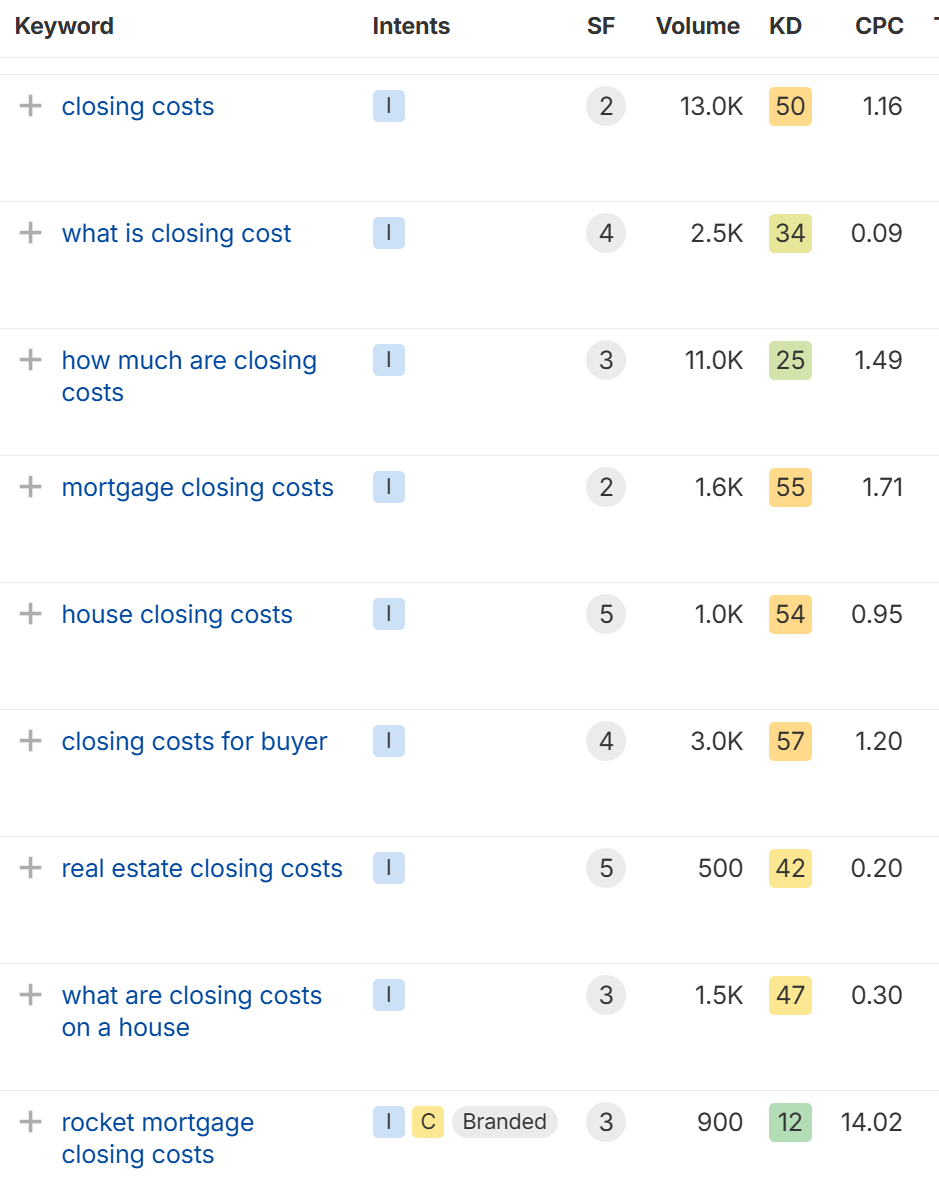
Even if “closing cost” keywords have low ad value ($0.30–$1.67), related terms like:
-
“Mortgage lenders” ($7 CPC)
-
“Sell my house” ($11 CPC)
-
“Refinance calculator” ($9+ CPC)
…can drive lucrative pay per click and affiliate income.
Example affiliate platforms:
-
MaxBounty
-
ShareASale
User Experience: AI Tips, Graphs, and Local Insights
Smart Tips Based on User Goals
The tool tailors results based on whether the user wants to:
-
Maximize profit
-
Sell fast
-
Pay off mortgage
Lightbulb style tips offer ways to:
-
Avoid realtor fees
-
Seek employer assistance programs
-
Choose no-closing-cost mortgages
These tips can link to internal pages for additional info or affiliate offers.
Local Real Estate Data
The AI can:
-
Fetch ZIP code-based news headlines
-
Show local housing market trends
-
Display graphs of where closing costs go (agent commission, title insurance, etc.).
Scaling and Growing the Business
More Than a Calculator
This isn’t just a tool, it’s the starting point of an entire brand. Here’s how to expand:
-
Add mortgage, FSBO, and title insurance pages
-
Build a lead magnet PDF with Gemini (e.g., “Top 15 Ways to Save on Closing Costs”)
-
Tie into an email service like Aweber for list building
-
Use API proxies to secure your tool backend
Traffic Generation Tips
-
Press release headline idea:
“AI-Enabled Closing Cost Calculator Helps Homeowners Save Thousands” -
Post 15 blog articles based on AI-generated tips
-
Use Pinterest or Reddit groups related to home buying/selling.
Why This Niche Works
Low Competition: Very few (if any) tools offer AI-powered real estate calculators.
High Value: Home-related searches yield massive ad revenue and affiliate opportunities.
Scalable: Expand into mortgage calculators, refinance tools, house price estimators, and more.
Proven: Marcus’ student made $6,500 in a few weeks using this exact method.
Implementation Steps
1. Basic HTML Structure
PAGES NEEDED
- THE API AI ENABLED TOOL – HOME
- OFFER FLIP AD PAGE ADVERTORIAL
- OPT / THANK YOU
- DISCLAIMERS DISCLOSURES
- SEOND OFFER FLIP PAGE
www.GotNiches.com
How It Works
-
User Inputs:
-
Home price, loan amount, location, and loan type
-
Experience level (first-time vs experienced buyer)
-
-
Basic Calculations:
-
Standard formulas for common closing costs
-
State-specific adjustments
-
-
AI Enhancements:
-
Click any cost item for instant explanation
-
Automatic personalized tips based on inputs
-
All explanations generated by Gemini in real-time
-
Deployment
-
Get a Gemini API key from Google AI Studio
-
Replace
YOUR_API_KEYin the JavaScript -
Upload both files to any web hosting:
-
GitHub Pages
-
Netlify
-
Vercel
-
Traditional web host
-
Advanced Add-Ons (Optional)
-
Save/Load Scenarios:
function saveScenario() {
    const inputs = { /* collect form values */ };
    localStorage.setItem('lastScenario', JSON.stringify(inputs));
}
-
More Detailed Calculations:
function calculateLoanTypeAdjustments(baseCosts) {
    const type = document.getElementById('loanType').value;
    if (type === 'FHA') baseCosts.lenderFees *= 1.5;
    if (type === 'VA') baseCosts.lenderFees *= 0.8;
}
Market Data Comparison:
async function getLocalAverages() {
    const prompt = `Give average ${document.getElementById('state').value} closing costs for ${
        document.getElementById('homePrice').value} home as bullet points`;
    // Call Gemini...
}

- TRAFFIC METHODS
   DOMAIN - RIGH RANK
   ADS PAID CHEAP
   PRESS RELEASE
   SEO RANK THE TOOL
   PIGGYBACK ON OTHER SITES HOSTING TOOL
www.GotNiches.com
Ai Smart Tools $638 Billion Dollar Business
Learn how to make money online by building AI-powered smart tools with no code in 48 hours. Discover examples, tips, and monetization strategies.
Want to learn how people are making thousands even millions building smart AI tools with zero coding knowledge? This guide walks you through the real world strategy of using APIs like ChatGPT, Gemini, and DeepSeek to launch profitable tools in just 48 hours.
In 2025, we’re in the middle of what might be the biggest online opportunity ever: a $638 billion AI tool market. And with the right mindset, examples, and a step by step path, you can build and monetize your own smart tool without ever writing a line of code.

What Are AI Smart Tools?
AI smart tools are applications that use APIs from large language models (LLMs) like ChatGPT or Gemini to deliver personalized or automated solutions. These tools:
-
Solve a specific user problem (e.g. due date calculators, grammar checkers, mortgage analyzers)
-
Interact with AI through APIs to enhance user experience
-
Often require little to no coding to build.
Static Tools vs Smart AI Tools
-
Static Tool: Does one thing (e.g. calculates BMI)
-
Smart Tool: Pulls dynamic content, gives recommendations, learns from input, stores user data.
Why This Opportunity Matters Now
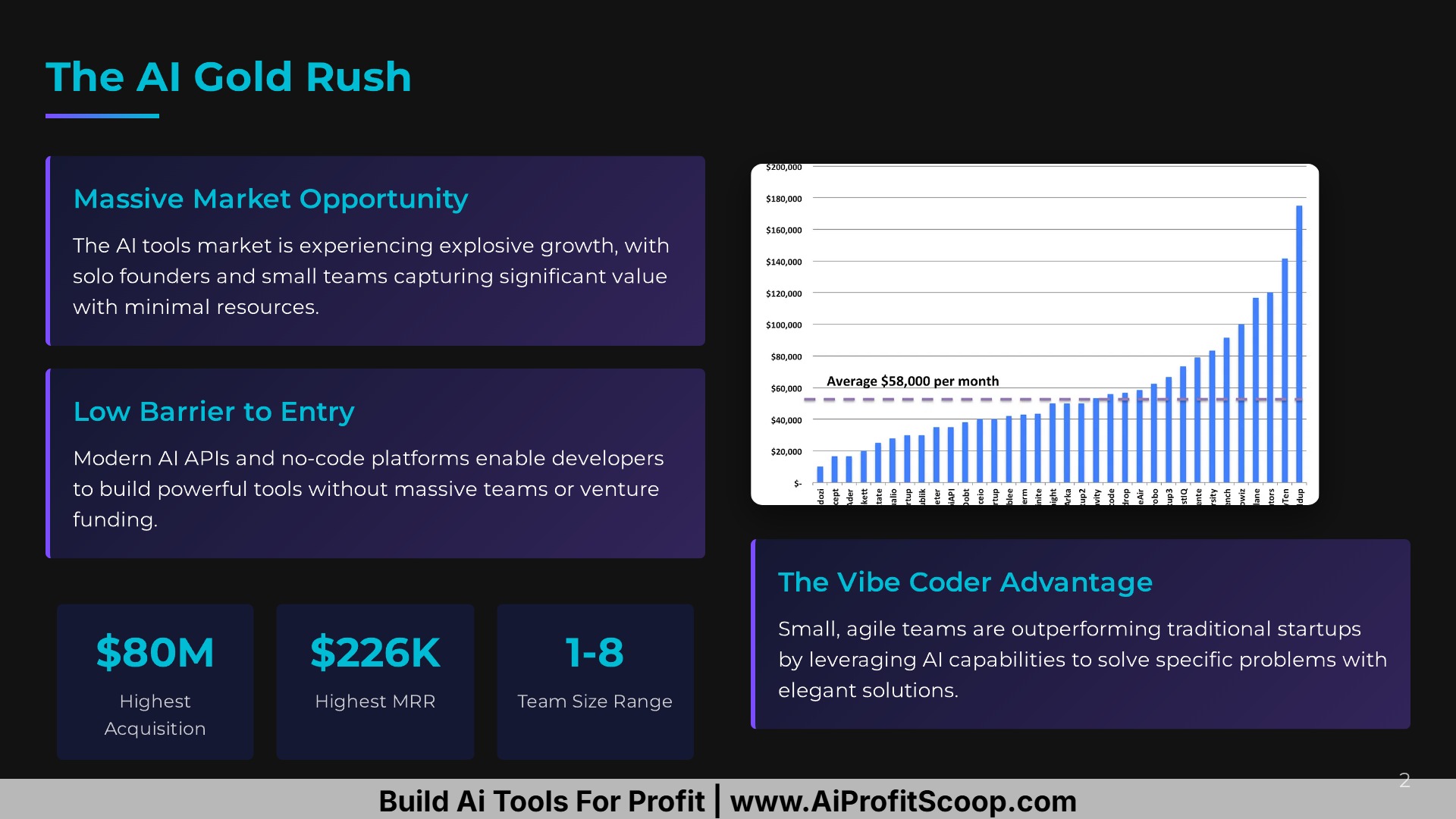
You’ve probably seen stories like:
-
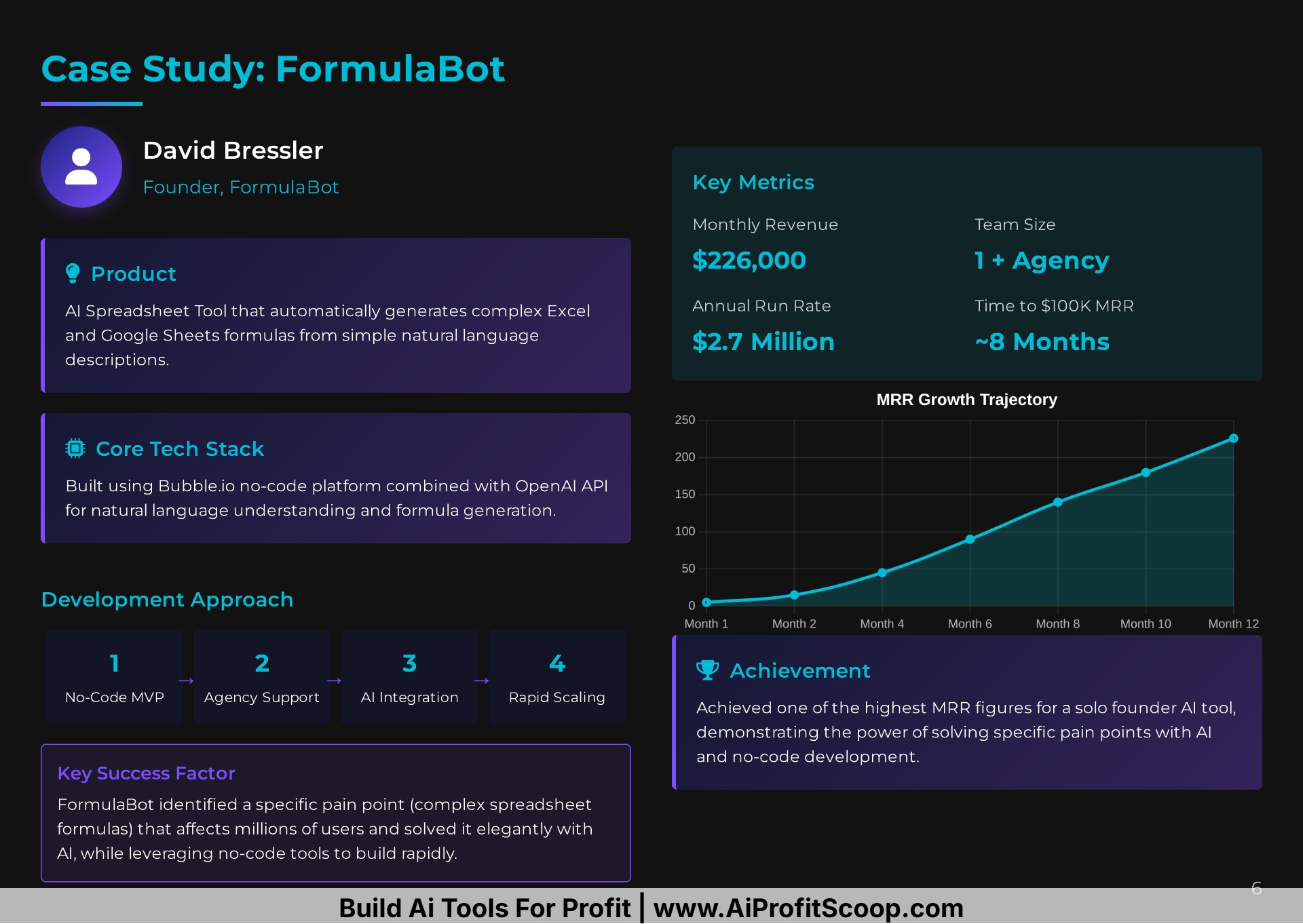
A startup making $226K/month with one employee
-
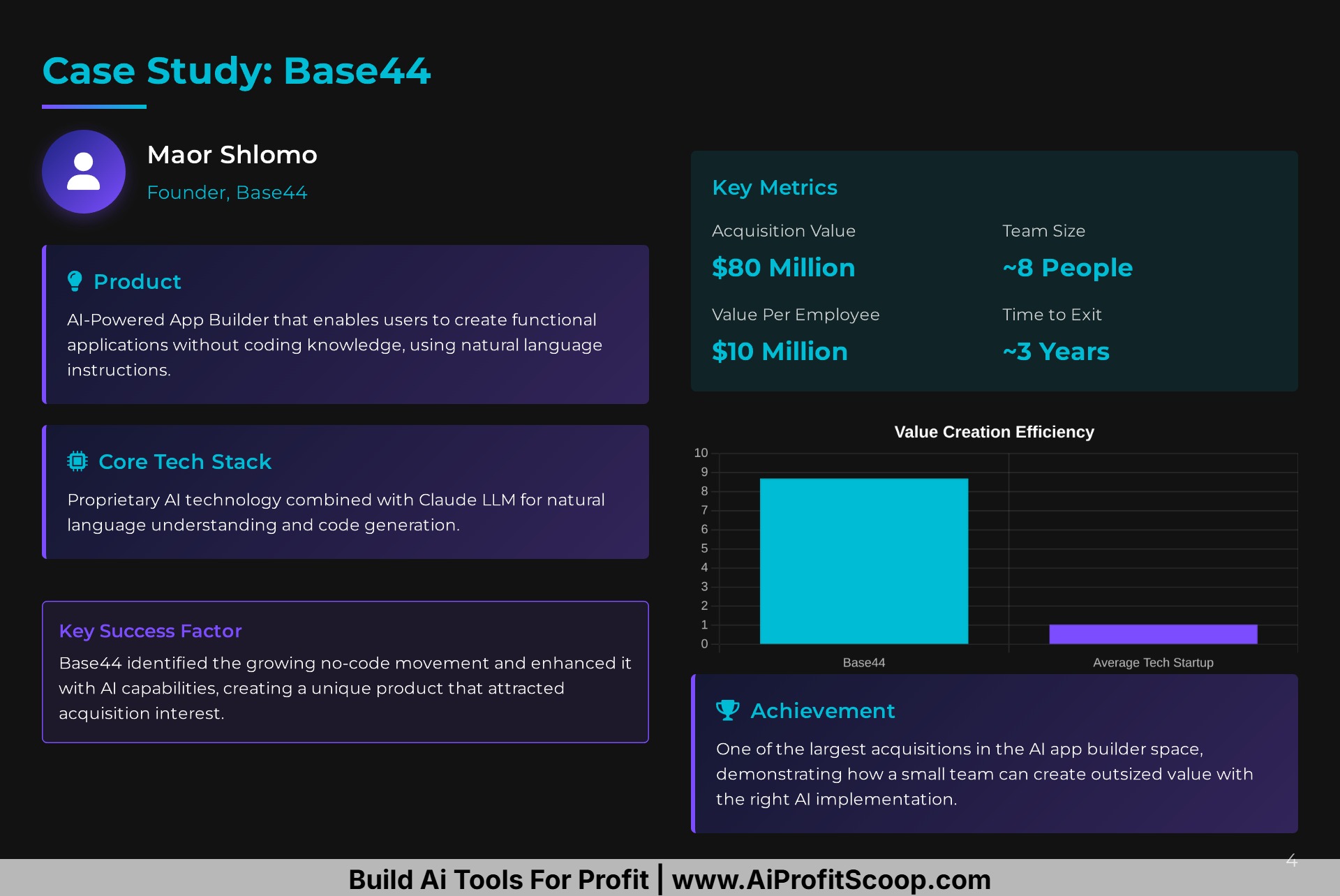
An AI app sold for $80M in under a year
-
A tool generating $45,000/month from affiliate traffic
These aren’t unicorns. They’re people who took action fast.
AI enabled smart tools are part of a $638B and growing opportunity. By 2026, this market is expected to breach the $1 trillion mark.
How to Build an AI Smart Tool in 48 Hours
Here’s the exact breakdown:
1. Identify a Problem That People Search For
Use tools like Ahrefs, Google Trends, or Ubersuggest. Good examples:
-
Pregnancy due date calculator
-
Rent vs. own housing decision tool
-
Font extractor from image
-
Car affordability analyzer
2. Define the AI-Enhanced Outcome
Ask:
-
Can this tool give smarter results with AI?
-
Could it personalize content, generate messages, or offer feedback?
-
Can it track data (e.g., cookies) and evolve over time?
3. Use a No-Code AI Platform
Use Gemini Canvas, ChatGPT Custom GPTs, Claude, or Perplexity Labs to:
-
Build frontend inputs
-
Connect to backend APIs
-
Generate copy, advice, or images
You don’t need to know code—platforms now walk you through step-by-step builds.
4. Add Personalization + Automation
Use AI for:
-
Personalized content based on user data
-
Tips based on time, progress, or goals
-
Image generation (like AI sonograms or graphs)
-
Cookie tracking for return visits
Example: A pregnancy calculator that remembers the user’s name, tracks their trimester, shows AI-generated sonograms, and updates tips weekly.
5. Embed Monetization
Once the tool works, you can:
-
Add affiliate links (e.g. baby products, credit score checkers)
-
Use ads (Google AdSense or Ezoic)
-
Offer paid upgrades (e.g. PDF report, premium version)
-
Grow a list and promote a course or tool kit
Examples of Profitable Smart Tools (From Real Builds)
Content Strategy Generator
Uploads a CSV file from Ahrefs → Generates blog strategy, categories, titles, affiliate offers, and SEO tips using Gemini + DeepSeek.
Grammar & Style Rewriter
Checks grammar, rewrites in casual/professional tone, detects plagiarism, and even rewrites for SEO optimization.
Dog Food Selector
Takes dog age, breed, allergies, and energy level → Recommends best dog food + includes affiliate links to pet stores.
Font Detector from Image
Upload image → AI tells you font name and provides links to download or purchase (monetized via affiliate offers).
AI SEO Ranking Analyzer
Enter a question like “how to tie a tie” → Shows what articles ChatGPT, Gemini, and Perplexity rank and why. Helps reverse-engineer AI SEO.
Car Affordability Calculator
Calculates how much house or car you can afford + offers smart suggestions like:
-
FHA or VA loans
-
Assumable mortgages
-
Tips for raising your credit score
Best Niches to Explore for AI Smart Tools
-
Mortgage & Real Estate
-
Fitness & Health (e.g. calorie counters, BMI)
-
Baby & Parenting (e.g. due date calculators)
-
Local Services (e.g. repair cost estimators)
-
Pets (e.g. food pickers, training plans)
-
Personal Finance (e.g. rent vs. own, debt snowball)
-
Students (e.g. citation generators, essay graders)
How to Get Traffic to Your AI Tool
-
Do a Press Release: Position it as a “breakthrough AI solution”
-
Run Paid Ads: On Google or Meta targeting your keywords
-
Content Marketing : Write blog posts showing how it works (like this one)
-
Use YouTube Shorts or TikTok: Demo the tool and link in bio
-
List it on Tool Marketplaces: Like Product Hunt, GPT Store, or Toolify.
Pro Tips to Scale and Win
-
Use user cookies to personalize return visits
-
Offer email collection for updates (build your list!)
-
A/B test landing pages and tool output
-
Use AI to iterate quickly (daily updates)
-
Build simple before complex focus on MVP!.
Why You Should Start Now
AI smart tools are the next wave and they’re accessible to everyone, even if you don’t know how to code. By solving real problems in a smarter, automated way, you’re building assets that work 24/7 and stand out in a saturated market.
If you’ve ever felt stuck in affiliate marketing, blogging, or passive income, this is your opportunity to rise above the noise.
What To Do Next
-
Want to build your first smart tool? Check out our Smart Tools Class at AI Profit Scoop
-
Drop a comment below and let us know which idea you’re going to build!
-
Share this post with a friend who’s into AI or making money online.
Let’s build something amazing with AI and without code.

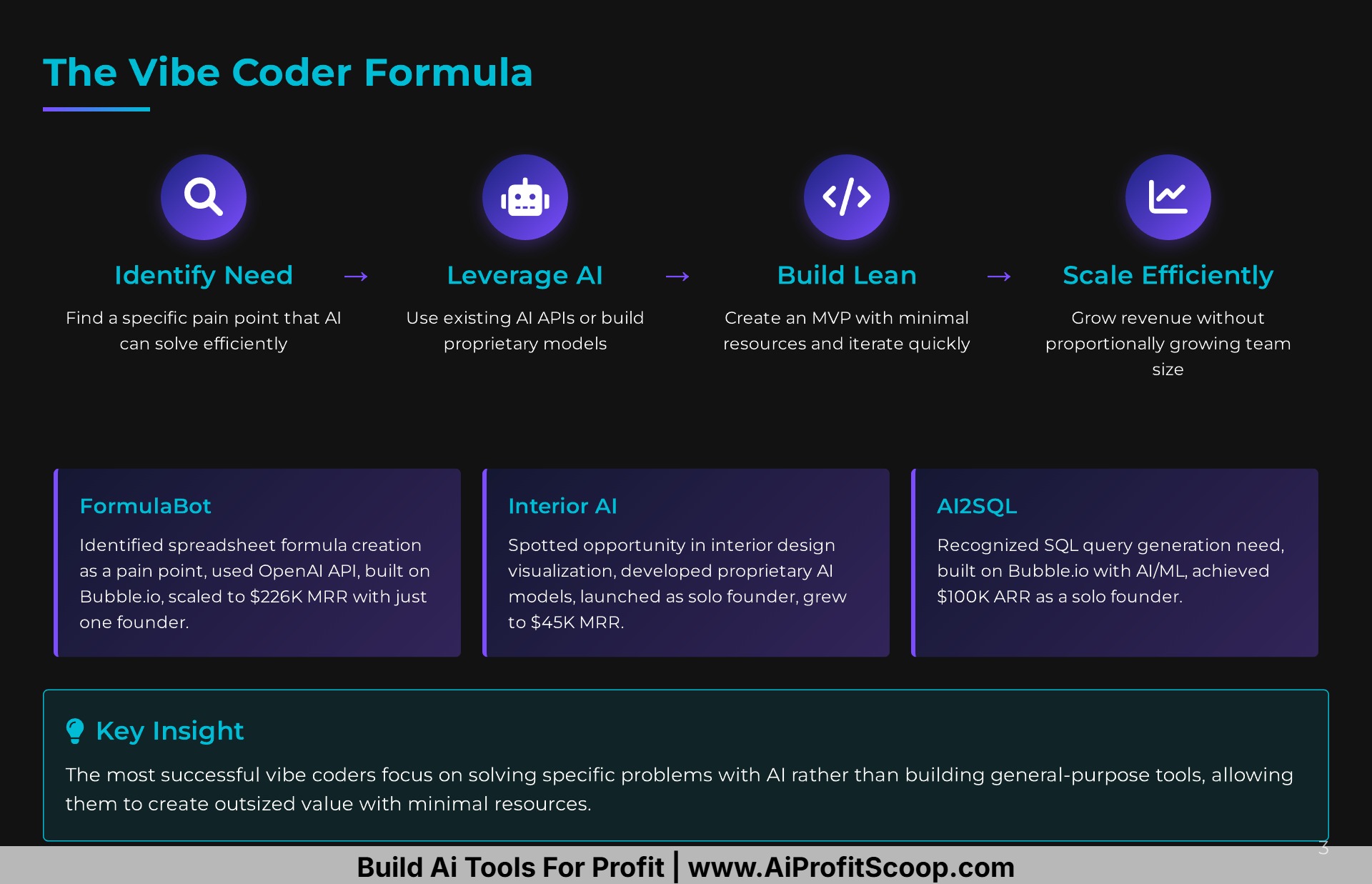
- Solve a Pain Point You Know: The most successful products start with a real problem, not a technology in search of one.
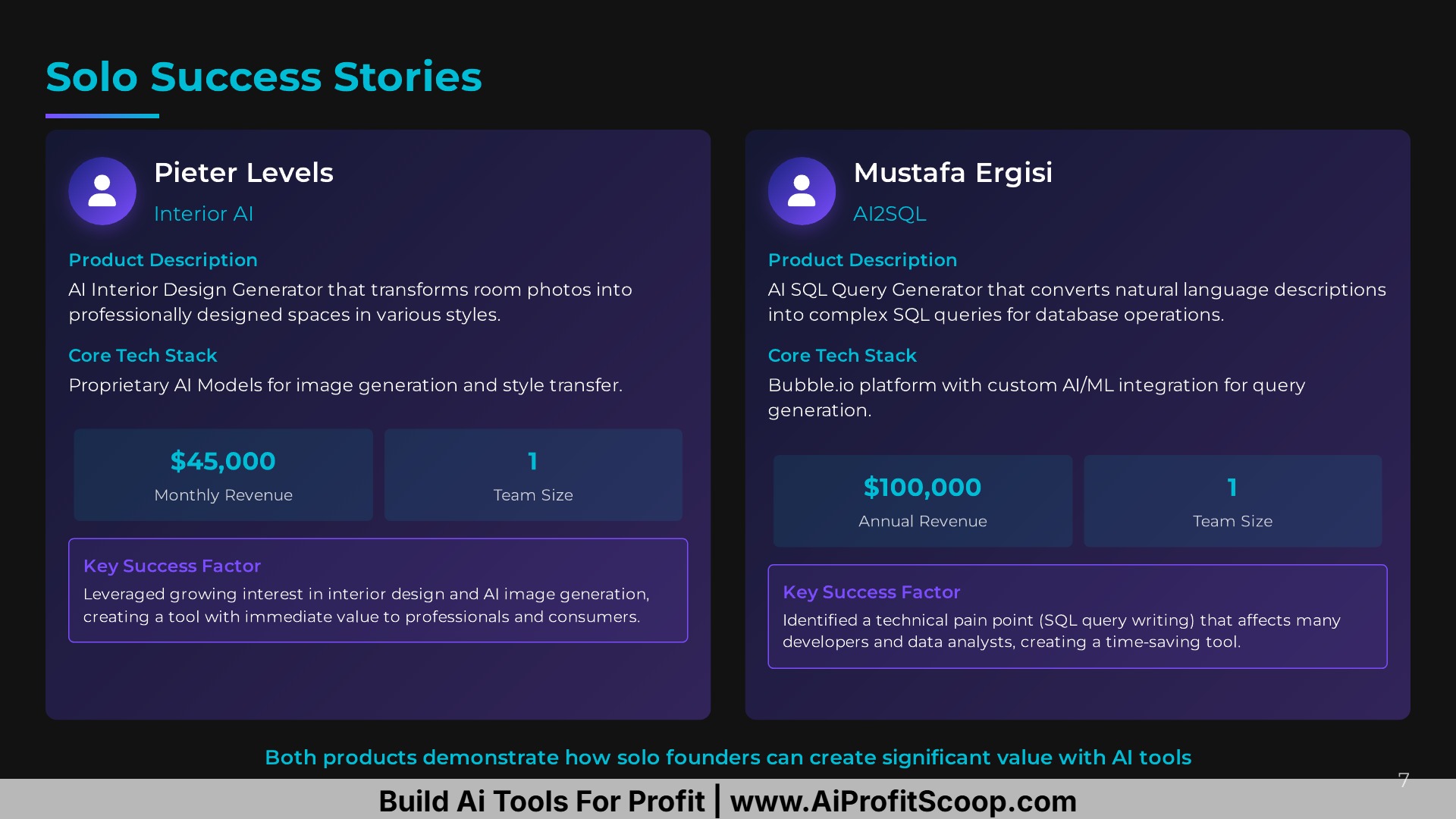
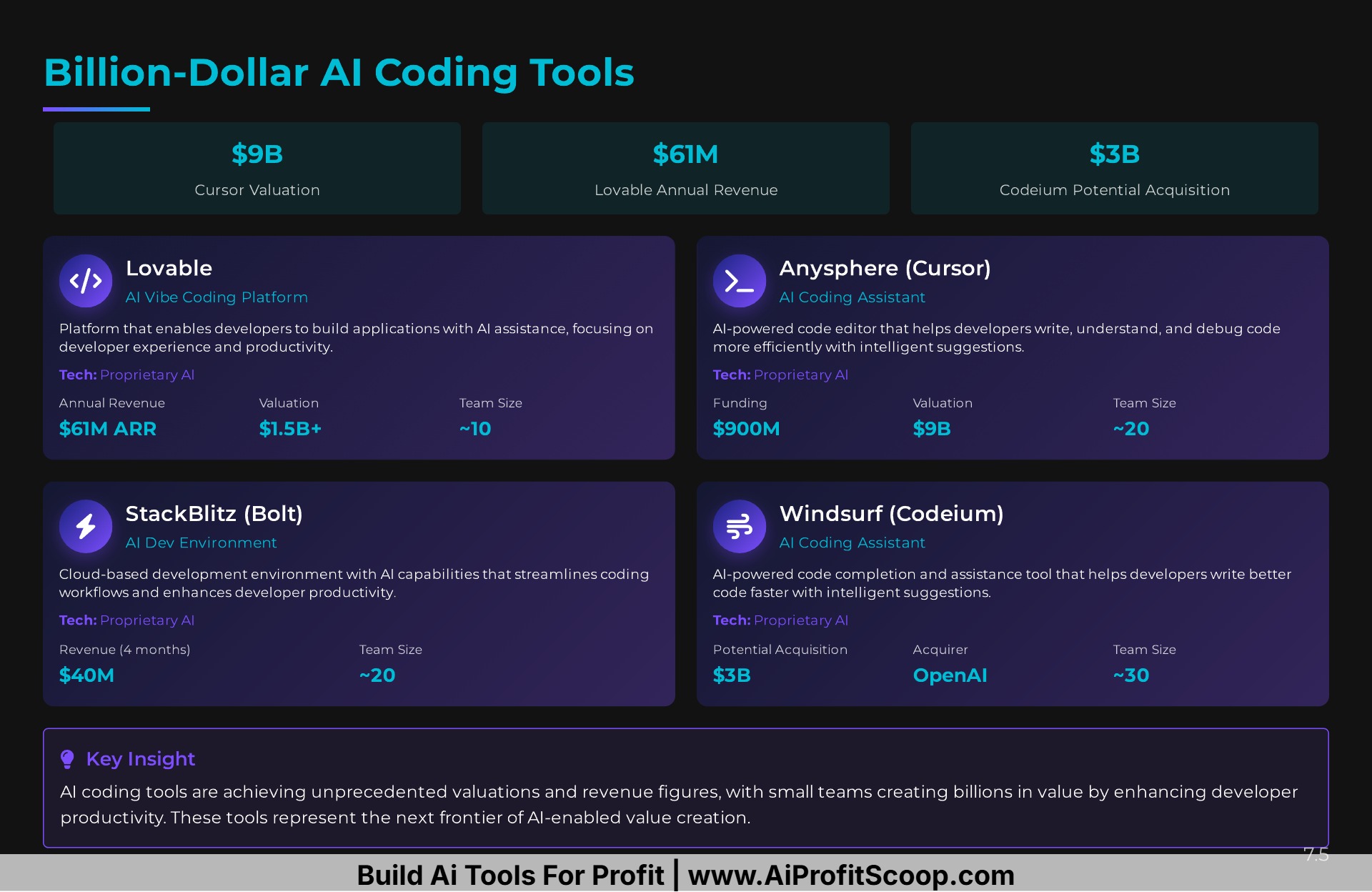
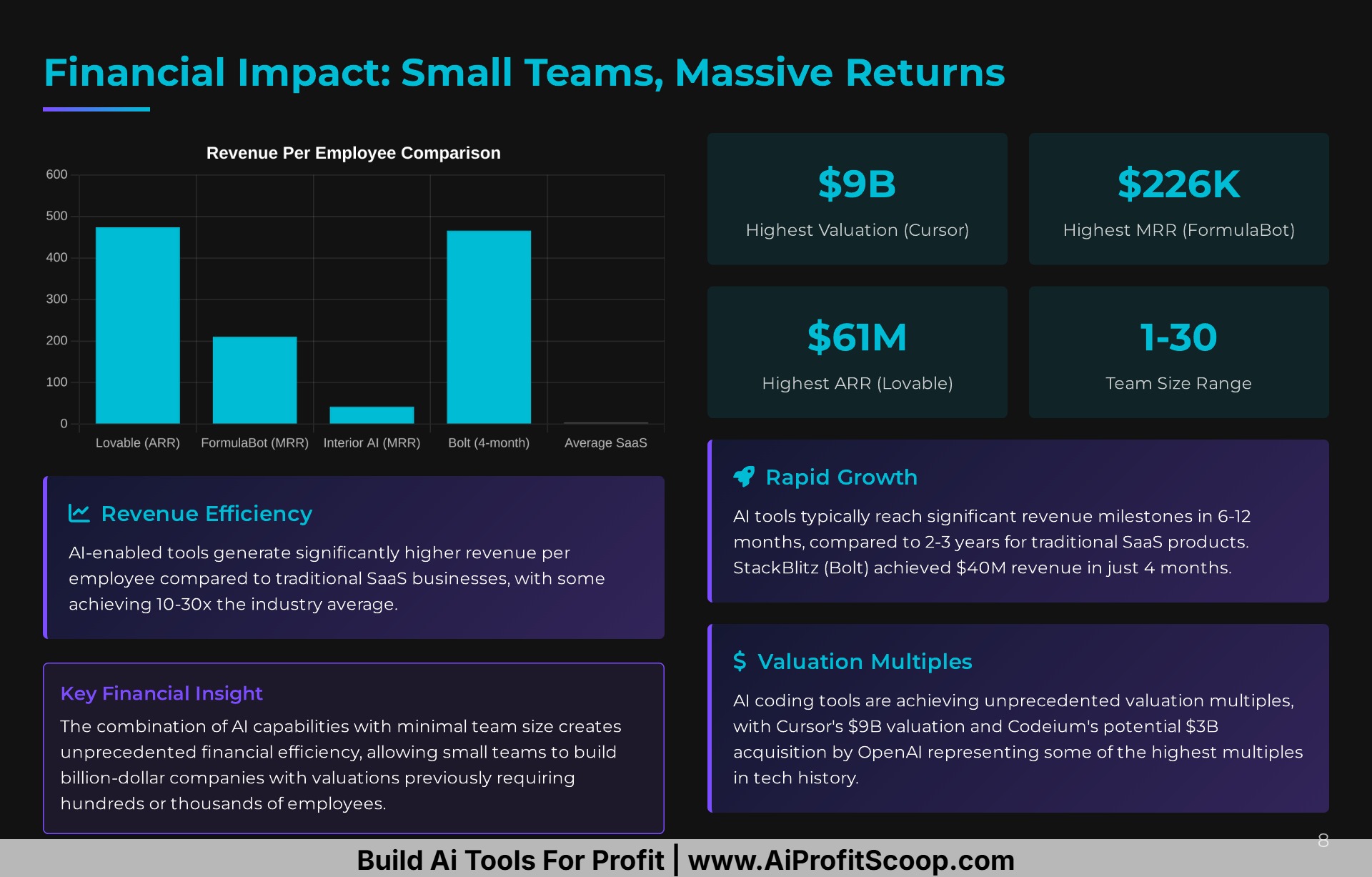
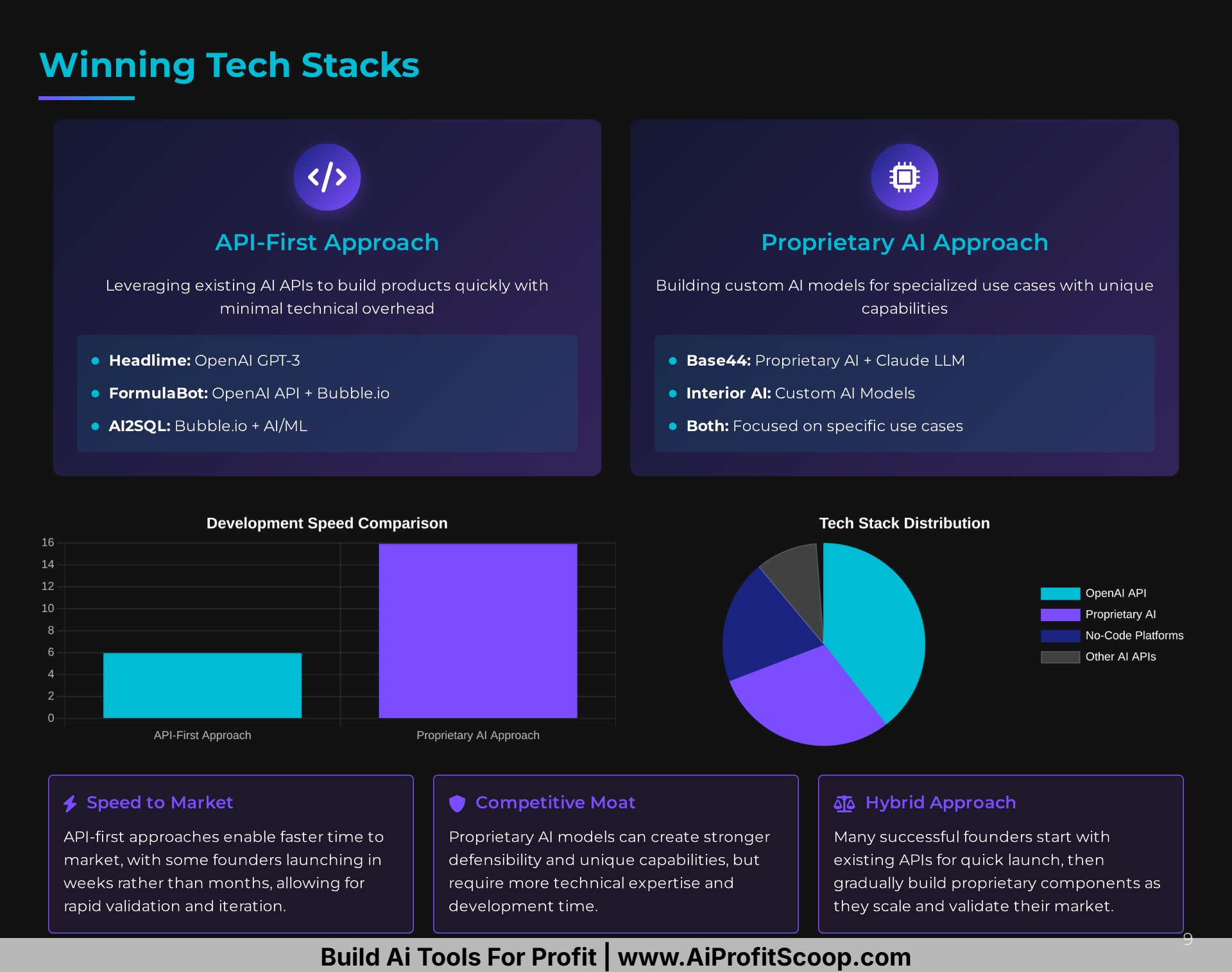
- Master the Lean Stack: Become proficient in the core tools that enable rapid development, such as Bubble, OpenAI, and Stripe.
- Build Your Audience Early: Your personal brand is your most powerful distribution channel. Start sharing your journey today.
- Embrace Speed and Iteration: The ability to ship quickly, listen to user feedback, and adapt is your greatest competitive advantage.
- Understand Your Unit Economics: Know your costs, especially the variable costs associated with AI, and price your product for value and sustainability.
100 Lucrative Online Tools: Your Blueprint for Digital Entrepreneurship
The digital landscape is fertile ground for savvy entrepreneurs to cultivate profitable online tools that cater to a global audience. From simple, single-purpose utilities to sophisticated AI-powered platforms, the opportunities to generate significant income are vast and varied. This report delves into 100 such online tools, categorized by their primary function, that have demonstrated strong earning potential through various business models like subscriptions, freemium tiers, one-time purchases, and advertising.
I. Design & Creative Tools
This category is a cornerstone of the digital economy, empowering creators and businesses to produce high-quality visual content. Monetization is often achieved through subscription plans offering access to premium features, assets, and higher usage limits.
- 1. Background Remover: An incredibly popular tool for e-commerce, marketing, and personal use.
- 2. Logo Maker: Provides templates and design elements for creating professional logos.
- 3. Infographic Maker: Simplifies the creation of data-rich and visually appealing infographics.
- 4. Video Editor: Offers a suite of tools for trimming, merging, and adding effects to videos.
- 5. Photo Collage Maker: Allows users to easily combine multiple photos into a single image.
- 6. Online Mockup Generator: Creates realistic mockups for websites, apps, and physical products.
- 7. Social Media Post Creator: Offers templates and assets specifically for platforms like Instagram, Facebook, and X (formerly Twitter).
- 8. Resume/CV Builder: Provides professionally designed templates for creating standout resumes.
- 9. Business Card Maker: A simple tool for designing and customizing business cards.
- 10. Meme Generator: A fun and highly shareable tool that can drive significant traffic.
- 11. Presentation Maker: An alternative to traditional software with collaborative and cloud-based features.
- 12. Color Palette Generator: Helps designers and artists create harmonious color schemes.
- 13. Font Pairing Tool: Assists in selecting complementary fonts for design projects.
- 14. GIF Maker/Editor: Enables the creation and customization of animated GIFs.
- 15. AI Art Generator: Leverages artificial intelligence to create unique images from text prompts.
II. Content & Writing Tools
In the age of content marketing, these tools are indispensable for writers, marketers, and businesses. Subscription models and freemium offerings with advanced features are common monetization strategies.
- 16. Grammar & Spell Checker: A fundamental tool for ensuring high-quality written content.
- 17. Plagiarism Checker: Essential for academic institutions, publishers, and content creators.
- 18. Paraphrasing Tool: Helps users rephrase sentences and articles to avoid plagiarism and improve clarity.
- 19. AI Content Generator: Creates articles, ad copy, and other text formats based on user input.
- 20. Headline Analyzer/Generator: Assists in crafting compelling headlines that drive clicks.
- 21. Readability Score Checker: Analyzes text to determine its ease of reading.
- 22. Keyword Density Checker: A simple SEO tool to ensure content is optimized for search engines.
- 23. Word Counter: A basic utility that is frequently searched for.
- 24. Transcription Service (Automated): Converts audio and video files into text.
- 25. Citation Generator: Helps students and researchers format citations in various styles.
III. File Conversion & Management Tools
These utilities address the universal need to convert and manage files in various formats. Revenue is often generated through per-conversion fees, subscriptions for batch processing, or ad support.
- 26. PDF to Word Converter: One of the most common file conversion needs.
- 27. Image to PDF Converter: Allows users to combine images into a single PDF document.
- 28. Video to MP3 Converter: Extracts audio from video files.
- 29. Image Compressor: Reduces the file size of images for faster web loading.
- 30. File Merger (PDF, etc.): Combines multiple files of the same type into one.
- 31. Online File Splitter: Divides large files into smaller, more manageable parts.
- 32. Ebook Converter: Converts files into various ebook formats (e.g., EPUB, MOBI).
- 33. Document Scanner (Mobile App): Uses a smartphone camera to create high-quality scans.
- 34. Online OCR (Optical Character Recognition): Extracts text from images and PDFs.
- 35. Cloud Storage Service: Provides online space for storing and accessing files.
IV. Marketing & Sales Tools
This extensive category provides businesses with the tools they need to reach and convert customers. SaaS (Software as a Service) subscriptions are the dominant business model here.
- 36. Email Marketing Platform: Enables businesses to send newsletters, automated campaigns, and transactional emails.
- 37. Social Media Scheduling Tool: Allows users to plan and automate social media posts.
- 38. SEO Keyword Research Tool: Helps businesses find profitable keywords to target.
- 39. Backlink Checker: Analyzes the backlink profile of a website for SEO purposes.
- 40. Landing Page Builder: Simplifies the creation of high-converting landing pages.
- 41. CRM (Customer Relationship Management) Software: Helps businesses manage their interactions with current and potential customers.
- 42. Lead Generation Form Builder: Creates forms to capture visitor information.
- 43. Pop-up & Opt-in Form Creator: Helps grow email lists and promote offers.
- 44. A/B Testing Tool: Allows marketers to test different versions of a webpage to see which performs better.
- 45. Heatmap & Session Recording Tool: Visualizes user behavior on a website.
- 46. Affiliate Marketing Platform: Connects businesses with affiliates to promote their products.
- 47. QR Code Generator: Creates QR codes for marketing campaigns and other uses.
- 48. Survey & Poll Creator: Gathers feedback from customers and website visitors.
- 49. Contest & Giveaway Platform: A tool to run viral marketing campaigns.
- 50. Social Proof Notification Tool: Displays recent sales or sign-ups to build trust.
V. Productivity & Collaboration Tools
In an increasingly remote and fast-paced world, these tools are essential for individuals and teams to stay organized and efficient. Subscription models based on the number of users and features are standard.
- 51. Project Management Software: Helps teams plan, execute, and track their work.
- 52. Time Tracking Tool: Monitors time spent on tasks and projects for billing and productivity analysis.
- 53. Online Calendar & Scheduling Tool: Simplifies appointment booking and team scheduling.
- 54. Note-Taking App: Provides a centralized place to capture and organize ideas.
- 55. To-Do List & Task Manager: Helps individuals and teams manage their daily tasks.
- 56. Online Whiteboard: A collaborative space for brainstorming and visual planning.
- 57. Mind Mapping Tool: Helps organize thoughts and ideas visually.
- 58. Password Manager: Securely stores and manages passwords.
- 59. Habit Tracker: A tool to help users build and maintain positive habits.
- 60. Focus & Pomodoro Timer: Helps users stay focused on tasks for set intervals.
VI. Developer & Technical Tools
This category caters to the needs of software developers and IT professionals. Monetization often involves paid plans for advanced features, higher API limits, or team collaboration.
- 61. API Mocking Tool: Allows developers to simulate an API before it’s fully developed.
- 62. Code Editor & IDE (Integrated Development Environment): Provides a platform for writing and debugging code.
- 63. Website Uptime & Performance Monitoring: Alerts website owners to downtime and performance issues.
- 64. Log Management & Analysis Tool: Helps developers track and analyze application logs.
- 65. Database Management Tool: Provides a user interface for managing databases.
- 66. JSON Formatter & Validator: A simple but essential tool for working with JSON data.
- 67. Regex (Regular Expression) Tester: Helps developers create and test regular expressions.
- 68. API Documentation Generator: Automatically creates documentation for APIs.
- 69. Website Scraper/Data Extractor: Extracts data from websites.
- 70. No-Code/Low-Code App Builder: Enables non-developers to create applications with minimal coding.
VII. E-commerce & Business Tools
These tools are specifically designed to help online businesses operate and grow. Revenue models include transaction fees, monthly subscriptions, and a combination of both.
- 71. Dropshipping Product Importer: Allows e-commerce stores to easily import products from suppliers.
- 72. Price Comparison Engine: Helps consumers find the best prices for products online.
- 73. Shipping Label Generator: Simplifies the process of creating shipping labels.
- 74. Inventory Management System: Tracks stock levels and helps prevent overselling.
- 75. Customer Review & Rating Platform: Gathers and displays customer reviews for products and services.
- 76. Subscription Box Management Software: Manages recurring billing and shipments for subscription-based businesses.
- 77. Invoicing & Billing Software: Creates and sends professional invoices.
- 78. Business Name Generator: Helps entrepreneurs brainstorm names for their companies.
- 79. Domain Name Search & Marketplace: Allows users to find and purchase domain names.
- 80. Live Chat Software: Enables real-time communication with website visitors.
VIII. Niche & Utility Tools
This diverse category includes tools that serve specific needs and can be highly profitable due to their targeted audience. Monetization can be through a variety of models depending on the tool’s function.
- 81. Online Calculator (Mortgage, BMI, etc.): Simple, ad-supported tools that can attract significant traffic.
- 82. Random Name/Number Generator: A basic utility with many applications.
- 83. Online Poll Maker: Quickly create and share polls on social media or websites.
- 84. URL Shortener: Creates shorter, more manageable links.
- 85. “Link in Bio” Tool: A popular tool for Instagram users to share multiple links.
- 86. Watermark Adder: Adds a watermark to images to protect copyright.
- 87. Image Resizer: Quickly changes the dimensions of an image.
- 88. Meeting Agenda Generator: Helps create structured and effective meeting agendas.
- 89. Checklist/Template Generator: Creates reusable checklists and templates for various tasks.
- 90. Online Signature Generator: Creates a digital signature for documents.
IX. Health, Wellness & Education Tools
This growing sector offers opportunities to provide valuable services that improve people’s lives. Subscription models for content and personalized plans are common.
- 91. Meal Planning & Recipe Generator: Helps users plan their meals and generate shopping lists.
- 92. Workout & Fitness Plan Generator: Creates customized workout routines.
- 93. Calorie & Macro Tracker: A tool for tracking daily food intake.
- 94. Meditation & Mindfulness App: Provides guided meditations and relaxation exercises.
- 95. Online Course Platform: Enables creators to build and sell online courses.
- 96. Flashcard & Study Aid Creator: Helps students create and use digital flashcards.
- 97. Language Learning App: Offers lessons and exercises for learning a new language.
- 98. Music Practice & Learning Tool: Provides resources for musicians to improve their skills.
- 99. Online Tutoring & Coaching Platform: Connects students with tutors and coaches.
- 100. Habit Formation & Accountability App: Helps users build good habits with social support features.
How I Use Google Gemini Deep Research To Build Million Dollar Landing Pages

If you’ve ever wondered what makes a landing page bring in $1M+ a year, you’re in the right place. In this guide, I’m going to show how I use Google Gemini Deep Research to analyze, build, and optimize landing pages that convert and make serious money. Grab a coffee, this is a game changer.
What Does a $1M Landing Page Really Look Like?
Let’s start by breaking the myth. Most people think that million dollar landing pages are super complex, filled with funnels, exit pops, five part email sequences, and pixel perfect designs. Nope.
The truth is: they’re simple, but not easy.
These are often one or two pages max, focused on ONE GOAL:
- Get the visitor to take an action.
The trick is making those pages smart, focused, and research driven. That’s where Gemini comes in.
Why Most Landing Pages Fail
Before we dive into tools and tricks, let’s understand why most people fail:
- No clear message
- Weak headlines
- No research on what the user really wants
- No emotional or logical hook
- Just slapping a button that says “Buy Now”
You’re not going to make 7 figures like that.
But with the right research and structure, it’s totally doable.
Introducing Google Gemini Deep Research
Gemini is not just another chatbot. This thing is like having an entire research team and copywriter in your back pocket. It allows you to:
- Research your market from hundreds of sites
- Build structured articles
- Create infographics
- Format content as blog style advertorials
- Turn research into a sales page
It’s like a copywriting and marketing powerhouse, and it saves me weeks of work.
How I Use Gemini to Build Landing Pages
Step 1: Pick a Proven Offer
Start with a high paying affiliate program or a product that converts well. I use:
- OfferVault: Find offers like Fiverr affiliates, survey platforms, etc.
- ClickBank: Septic tank treatments, AI tools, etc.
Look for payout + popularity + low competition.
Step 2: Start Deep Research
Inside Gemini, choose Deep Research and input a prompt like:
“What are the elements of a high converting landing page for [topic]?”
Examples I used:
- “Types of mortgage loans that save people money”
- “Why septic tank additives are harmful and which ones work”
Gemini then pulls thousands of data points, creates a structured overview, and builds a foundation.
Step 3: Prime Gemini for Content Creation
After getting the research, guide Gemini like this:
“Structure this into an advertorial that sells [product].”
You’ll get a 3,000-5,000 word article that reads like a blend of a blog and a sales letter. This becomes the backbone of your landing page.
You can:
- Format this with subheadings
- Add visuals later
- Copy/paste into a simple WordPress theme or builder.
Step 4: Use Infographics to Tell a Visual Story
Gemini has a secret weapon: Create Image button.
This turns your research into infographics. Use these to:
- Build trust
- Simplify complex concepts
- Make the user stop scrolling
For Septifix, it gave me:
- Stats on drain field costs
- Science behind good vs. bad additives
- Visual timelines of treatment processes
Perfect for storytelling.
Step 5: Create Segment Based Landing Pages
Not all users are the same. That’s why I often include selection buttons at the top of the page:
- “I’m a designer”
- “I’m a developer”
- “I’m new to freelance”
Each path leads to a tailored sub offer, increasing click through rate and relevance. One size does not fit all.
Step 6: Add Elements That Sell
Make sure your page has:
- A killer headline
- A clear CTA (with urgency)
- Emotional story or pain point
- Infographics
- User intent match (what they’re actually looking for)
Use checklists like:
- Is this page helpful?
- Does it address pain points?
- Would YOU buy from this page?.
Examples That Worked
Here are three campaigns I tested:
1. Fiverr Affiliate + AI Job Loss
- Headline: “The Robots Are Coming For Your Job”
- Story: AI is replacing freelance gigs
- Hook: Here’s how to survive with Fiverr
- Result: Strong engagement and clicks
2. Septifix + Septic Additive Danger
- Visuals: Explaining bacteria vs. chemical treatment
- CTA: “Yes, I want to protect my septic system”
- Pages included FAQ, testimonials, infographics
3. Mortgage Calculator + Refinance Offers
- Interactive: Plug in your loan to see savings
- Hook: Discover how your mortgage is draining wealth
- CTA: “See your new rate & savings”
All of these were made using Gemini in under a few hours.
FAQs, Fact Checks, and Disclaimers
Before you publish:
- Replace AI-generated testimonials with real ones
- Add disclosures and disclaimers
- Verify numbers and claims
Gemini gives you speed, but YOU need to be the ethical gatekeeper. You’re still responsible for what’s on the page.
Why This Method Works
- Research first: Like a good lawyer building a case
- Visuals: Capture attention
- Infotorial structure: Educate and sell
- Tailored content: Match user intent
- Scalable: Make 5-10 pages from one campaign
This is how I’ve built seven-figure campaigns. Not by luck, not by random trends, but by building stuff that sells.
Start Smart, Scale Later
You don’t need 100 landing pages. You don’t need a team. You just need:
- The right offer
- Gemini for research
- A clear message
- Visual storytelling
- Honest testing and refining
This is how you go from hobby marketer to serious digital entrepreneur.
Get out there, use the tools, build your pages, and drive that traffic.
And if you want:
- All these notes
- Templates
- Tools mentioned in this guide.
$300/Day With a 3-Page AI Business (REAL Method)
Discover how to make $300/day with a 3-page AI powered business. Learn the full setup, tools, and strategies to build your AI income stream fast!.
A Real AI Powered Business That Makes Money
If you’ve been hunting for a real way to make money online, something beyond the fluff and empty promises, you’re in the right place. In this guide, you’ll learn how to build a simple but powerful three page AI-powered business that can generate up to $300 per day.
This isn’t about passive YouTube videos or affiliate links that never convert. We’re talking about creating a usable, scalable tool powered by AI that solves real problems for people. You’ll see step by step how to build it, host it, grow it, and monetize it. And yes, all the tools used are accessible to beginners.
Whether you’re new to making money online or you’re an experienced digital entrepreneur, this method is a game changer.

What Is a 3-Page AI Business?
At its core, this business is built around:
-
A Tool Page: An AI-powered utility that solves a specific problem.
-
An Opt In Page: Used to collect leads or emails in exchange for access.
-
A Sales/Legal Page: Includes disclaimers, upsells, or pricing information.
The strategy? Use AI to build a tool that people need and offer it through a lead generating site. It’s minimal. It’s scalable. And it works.
Why This Method Works (With Real Proof)
Let’s start with a powerful example: a solo owned AI tool startup recently sold to Wix for $80 million, just six months after launch. It wasn’t some massive team or advanced codebase. It was a simple tool solving a complex problem.
The lesson? Tools that solve problems = value.
AI gives you the leverage to build those tools, even if you aren’t a coder.
This exact strategy has earned thousands of dollars monthly for digital entrepreneurs like Marcus. He built a tool that helps people generate content strategies using AI. It took about 6 hours from idea to working product. That’s the power of this system.
How to Build Your $300/Day AI Tool
Step 1: Find a Complicated Problem That Has Demand
Look for things that:
-
People search for
-
Are hard to do manually
-
Tie to services or affiliate products
Examples:
-
Pitch deck builder
-
Refund policy generator
-
AI subtitle tool
-
YouTube banner designer
-
Press release creator
-
Content strategy generator
Use tools like:
-
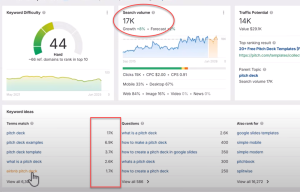
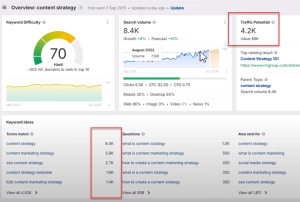
Ahrefs or free keyword tools to check search volume
-
Reddit or Quora for pain points and user intent
-
Google Keyword Planner for monetization potential
Step 2: Create a Tool That Solves the Problem
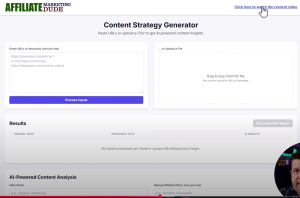
Marcus’s tool, NicheVision, accepts keywords and delivers content strategies for platforms like:
-
YouTube
-
TikTok
-
Instagram
-
LinkedIn
-
Google SEO
It’s built using the Google Gemini API, meaning it can run AI prompts in the background without requiring the user to subscribe to any AI service.
Important Features:
-
Keyword extraction
-
Platform-specific strategy generation
-
SEO content briefs
-
Export functions
-
Affiliate offer suggestions
Tools like Manus AI or Gemini Canvas can help you generate UI and code for your tools, so no coding knowledge is needed.
Hosting and Building the Site
-
Buy a Domain & Hosting
-
Use sites like GoHubSite.com or SpamZilla to find good expired domains.
-
Host your tool in a subfolder like
/tools/or/content/for easy access.
-
-
Create the Tool Page
-
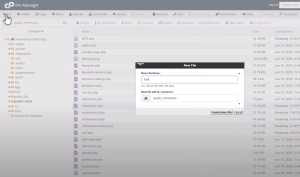
Use a file like
tool.phpand copy your code there. -
Link your API key to the Gemini-powered functions.
-
Test functionality before going live.
-
-
Create an Opt In Page
-
Use Aweber or similar services to build a popup opt-in form.
-
Set the popup to appear 2 seconds after page load.
-
Capture emails and redirect users to the tool.
-
-
Add a Disclaimer/Monetization Page
-
Include terms, privacy policy, disclaimers, and any paid options like:
-
$9/month access
-
$37 one-time access
-
Affiliate links
-
-
How to Promote Your 3-Page AI Business
Strategy 1: Use AI to Create Traffic Driving Content
Leverage tools like Gemini or Manus to create:
-
100 content marketing tips (for social posts)
-
100 niche tools lists (for blogs or Pinterest)
-
Guides, carousels, and lead magnets
Example:
“Here are 25 content marketing tips, Use our free strategy generator tool to get your own AI-powered plan!”.
Strategy 2: Embed a Sticky Call to Action
Make sure your tool includes:
-
A sticky header with a call to action
-
A built in opt in form
-
Affiliate offers related to the tool
Strategy 3: Offer It as a Lead Magnet
Instead of a typical eBook, offer the tool itself as a freebie. That’s much more valuable than a PDF!
You can use:
-
Your website
-
Email marketing
-
YouTube videos
-
Facebook Groups
-
Pinterest pins (like “Free AI Strategy Tool”).
Monetization Options
-
Software as a Service (SaaS):
Charge $9/month or $100/year for access. -
Affiliate Marketing:
Include affiliate links for:-
AI writing tools
-
SEO tools
-
Hosting companies
-
Print-on-demand platforms
-
-
Service Upsells:
Offer personalized content strategy services (e.g., $497 for a 1 on 1 plan). -
Free + Email List:
Offer free use, but grow a list and sell products later.
Why This Works
The AI gold rush isn’t coming. It’s already here. But instead of chasing the latest trend, this system gives you a real product, a real process, and real potential for income.
This 3 page AI business can help you earn $300/day or more by focusing on value, problem-solving, and strategic promotion. You just need the right tool, the right setup, and the drive to keep going.
Summary of Key Steps:
-
Pick a complicated problem with demand
-
Use Gemini or Manus to build a tool
-
Host your tool on a subfolder
-
Create an opt-in popup page
-
Promote through social, SEO, and lists
-
Monetize via SaaS, services, or affiliate links.
Build a No Code AI Tool to Make Money Online (Not for the Lazy!)
Join Marcus – AI API Tools Class Here
Test Out The Content Tool Here
Join Marcus – AI API Tools Class Here
Test Out The Content Tool Here
Discover how to build a no code AI tool like a $1.3M business. Step by step guide with monetization strategies, free tools, and real world examples.
In today’s digital landscape, AI tools are revolutionizing how businesses operate and they’re generating massive revenue. Imagine creating your own AI powered tool in less than 24 hours, with no coding experience, and turning it into a profitable business.
In this guide, I’ll show you exactly how I built a $1.3M/year no-code AI tool, step by step. This isn’t for the lazy; it’s for those ready to take action, implement, and profit from the AI gold rush.
Why This Opportunity is HUGE
-
The AI tools market is projected to hit $400B+ this year.
-
No code platforms make it easier than ever to build AI-powered software.
-
You can monetize through subscriptions, ads, or affiliate offers.
If you’re serious about making money online, this is the biggest opportunity I’ve seen in 25 years.
Step 1: Understanding AI Tools & APIs
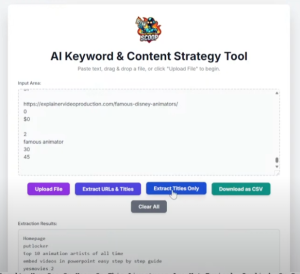
What is an AI Tool?
An AI tool is a software application that uses artificial intelligence to perform specific tasks, such as:
-
Content generation
-
Image editing
-
SEO analysis
-
Lead generation
What is an API?
An API (Application Programming Interface) is a digital “waiter” that connects two software systems. For example:
-
Uber Eats API connects you (the app) to restaurants (the service).
-
Gemini API connects your tool to Google’s AI for content generation.
Why Use APIs?
-
Automate repetitive tasks
-
Build custom tools without coding
-
Scale content & services instantly.
Step 2: Finding Profitable AI Tool Ideas
How to Validate Demand
-
Check Google Trends & Ahrefs
-
Search for terms like “AI real estate flyer generator” or “SEO audit tool.”
-
Look for high search volume (1K+ monthly searches).
-
-
Browse Marketplaces
-
AppSumo (top-selling AI tools)
-
WordPress Plugin Directory (popular plugins)
-
Product Hunt (trending SaaS tools)
-
-
Look for Pain Points
-
What do people struggle with? (e.g., “How to write real estate ads fast?”)
-
Can AI solve this? (Yes!).
-
Example AI Tool Ideas
| Niche | Tool Idea | Monthly Searches |
|---|---|---|
| Real Estate | AI Flyer Generator | 1,800 |
| Marketing | Social Media Post Writer | 5,600 |
| SEO | Content Optimizer Plugin | 4,500 |
| E-commerce | Product Description Generator | 3,200 |
Step 3: Building Your AI Tool (No Code Needed)
Option 1: WordPress Plugin (Example: AI Content Assistant)
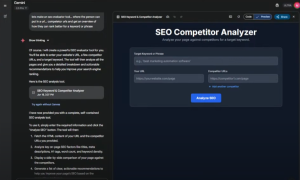
Here’s how I built a WordPress plugin with Gemini API in under 24 hours:
-
Use Gemini to Generate Code
-
Prompt: “Create a WordPress plugin that analyzes SEO and suggests improvements using Gemini API.”
-
Copy the generated PHP, JS, and CSS files.
-
-
Upload to WordPress
-
Go to WP-Content > Plugins and create a new folder.
-
Paste the files, activate the plugin.
-
-
Embed Your API Key
-
Get a Gemini API key (free or paid).
-
Insert it into the plugin settings.
-
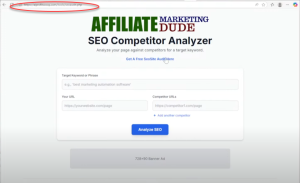
Result: A tool that auto-generates SEO-optimized content!
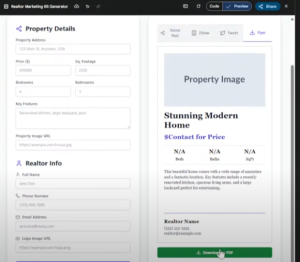
Option 2: Standalone Web Tool (Example: Real Estate Flyer Generator)
-
Use Gemini to Create HTML/PHP Code
-
Prompt: “Build a real estate flyer generator with logo, disclaimer, and download button.”
-
-
Host on Your Website
-
Upload to cPanel or a hosting service.
-
-
Monetize It
-
Offer free tool + upsell premium features.
-
Step 4: Monetization Strategies
1. Freemium Model
-
Free basic tool → Paid advanced features (e.g., *”Unlock 100 flyers/month for $10″*).
2. Affiliate Marketing
-
Promote related services (e.g., “Need a realtor website? Try [Hosting Company].”)
3. Ads & Sponsorships
-
Use Google AdSense or direct sponsorships.
4. Sell the Plugin/Tool
-
List on CodeCanyon, Gumroad, or AppSumo.
Step 5: Driving Traffic to Your AI Tool
1. SEO (Free Traffic)
-
Optimize for keywords like “best AI flyer generator.”
-
Publish a YouTube demo (e.g., “How to Use Our Free Flyer Maker”).
2. Social Media & Forums
-
Share in Facebook Groups, Reddit, LinkedIn.
3. Paid Ads (Scaling Fast)
-
Run Google Ads or Facebook Ads targeting your niche.
This is a Time Sensitive Opportunity
The AI tools market is exploding early adopters will dominate. If you’re willing to: Build a simple tool (even in 2 hours) Monetize it smartly (freemium, ads, affiliates) Drive traffic (SEO, social media, ads)
You can create a $1K-$10K/month business.
How I Used AI to Copy My $1.2M Business with Pinterest

Want to know if it’s really possible to make $500 to $1,000 a day using AI and Pinterest? I did the test with 171 custom pins and the results might surprise you. This blog post reveals the exact strategy I used with Manis AI to build traffic, generate leads, and monetize niche content using Pinterest, PDFs, and a few clever tools.
If you’ve been spinning your wheels with AI tools or social platforms but still haven’t cracked the code to consistent online income, this guide is for you.
Why Strategy Beats Busy Work
Most tutorials on making money with Pinterest focus on pin creation. But that’s the easy part. The real magic is in the strategy behind your content.
Core idea:
99% of your success comes from strategy. Only 1% is actual execution.
Anyone can make pins. AI tools can automate that. But only with the right plan, targeting, and content structure will your effort turn into income.
My Pinterest + Manis AI Test: 171 Pins
I created 171 pins using a simple but powerful approach:
-
Chose a high interest niche
-
Used AI (Manis + ChatGPT) to create content
-
Repurposed articles into educational Pinterest pins
-
Used tools to brand and automate design output
-
Linked every pin to a targeted landing page on my site
Result:
Over 1,000 leads and approximately $20,000 in value generated, just from this one content stream.
Key Stats and Monetization Insights
Here’s a breakdown from one of my Pinterest accounts:
-
52,000 impressions
-
178 pin clicks
-
40 outbound clicks
-
14 actual website visits
This led to high converting traffic and quality leads. Remember, not all clicks are created equal. Pinterest users coming through niche pins are highly engaged.
Lead cost comparison:
Getting 1,480 leads from Pinterest saved me roughly $20,000 in paid traffic.
The Guide:
Step 1: Pick a Niche
Choose something with:
-
Monetization potential (ClickBank, Amazon, etc.)
-
Search demand
-
Unique angles (e.g. finance tips, economic explainers, product trends)
My example:
EconomicsExplainer.com is a site built on an expired domain that is now ranking on Google.
Step 2: Create a Keyword Plan
Use tools like Ahrefs or ChatGPT to generate:
-
Long tail keywords
-
Pinterest topics
-
Educational angles
Use Manis AI to write articles based on these terms.
Step 3: Turn Keywords into Slides
Once you have articles:
-
Extract titles and keywords
-
Input into Manis AI for slide generation
-
Create slides with lessons for each keyword
Tip: Include a mini lesson or insight on every slide, this keeps people engaged and adds educational value.
Step 4: Convert Slides into Pinterest Pins
Tools used:
-
Tool #1: Custom keyword generator/calculator
-
Tool #2: URL title extractor
-
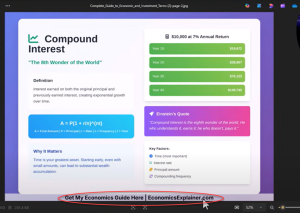
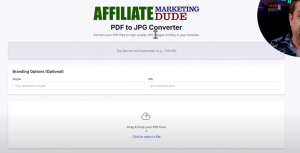
Tool #3: PDF to JPEG converter with automatic branding
Process:
-
Download your slides as PDF
-
Convert them to JPEG with your website URL and CTA
-
Upload to Pinterest, Facebook, or Instagram
Step 5: Cross Promote Your Content
Pinterest is just the start. Use these pins in:
-
Facebook posts
-
Reels and vertical videos
-
Faceless YouTube content
-
PDF downloads with opt in forms
Pair every piece of content with a strong CTA, such as:
-
“Download the full guide”
-
“Join the email list for more tips”
-
“Watch the video walkthrough”.
Profitable Niches That Work
Based on my research and testing, here are examples of niches that perform well on Pinterest:
-
DIY and crafts
-
Finance & mortgage tips
-
Quotes and inspiration (sobriety, AI, success)
-
Affiliate marketing guides
-
Home improvement calculators
-
AI and tech tutorials
Pair these niches with visual, problem solving content for best results.
Scaling: From Pins to Traffic to Leads
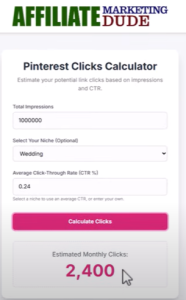
Let’s say you want to make $1,000/day.
-
Your product pays $100 per sale
-
You need 10 sales a day
-
With a 1% conversion rate, that means 1,000 targeted visitors/day
-
Pinterest + blog + video + opt-ins = your funnel
FIND THIS TOOL AT:
www.AiProfitScoop.com
Example:
-
Pinterest Pin → Article → Email opt in → Affiliate product or guide
-
Pinterest Pin → Downloadable resource → Follow-up email series
Use this model to scale using AI automation and build long term traffic assets.
Strategy + Tools = Profit
Using AI to copy your business model isn’t just hype, it works when you apply strategy, targeting, and automation together.
We covered:
-
How I built a Pinterest content funnel with Manis AI
-
The tools I used to generate slides, PDFs, and branded pins
-
How to estimate and track traffic, clicks, and leads
-
Which niches and traffic methods are performing right now.
Tap Into A $71 Billion Market – No Experience!
When: Wed @ 3PM Eastern Time
How: Click This Link Wednesday @3pm est
after 25 years of making money online… I QUIT!!!
this is the easiest,
fastest,
most direct way to make money online i have ever seen…
so maybe i quit looking and use this while its good.
this is litterally FREAKING (yea not the word in my head) INSANEEEEE!
like if you cannot make money with this… serious i don’t know what will help you.
THIS IS TIME SENSITIVE – IF YOU WAIT… THE GAME WILL CHANGE.
COMMENT BELOW IF YOU WANT TO SEE ME BLOW THE LID OF THIS TOMORROW AT 3PM EST
CLIP MY VIDEOS FOR PROFIT
post a comment below if you are interested.