
Valeria C
Using Grok to Make a $10,000 a Month SaaS Business


Discover how to leverage Grok. A powerful AI coding tool to build simple micro tools, Chrome extensions, and WordPress plugins that can generate up to $10,000 a month. From a nostalgic Nintendo story to real time coding demos, learn every step in detail!.
Imagine creating a new piece of software in seconds, even if you barely know how to code. That’s the power of Grok, a tool designed to generate code quickly and effortlessly. In this detailed guide, we’re going to dissect everything. From building a Chrome extension that sets timers on distracting websites, to drawing inspiration from a childhood Nintendo obsession, and scaling up your ideas into a $10,000/month SaaS business. If you’re ready for the process, backed by examples and personal anecdotes, this is the post for you.
Table of Contents
- Why Simple Tools Can Make Big Money
- A Childhood Nintendo Lesson: The Power of Piggybacking
- What Is Grok? (And Why It’s So Fast)
- Building a Quick Chrome Extension Using Grok
- The Coder Piggyback Method
- Guide: Creating a $10,000/Month SaaS
- Detailed Example: Niche Link in Bio Service
- Additional Ideas: From SEO Tools to Games
- Conclusion
Why Simple Tools Can Make Big Money
Many people assume that making software requires a complex skill set, huge budgets, and large teams. However, simple utilities often solve problems that millions of people face daily.
- A basic timer plugin can help users limit social media usage.
- A domain checker can attract website flippers who need a quick valuation tool.
- An email signature generator can help professionals stand out.
When these tools address a real problem, the money can add up quickly. Especially when built on an existing platform like Google Chrome or WordPress, where the user base is already massive.
The Power of Piggybacking
In 1987, the holiday season delivered a life changing moment for many kids: the Nintendo Entertainment System (NES). Millions of kids worldwide, including the speaker in our transcript, unwrapped that iconic gray console and fell in love with games like Blaster Master and other classics from companies like Konami.
Why does this matter to you as an aspiring entrepreneur or developer? Those game companies “piggybacked” on Nintendo’s existing platform. Nintendo did the heavy lifting of building the console and cultivating a hungry market. Game developers simply created NES-compatible cartridges. Often using relatively little code and sold them to an audience that was already primed to buy. Over time, many of these companies made billions.
You can adopt the same strategy. Instead of building an entire platform from scratch, you can create tools, extensions, or plugins that latch onto established ecosystems, like Chrome, WordPress, or social media platforms and thrive off their large user bases.
What Is Grok? (And Why It’s So Fast)
Grok is an AI tool that specializes in rapidly generating code across multiple frameworks and languages. It’s somewhat similar to ChatGPT’s coding capabilities but often faster and more targeted for certain tasks. If you type in a command like:
“Create a Chrome extension that sets a timer when certain websites are visited and triggers an alarm or alert when time is up,”
Grok can produce the HTML, JavaScript, and JSON files you need in a matter of seconds. This speed is a game changer, allowing you to:
- Instantly test new ideas
- Build prototypes quickly
- Spend less time debugging initial code
Memory Hurdles
One caveat is that Grok’s memory can sometimes be limited. It may “forget” earlier instructions or code snippets in long sessions. This requires either shorter, focused commands or a workaround such as downloading your Grok session as soon as you generate the code.
Building a Quick Chrome Extension Using Grok
Let’s use a concrete example. Suppose you want to build a Chrome extension that limits time spent on distracting websites. Here’s how you’d do it:
- Open Grok on the “X” platform (formerly Twitter).
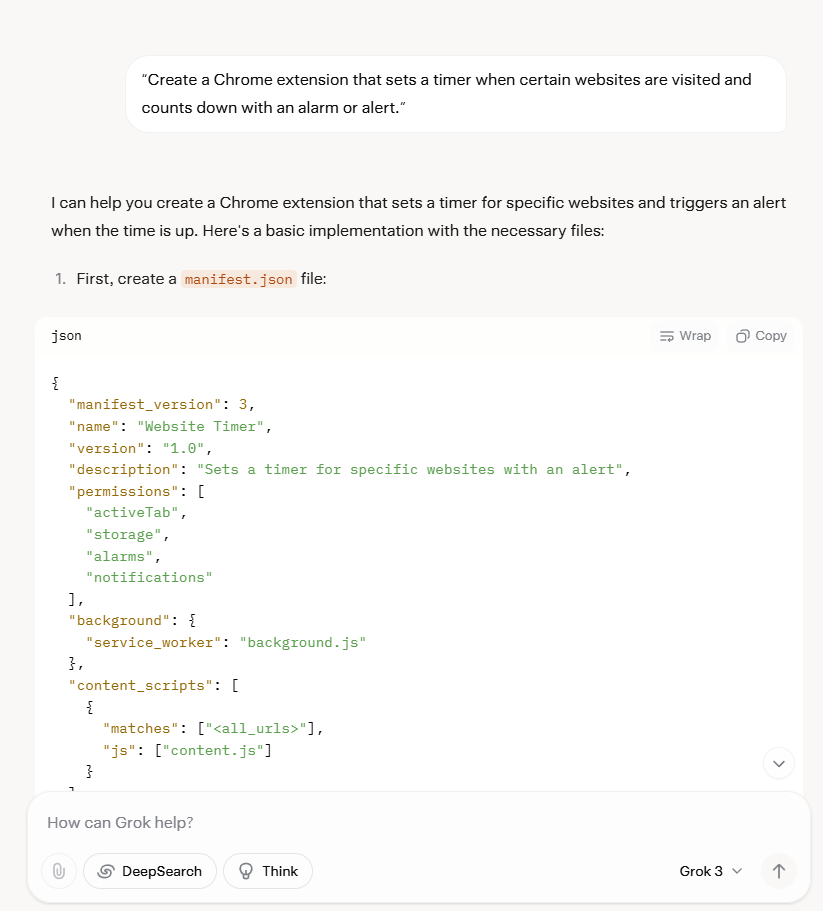
- Type in:
“Create a Chrome extension that sets a timer when certain websites are visited and counts down with an alarm or alert.”
- Within seconds, Grok will produce a list of files like
manifest.json,background.js, and possibly apopup.html. - Copy the provided code and paste it into a local folder on your computer.
- In Chrome, go to
Extensions > Manage Extensions > Load Unpackedto test it out.
Example: Website Timer & Alerts
- The extension starts counting whenever you visit, say, Instagram or Facebook.
- After, for example, 5 minutes, an alarm pops up, reminding you to close that tab.
- This extension could be free to attract users or paid for premium features like scheduling or advanced analytics.
Memory Challenges with Grok & How to Overcome Them
As mentioned, Grok may time out or lose track of your previous code. To handle this:
- Download your session frequently.
- Keep a separate text file or document with important code snippets.
- If Grok “forgets,” re-prompt it with the last piece of functional code you have saved.
The Coder Piggyback Method
The core insight is to leverage existing platforms a strategy the transcript calls the “coder piggyback method.” Just as NES game developers thrived by making cartridges for the Nintendo console, you can thrive by building Chrome extensions, WordPress plugins, or niche apps that integrate with:
- eBay (e.g., listing or bidding tools)
- Google (SEO or keyword checkers)
- Amazon (product research or price comparison)
- Social media (analytics dashboards, bio link services)
It’s all about finding an audience that’s ready to adopt tools that enhance their current platform of choice.
Creating a $10,000/Month SaaS
Making $10,000 a month might sound ambitious, but it’s more achievable than you think when you break it down. Here’s the exact roadmap:
1. Identify a Popular Platform or Niche
- Look for massive user bases: Google Chrome, WordPress, Etsy, Slack, etc.
- Check online marketplaces or extension stores to see what people already use.
- Notice any gaps or inefficiencies that an extension/plugin might solve.
2. Use Data to Spark Ideas
- Keyword Research: Search for Chrome extension keywords like “timer,” “VPN,” “blocker,” or “SEO tools” to see what’s popular.
- Market Demand: For instance, if “timer extension” gets 10,000+ monthly searches, that’s a solid niche.
- Competition Analysis: Look at existing solutions. What do their reviews or user comments say? Identify what’s missing.
3. Generate Basic Code with Grok
- Create a new session in Grok.
- Type detailed prompts, such as:
“Create a Chrome extension that does X, Y, and Z, with a popup interface and a background script that tracks time spent.”
- Grok will output the entire code structure.
- Test the code by loading it into Chrome or a local development environment.
4. Hire a Programmer to Polish and Secure Your Product
- Why Hire? Even though Grok is powerful, it can produce buggy code. Security and payment integrations often require more expertise.
- Where to Hire: Try OnlineJobs.ph where skilled developers might cost as little as $5/hour.
- What They’ll Do:
- Fix bugs and ensure code runs smoothly
- Implement APIs (e.g., Stripe for payments, AI models for advanced features)
- Manage data security (SSL certificates, database encryption)
5. Monetize and Scale
- Freemium Model: Offer a free tier with basic features and premium tiers with advanced functionality.
- Ads and Affiliate Income: If you opt for a free tool, show relevant ads or affiliate offers to monetize.
- Bulk Licensing: Pitch your software to businesses who might want multiple accounts or team access.
- Cross-Promotion: Build an email list from your user base and promote other services or products they might need.
Niche Link in Bio Service
One tool the transcript highlights is a Link-in-Bio service similar to Linktree, but much more focused. Here’s how to make it lucrative:
-
Target a Specific Audience
- Realtors, authors, content creators, podcasters, etc. Each group has unique needs.
- Example: Realtors might want to display property listings, schedule appointments, and show contact info for quick leads.
-
Prompt Grok to Create the Foundation
- Ask:
“Create a simple Link in Bio tool with dropdowns, image thumbnails, and a form for customizing links.”
- Grok provides the structure (HTML, CSS, PHP, or JavaScript code).
- Ask:
-
Add a Payment Page
- Freemium features: Basic link-in-bio page for free.
- Premium subscription: $5–$25/month for analytics, lead capture, or additional customizations.
- Use Grok to generate a Stripe payment integration code.
-
Design & Marketing
- Make sure the landing page looks professional.
- Use real examples like “Realtor A added 10 new leads in a week with this tool.”
- Emphasize the unique benefits that general Linktree pages don’t offer like specialized layouts or built-in marketing tips.
-
Projected Earnings
- If only 400 realtors pay $25/month, that’s $10,000 monthly.
- Alternatively, if you have thousands of free users, you can show targeted ads or partner with real estate tech companies to monetize.
Additional Ideas: From SEO Tools to Games
There’s no reason to stop at Link in Bio or timer extensions. Grok can handle:
-
WordPress Plugins
- Accessibility widgets
- Comment spam blockers
- Coupon code pop-ups
- Speed optimization tools
-
SEO Checkers
- Chrome extensions that analyze on-page SEO
- Keyword density tools
- Backlink checkers
- Bulk domain value estimators
-
Games & Entertainment
- Simple web-based games like Tetris clones or quizzes
- Retro-inspired 8-bit games (just like old NES titles)
- “Edutainment” apps that teach math, languages, etc.
-
Niche-Specific SaaS
- Podcast management: Generate show notes, titles, or highlight clips
- Real estate automation: A Chrome extension that calculates property data, merges with Zillow or Redfin for comparisons
- E-commerce helpers: Tools for Etsy, eBay, or Amazon sellers (automated listing creation, keyword tracking, etc.)
Each of these can evolve into a profitable subscription-based service or a high-traffic, ad-monetized web app.
Today’s AI landscape offers unprecedented opportunities. Tools like Grok can generate entire solutions. Whether that’s a Chrome extension, WordPress plugin, or a full-fledged SaaS in mere minutes. Combine Grok’s coding prowess with your creativity and strategic marketing, and you have the recipe for a $10,000/month business.
From timer extensions to Link in Bio services, the key lies in piggybacking on existing platforms where users already gather. Just like Nintendo game developers found success by plugging into the NES user base, you can tap into massive communities on Chrome, WordPress, and beyond.
Ready to get started?
- Brainstorm a problem your target audience struggles with every day.
- Open Grok and turn that idea into a working prototype within minutes.
- Scale with thoughtful marketing, premium features, and, if needed, the help of a part time developer.
The possibilities are literally endless, and the only thing limiting you is your own imagination. So take that first step, and begin building your dream SaaS today!.
Make $171 Per Image With Google Reverse Image Search
Discover how to earn up to $171 per image using Google Reverse Image Search and AI. Learn the steps, from finding top infographics to monetizing with affiliate offers.
Are you looking for a simple yet powerful way to earn money online using images? In this guide, we’ll show you how to make $171 per image with Google Reverse Image Search. By leveraging AI tools and infographics, you can attract the right audience, monetize your content, and potentially turn a tidy profit. Read on to learn how it all fits together.
Why Google Reverse Image Search Is a Game Changer

Google Reverse Image Search helps you discover visually similar graphics and high engagement infographics. the types of content people love to share on social media. By tapping into these popular visuals, you can:
- Identify trending topics and highly shared infographics
- Gather content ideas for blog posts, social media, and YouTube videos
- Discover what your target audience is already excited about
When you know which images and infographics get people’s attention, it becomes easier to create or curate similar content that resonates. And that’s where the earning potential truly begins.
Guide to Earning $171 Per Image
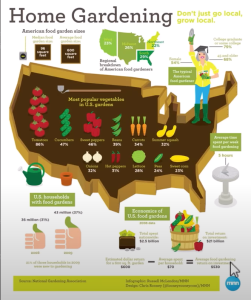
1. Find High Engagement Infographics
-
Pick Your Niche
- Examples: Gardening, Finance, Pop Culture, Health & Fitness.
- Focus on areas people are already discussing and searching for.
-
Use Google Reverse Image Search
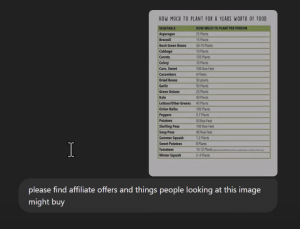
- Save a popular infographic (or create your own) to your computer.
- Go to Google Images and drag your file into the search box.
- Check out the visually similar results to see which infographics are trending.
-
Build a Swipe File
- Collect 50–100 infographics covering subtopics within your niche.
- Organize them in folders so you can quickly find inspiration.
2. Create Unique Content With AI
-
Leverage Tools Like ChatGPT
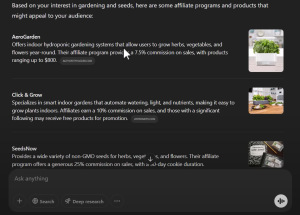
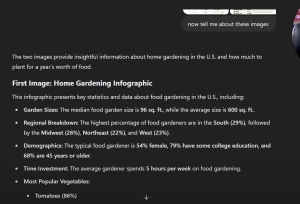
- Ask it to interpret the infographic’s topic and generate ideas for associated blog posts.
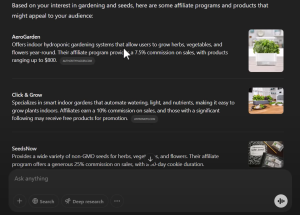
- Prompt it for affiliate product suggestions relevant to that infographic (e.g., gardening tools, finance apps).
-
Generate Fresh Articles
- Use AI to outline and write short, informative posts about each infographic.
- Always check for originality and accuracy (tools like Grammarly or Copyscape can help).
-
Design or Refine Infographics
- Tools like Pictochart, Canva, or Napkin AI can help you create or rework infographics.
- Emphasize statistics, tips, or “how-to” data that your target audience finds valuable.
3. Set Up a Monetized Blog
-
Install WordPress
- Choose affordable hosting (e.g., GoHubSite.com) and link your domain.
- Use “Post Name” permalink structure for clean URLs.
-
Publish Your Content
- Write a catchy headline for each infographic post.
- Naturally include your main and related keywords within the text.
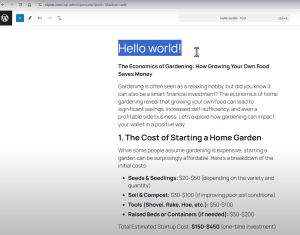
-
Insert Monetization
- Add affiliate links to relevant products.
- Consider displaying ad networks (e.g., Google AdSense) or sponsored offers.
- Keep your blog layout simple so readers can easily navigate and click your offers.
4. Drive Traffic With Social Media and SEO
-
Share Infographics on Pinterest and TikTok
- Visual platforms thrive on eye catching data.
- Link back to your blog posts for full details and affiliate links.
-
Optimize Posts for Search Engines
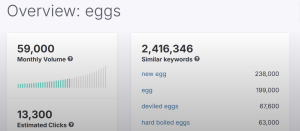
- Target low-competition keywords (e.g., “egg price inflation,” “gardening money hacks”).
- Include internal links to related blog posts to keep users on your site longer.
-
Build Social Proof
- Encourage readers to share on Facebook, Twitter, and LinkedIn.
- The more your infographic circulates, the more clicks and potential earnings you can generate.
Example Niche Spotlight: Gardening Economics
Ever wondered how a simple garden can save you hundreds of dollars a year? Infographics focusing on gardening and seed costs have proven to be highly shareable. You can:
- Demonstrate how much money you can save by growing your own produce.
- Promote affiliate offers for seed kits, gardening tools, or composting bins.
- Link to credit card rewards programs that offer cashback on grocery related purchases.
Earning money with Google Reverse Image Search is all about finding high engagement infographics, understanding your audience’s interests, and offering valuable solutions. Whether through affiliate links, advertising, or creative AI-driven content. By following these steps, you can leverage trending visuals, turn clicks into commissions, and potentially see $171 (or more) from a single infographic. Ready to get started? Dive in, create your first post, and watch your traffic and earnings grow!.
New ChatGPT Feature: Earn $161 per Day Easily
Discover the new ChatGPT feature that can earn you $161/day. Learn simple daily tasks and AI-driven strategies to boost your online income now.
Have you ever wondered if there’s an easy way to earn money online. One that almost feels automated? Thanks to a new ChatGPT feature, you can now schedule daily tasks that help generate income, day in and day out. In this post, we’ll reveal how you can make $161 per day (or even more) by leveraging ChatGPT’s scheduled tasks, automation, and strategic content creation. Let’s dive in!
What Makes This New ChatGPT Feature So Powerful?
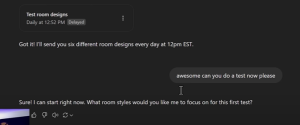
ChatGPT isn’t just for casual conversations anymore. A little known functionality allows you to schedule tasks that will run automatically. These tasks can include:
- Generating blog posts
- Creating social media content
- Researching new affiliate offers
- Collecting daily news or trending topics
By receiving automatic reminders and ready made content, you can stay focused on only the high-impact tasks, like posting, tweaking, and monetizing.
How to Get Started with Scheduled Tasks
1. Upgrade or Access ChatGPT with Task Scheduling
While there are free AI tools, the paid version of ChatGPT (often around $20/month) offers advanced features, including the ability to schedule tasks. Once you have access:
- Open ChatGPT and look for settings or prompts that enable scheduling.
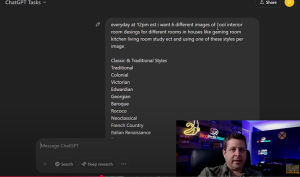
- Create a New Task and set daily or hourly reminders.
- Specify Your Prompts so ChatGPT knows what content to generate.
If you’re on a tight budget, you can also experiment with free AI platforms. However, the scheduling feature may be limited or unavailable.
2. Define Your Money Making Tasks
Identify simple, repeatable activities that directly contribute to your income goals. According to the video transcript, tasks might include:
- Creating and posting interior design images (or any other niche-related images)
- Writing social media captions and Facebook posts
- Drafting SEO-friendly blog articles
- Collecting news updates in your niche for newsletter content
- Finding and listing affiliate product links (e.g., from Amazon or Wayfair)
By automating these tasks, you ensure you’re consistently producing the content and materials needed to make money online.
3. Execute and Monetize
After ChatGPT generates your content:
- Review and Edit: Make sure the text or images match your brand voice and niche.
- Publish: Share on your blog, social media, or email newsletter.
- Monetize: Insert relevant affiliate links and calls to action to convert viewers into buyers.
Daily Routine for a Consistent $161+/Day
Below is a sample workflow to show how easily you can scale:
-
Morning (Blog Post Creation)
- ChatGPT delivers a scheduled blog draft on your niche topic.
- You quickly edit and add affiliate links, then publish.
-
Midday (Social Media Updates)
- ChatGPT generates curated social media captions or AI-designed images.
- You post them to Pinterest, Facebook, or Instagram with your affiliate links.
-
Afternoon (Email Outreach)
- ChatGPT sends an outline of a newsletter featuring daily insights or deals.
- You personalize it slightly and send it to your email list for immediate traffic and sales.
-
Evening (Analytics & Optimization)
- ChatGPT compiles basic analytics or suggestions for your content strategy.
- You review and refine your plans for the next day.
Potential Earnings with AI
When your daily activities become systematic and routine, each task contributes to your bottom line. As the transcript reveals, it’s possible to make $100, $200, or even $161 per day, especially when:
- You target in demand niches (e.g., interior design, personal finance, fitness, etc.).
- You consistently post useful, AI-optimized content that ranks or garners engagement.
- You incorporate affiliate marketing and/or paid ads to boost revenue.

The new ChatGPT feature lets you schedule repetitive tasks, ensuring you never miss an opportunity to create monetized content. By automating your daily routine, you can focus on high level strategy and personal engagement. ultimately boosting your earnings. Take advantage of this now, because as AI continues to evolve, early adopters will be well ahead of the curve.
Are you ready to make the most of ChatGPT’s capabilities? Start scheduling tasks, generating content, and watch as your online income grows every single day!
AI Side Hustle: How to Make Money Online with ChatGPT
Discover a simple AI side hustle using ChatGPT to create images, attract free traffic, and earn money online. No special skills or budget required.
Are you looking for a quick and simple AI side hustle that can help you make money online? Thanks to the power of tools like ChatGPT, it has never been easier to start generating income. Even if you have zero experience or a limited budget. In this post, we’ll walk you through a method to create AI-generated images, share them on popular platforms, and monetize the traffic with affiliate marketing.
1: Set Up Your Essential Tools
Before you begin, gather these basic tools and resources:
- ChatGPT (Version 3 or 4): You can use the free version of ChatGPT-3.5 or explore ChatGPT-4 if you have access.
- A Pinterest Account (Optional but Recommended): Great for sharing AI-generated images and driving traffic.
- Affiliate Program Membership: Amazon Associates is the easiest way to start, but there are many other affiliate networks you can join.
- Website or Blog (Optional): Having your own site can help you organize and present your affiliate links more professionally, but you can also link directly to affiliate products on social media.
2: Create AI-Generated Images
Using ChatGPT in conjunction with an image generator (e.g., DALL·E, Midjourney, or similar AI tools) allows you to:
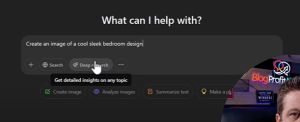
- Brainstorm Design Ideas: For instance, type prompts like “Create a sleek modern bedroom with minimal furniture” or “Show a preppy dorm room with vibrant colors.”
- Fine-Tune Your Prompts: If you want more specific results (e.g., a live-stream gaming setup or a boho-chic bathroom), add details like colors, room style, and special features.
- Copy the Resulting Image: Once the generator produces an image, save it to your device or clipboard.
Why AI-Generated Images Work
- Uniqueness: Each image is original and tailored to a specific design query.
- Endless Possibilities: You can quickly pivot to different styles, such as minimalist, vintage, preppy, etc., to attract a wide audience.
- Visual Appeal: Eye-catching images perform well on Pinterest, Facebook, and other social media platforms, driving free traffic to your offers.

3: Monetize with Affiliate Marketing
Turning your AI-created designs into income is simple with the right approach.
Using the Amazon Affiliate Program
- Sign Up for Amazon Associates: Join here if you haven’t already.
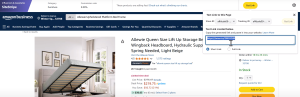
- Grab Your Affiliate Links: Use Amazon’s Site Stripe tool to generate short links for the products that resemble items in your AI-generated room design.
- Create a Resource List: For example, if your image shows a gaming desk and ergonomic chair, link to similar desk and chair products on Amazon.
- Disclose Affiliate Partnership: Stay compliant by clearly stating you earn a commission if people click and buy.
Other Affiliate Opportunities
- Home Improvement Retailers: Many large stores (e.g., Home Depot) offer affiliate programs.
- Niche Furniture Brands: Gaming chair companies like Secretlab can pay higher commissions than Amazon.
- Lead-Gen Offers: Some programs pay just for user sign ups, so you earn without a purchase requirement.
4: Share Your Images and Drive Traffic
Spread your AI-generated designs where people are already looking for inspiration.
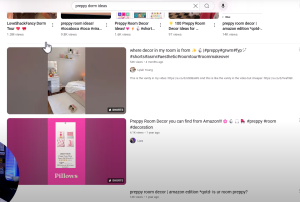
- Pinterest Boards: Pin your unique designs on style specific boards (e.g., “Preppy Dorm Décor” or “Modern Farmhouse Bathroom”). Include a link to your blog post or directly to your affiliate offers.
- Facebook Groups: Find relevant groups (e.g., “Home Aesthetic,” “Gaming Room Ideas”) and share your AI images along with a short description and a link.
- YouTube Shorts or TikTok: Compile a quick slideshow of your AI-created rooms to showcase various styles. Add affiliate links in the description.

Create a Helpful Blog Post
If you have a website, consider publishing a blog post featuring each AI-generated design:
- Highlight Specific Products: List every item from the image and link it to your affiliate URL.
- Explain the Benefits: For instance, “Ergonomic Gaming Chair with Lumbar Support for Prolonged Comfort.”
- Offer Comparisons: Include different price points and styles to attract a broader audience.
How to Get Started with Affiliate Marketing
With ChatGPT and a bit of creativity, you can build an AI side hustle that quickly generates eye-catching images, drives free traffic, and monetizes effortlessly through affiliate marketing. While you won’t get rich overnight, applying these steps consistently can help you create a steady stream of online income. Remember to focus on high quality visuals, honest product recommendations, and a clear call to action. this winning combination will keep your readers inspired, engaged, and ready to buy.
How to Build a Million Dollar Transcription Business
Start an AI side hustle in transcription and content repurposing. Learn how to earn big by automating podcast and video transcripts in minutes!.
Are you looking for a high earning AI side hustle that leverages cutting. Edge automation tools? Transcription services and content repurposing might be the perfect opportunity. From established companies making millions of dollars daily to small agencies earning steady monthly revenue, this booming industry is up for grabs. Especially with the power of artificial intelligence.
In this article, we’ll explore how you can start a profitable AI transcription side hustle, repurpose content for podcasts and YouTube videos, and potentially build a million dollar business. Let’s dive in!.
Why Transcription Services Are in High Demand
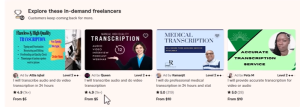
AI has revolutionized the way we handle audio and video content. Traditional transcription services often cost several dollars per minute and may take hours or days to complete. Now, AI-driven platforms can deliver near instant transcriptions for a fraction of the price.
- Growing Market: The global transcription industry is expected to reach $41 billion by 2030.
- New Tools Emerging: Free or low-cost platforms like Notebook LM, Otter.ai, and other AI solutions allow you to process files in seconds.
- Content Repurposing: Businesses and content creators crave extra mileage from their podcasts, YouTube videos, and webinars. Turning these into blog posts, social snippets, and downloadable materials opens new revenue streams.

The Multimillion Dollar Potential
Huge Revenue Examples
- Rev.com reportedly earns around $2 million per day by handling transcriptions and captions.
- Notion (which offers AI-assisted note-taking) is valued at $10 billion.
- Otter.ai brings in over $20 million in annual revenue, primarily through subscription models.
While these are large-scale companies, it demonstrates just how lucrative an AI transcription side hustle can become.
Setting Up Your AI Transcription Side Hustle
1. Choose Your AI Tools
Selecting the right platform is critical. Popular choices include:
- Notebook LM : Allows you to upload audio or video files for quick transcriptions and summaries.
- Otter.ai :Offers a free tier and paid plans, great for live meetings and quick file uploads.
- Trint :Provides editable transcripts and advanced features like speaker identification.
- Some AI platforms also summarize and create outlines from transcripts. This is perfect if you want to offer more than just raw text.
2. Develop a Repurposing Package
The real money often goes beyond transcription alone. Bundle services such as:
- Detailed Blog Posts derived from audio or video content.
- Social Media Snippets with timestamps for quick, shareable clips.
- Email Newsletters featuring top highlights or quotes from the episode.
- Downloadable PDFs summarizing the content for audience convenience.
By presenting these “all in one” content packages, you can justify premium pricing and help your clients see significant ROI.
3. Automate Where Possible
To scale effectively, you need to minimize manual tasks. AI tools like Make can help automate processes:
- Receive Audio/Video File from the client.
- Upload to AI Transcription Service (e.g., Notebook LM, Otter.ai).
- Push Text to a Content Polishing Tool (e.g., OpenAI’s ChatGPT).
- Format and Deliver as blog posts, email drafts, or social captions.
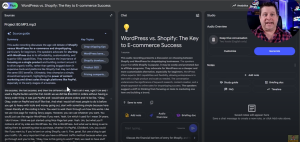
The more you can automate, the easier it will be to handle multiple clients simultaneously, eventually scaling your side hustle into a legitimate agency.
How to Price Your Services
Pricing can be based on tiers or monthly retainers. For instance:
- Basic Plan ($300–$500/month): Raw transcripts plus light editing.
- Standard Plan ($1,000–$1,500/month): Transcripts, a polished blog post, and social media content.
- Premium Plan ($2,000+/month): Everything from the Standard Plan plus email newsletters, lead magnets, and SEO optimization.
Even a handful of high-paying clients can bring you to $10,000+ in monthly revenue.
Example Workflow
- Client Provides MP3/MP4 or Podcast Link
- You Upload to Notebook LM: The tool creates a transcript and summary.
- AI Refinement: Use a tool like ChatGPT to convert the transcript into a blog post or social media script.
- Additional Content: Create short form quotes, infographics, or video snippets.
- Delivery : Send a final package to the client, including a shareable blog post, social snippets, and any other requested format.
Getting Clients: Tips for Success
1. Target Podcasters and YouTubers
Many creators aren’t aware of how valuable repurposing can be. Reach out to small to mid sized podcasts or YouTube channels and offer trial packages.
2. Showcase Results
If you can demonstrate how your transcription and content repurposing led to increased website traffic or new subscribers, you’ll have an easier time persuading potential clients.
3. Cold Email or Social Outreach
Craft an engaging email or direct message highlighting what you can do with AI. Show them a sample transcription or a short blog post excerpt from their content to grab their attention.
The AI side hustle of transcription and content repurposing is more than just a passing trend. It’s a burgeoning industry, ripe for innovators who can bring speed and efficiency to the table. Whether you’re helping a small podcast reach a new audience or assisting a major brand in cutting transcription costs, the earning potential is enormous.
Take the first steps now: pick your AI tools, set your service packages, and start pitching. With the right mix of automation, excellent customer service, and well crafted content, you could be well on your way to building a million dollar transcription business.
Make Money with Google Maps & AI
Discover how to make money with Google Maps and AI by creating local review sites, ranking directory style content, and driving lucrative affiliate commissions.
Google Maps is more than just a navigation tool. It’s also a goldmine for earning online income. By combining the power of Google’s local search results with Artificial Intelligence (AI), many people are creating profitable directory style websites and making thousands of dollars each month. In this post, we’ll explore exactly how you can replicate this success, from spotting opportunities on Google Maps to using AI tools to produce content quickly and effectively.
Table of Contents
- Why Google Maps Is So Lucrative
- Identifying Profitable Niches
- Building a Local Review or Directory Site
- Using AI to Generate Content Effortlessly
- Monetization Methods
- Optimizing Your Site for Local Search
- Step-by-Step Launch Checklist
- Conclusion
Why Google Maps Is So Lucrative

Google Maps listings capture highly targeted local traffic. People searching for services like “emergency dentist,” “romantic getaways,” or “traffic schools near me” are often ready to buy or take action. These localized queries are perfect for monetization because:
- High Buyer Intent: Local searches (e.g., “emergency dentist”) typically come from users who need immediate solutions.
- Low Competition in Specific Niches: While general terms can be competitive, narrower local markets offer greater potential for smaller sites.
- Diverse Monetization Options: From affiliate offers and pay per call programs to direct leads for local businesses, many revenue streams are available.
Identifying Profitable Niches
Not all local niches are created equal. Aim for niches with a direct path to money, such as:
-
Emergency Services
- Emergency dentists, plumbers, locksmiths, etc.
- High paying pay per-call offers or lead forms.
-
Legal Services
- Traffic ticket lawyers, personal injury attorneys, or estate lawyers.
- Lawyers often pay top dollar for new client leads.
-
Romantic Travel & Entertainment
- Romantic getaways, fine dining, or spas near specific locations.
- Ideal for promoting hotel bookings, flower delivery, and gift card offers.
-
Insurance or Financial Services
- Auto insurance, health insurance, or business insurance.
- Insurance referrals can earn substantial affiliate commissions.
Use tools like SpyFu or Ahrefs to gauge search volumes and identify profitable keywords. Focus on “best,” “near me,” “emergency,” or “affordable” variations for long-tail traffic.
Building a Local Review or Directory Site
A proven way to monetize local searches is by creating a directory or review style website that ranks for specific “near me” or location based queries.
-
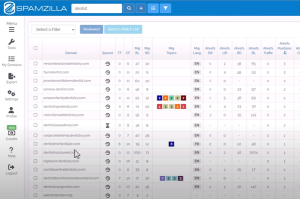
Pick a Local Domain
- If possible, use an aged domain with existing backlinks for a ranking boost.
- Keep your domain name simple and relevant to your niche or location.
-
Organize Content by Location
- Create categories for each city or region.
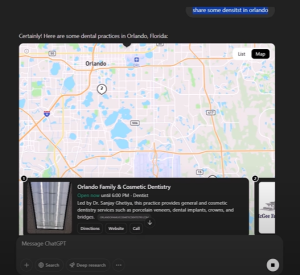
- Use internal links to connect relevant posts (for example, “Orlando Dentists,” “Miami Dentists,” etc.).
-
Showcase Helpful Info
- Display addresses, business hours, services offered, and genuine customer reviews.
- Include star ratings or summarized feedback to make your content more engaging.
Using AI to Generate Content Effortlessly
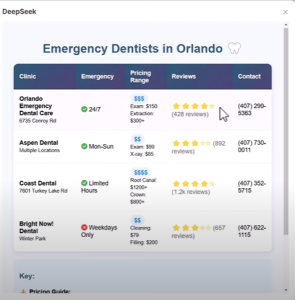
One of the most significant advantages today is leveraging AI tools like ChatGPT or DeepSeek to quickly compile and create content. Here’s how:
-
Research & Summarize
- Prompt your AI tool with queries like, “List top emergency dentists in [City] with addresses, average pricing, and reviews.”
- The AI will generate a quick reference table or HTML code you can paste into your site.
-
Expand & Personalize
- Ask the AI to write a short paragraph about each business, highlighting service quality, specialties, or unique selling points.
- Always fact check the details for accuracy. AI can make mistakes.
-
Optimize for SEO
- Include keywords like “Emergency Dentist [City],” “Best Orlando Restaurants,” or “Traffic School near me.”
Monetization Methods
With local directory sites, multiple monetization strategies can apply:
-
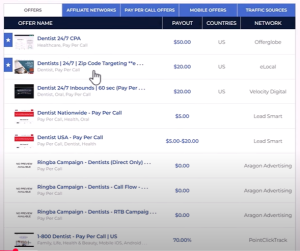
Pay Per Call Offers
- Many affiliate networks pay $10–$50 (or more) for valid calls to specific businesses.
-
Lead Forms
- Insurance and legal leads can pay upwards of $15–$100 per lead.
-
Display Ads & AdSense
- Ads can supplement revenue; however, niche affiliate or pay per call often pays better.
-
Premium Listings
- Offer local businesses the opportunity to appear at the top of your directory for a monthly fee.
-
Sponsored Content
- Write a featured review for a business in exchange for payment or commission.
Optimizing Your Site for Local Search
To rank well for local queries, apply these best practices:
-
Unique, High-Quality Content
- Avoid spun or duplicate text; aim for clarity and correctness.
- Use bullet points, tables, or charts to present information swiftly.
-
Location Specific Keywords
- Incorporate city names, ZIP codes, or “near me” variations.
- Keep keyword usage natural and user focused.
-
Google Business Profile Integration
- If you have your own location or want to highlight partnerships, embed Google Maps or link to official listings.
-
Mobile Friendly Design
- Local searches often happen on smartphones, so your site must load fast and display well on smaller screens.
Launch Checklist
- Secure a Domain & Hosting
- Choose an aged or relevant domain if possible.
- Install WordPress
- Use a lightweight, responsive theme.
- Set Up Essential Plugins
- SEO plugins like Rank Math.
- Caching plugins for faster load times.
- Create Category Pages
- Group your content by location or service type.
- Use AI for Content Creation
- Generate review based posts, tables, or how to guides.
- Always fact check.
- Add Affiliate Links & Calls to Action
- Integrate banners or text links for relevant offers.
- Promote on Social Media
- Use local Facebook groups, Instagram, or TikTok to drive initial traffic.
- Track Results
- Monitor ranking improvements and conversions using Google Analytics and Search Console.
Building a niche directory site that leverages Google Maps and AI can be a game changer for your online income. The key is to choose the right local niche, create genuinely helpful content, and monetize through high paying offers like pay per call or affiliate lead forms. Remember to optimize for local SEO and keep an eye on new AI tools that streamline your content creation process.
Ready to jump in?
Earn $21,000/Month with This Simple AI Color Palette Niche
Join Ai Profit Scoop Here
Get A High Ticket Niche And Work With Marcus Here
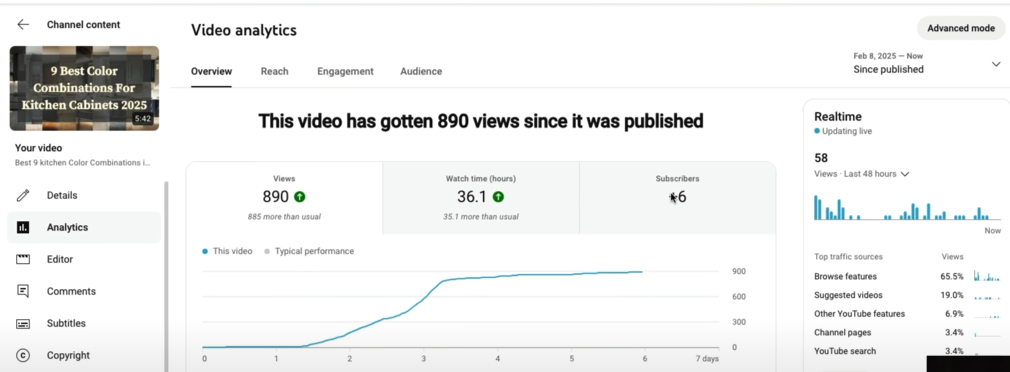
Discover how a simple AI driven color palette niche can generate $21,000 a month. Get step by step tips, tools, and strategies to profit quickly!.
Have you ever thought that something as simple as paint colors could lead you to a $21,000 per month income stream? It might sound too good to be true, but when you tap into low competition niches and pair them with powerful AI tools, the opportunity becomes very real. In this blog post, you’ll learn how to:
- Identify and leverage the AI color palette niche
- Create traffic driving visual and interactive content
- Monetize multiple streams like affiliate marketing, lead generation, and digital products
Whether you’re a seasoned marketer or a complete beginner, these strategies will help you start small, scale fast, and potentially earn substantial passive income in the process.
Why the AI Color Palette Niche Is So Profitable
1. Low Competition, High Demand
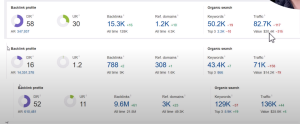
Most internet marketers gravitate toward popular niches like credit repair, web hosting, or weight loss. which are all highly competitive. By contrast, the color palette and paint niche cater to a diverse audience with far fewer direct competitors. Millions of people search for color combinations, DIY painting tips, and design inspiration every month. Yet, few marketers tap into these keywords and topics as a legitimate way to earn a living.
2. Broad Audience Appeal
The paint niche goes beyond just homeowners. It also attracts:
- DIY enthusiasts looking for clever home improvement hacks
- Art and design professionals researching color theory
- Crafters wanting unique color swatches for projects
- Interior designers scouting new trends
Because it’s so broad, you can tailor your content to different groups, ensuring that your site or channel remains relevant year round.
3. Multiple Monetization Pathways
This niche lends itself perfectly to affiliate marketing, sponsored partnerships, lead generation, and even creating and selling your own digital products (like an eBook of color schemes). By diversifying your income streams, you increase your earning potential and protect your business from market fluctuations.

Getting Started with AI-Driven Content
1. Pinpoint Your Target Persona
To maximize your earnings, it’s crucial to clearly define who you’re talking to. Consider creating detailed buyer personas:
- Budget Conscious Homeowner: Looking for cost effective paint options and DIY tips.
- Trend Focused Homeowner: Wants the latest colors, brand-name paints, and trendy design tips.
- DIY Blogger/YouTuber: Interested in color palette ideas to share with their own audience.
- Professional Painter or Interior Designer: Needs advanced, in depth info on paint types, tools, or client consultations.
Each persona has slightly different needs, and your content can cater to all or just one or two of them.
2. Craft Engaging Visuals with AI
Pinterest thrives on aesthetically pleasing pins, and YouTube loves visually striking content. You can use AI tools such as ChatGPT, Midjourney, DALL·E, or Stable Diffusion to:
- Generate color swatch images (e.g., pastel palettes, calming palettes, vibrant palettes).
- Create room mockups (e.g., living rooms or kitchens painted in trending colors).
- Prepare short video content showing color transitions or before-and-after comparisons.

3. Develop Interactive Tools with AI
One of the most powerful ways to stand out in a sea of DIY and interior design blogs is by offering free interactive tools:
- Color Picker Quiz: Answer a series of questions about mood, lighting, and style preference to suggest personalized palettes.
- Palette Visualizer: Allow users to choose from multiple AI-generated room images, swapping in different colors to see how they look in real time.
- Paint Matching Generator: Input a specific color (like a brand’s color code), and the tool suggests complementary or analogous shades.
These tools keep people on your site longer and establish you as a go-to resource in the niche.
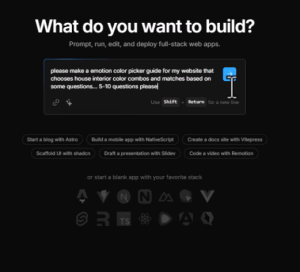
Monetizing the Color Palette Niche
1. Affiliate Marketing
Painting Services & Home Improvement
Many affiliate networks like OfferVault (external link) feature pay per lead or pay per call offers:
- Local Painting Services: You might earn $10–$20 per qualified lead (e.g., someone requesting an estimate).
- Paint Brands & Retailers: Some major brands or retailers may offer affiliate partnerships or coupon lead-generation offers.
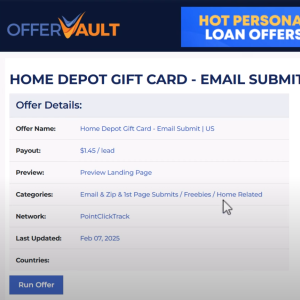
Digital Products & DIY Guides
Platforms like ClickBank also have home-improvement-related digital products:
- AI Interior Design Software: Earn $30–$50 per sale for promoting tools that offer AI-based room planning.
- Color Theory eBooks: Some eBooks or video courses on color theory and interior design come with high commission rates.
Amazon Associates Program
For consistent, smaller commissions, promote painting essentials:
- Paint rollers, brushes, sprayers
- Painter’s tape, drop cloths, primer
- Designer paint decks and swatch kits
Every purchase made within 24 hours (or the specified cookie period) of a user clicking your link can net you a commission—even if they buy other unrelated items.
2. Sponsored Content and Brand Collaborations
- Home Improvement Stores: Reach out to hardware or paint store chains to feature their products in your videos or blog posts.
- Paint and Decor Brands: Offer to create sponsored “how-to” articles or AI-driven “mood board” features using their paint lines.
- Interior Design Apps: Many startups need exposure; they could sponsor a blog series or social media campaign on your platforms.
3. Lead Generation for Painting and Remodeling
Some companies pay $9–$20 just to get a lead’s email or phone number:
- Home Improvement Lead Forms: Partner with local or national contractors who pay a fee for each referral.
- Online Quote Services: Sites that help homeowners find pros in their area often run CPL (cost-per-lead) campaigns.
4. Sell Your Own Digital Products
- Color Palette eBooks: Compile AI-generated palettes with room mockups, and sell them as PDF guides.
- Premium Membership Site: Offer exclusive monthly color updates, design consultations, or advanced AI-based color matching tools behind a paywall.
- Printable Wall Art: If you also cater to artists or crafters, AI can help generate unique abstract patterns or color-based art to sell on marketplaces like Etsy.
Proven Traffic Strategies
1. Pinterest Pins
Pinterest’s visual interface is perfect for color based content.
- Pin Style Ideas: Create dedicated boards for “Calming Blues,” “Modern Neutrals,” or “Warm Kitchen Colors.”
- Include Keyword-Rich Descriptions: For example, “Warm Kitchen Colors | Perfect for a Cozy Atmosphere | Paint Inspiration.”
- Link Back to Your Site or Tool: Use a compelling call to action, such as “Explore more color palettes on my website.”
2. YouTube & YouTube Shorts
YouTube is the second-largest search engine on the web.
- Showcase Mood Boards: Short, 1-minute videos demonstrating 5–7 color combos for a bedroom or living room.
- DIY Tips: Step-by-step painting tutorials, from prepping the room to final touches, with affiliate links in the description.
- AI Visualizations: Screen-record yourself using your AI-powered color picker or design tool, encouraging viewers to try it themselves.
3. SEO-Focused Blog Posts
Organic traffic from Google can be a goldmine if you target the right keywords.
- Long-Tail Keywords: “Best paint colors for small apartments,” “DIY painting tips for living room,” or “Pastel nursery color palettes.”
- Include FAQs: Answer common questions like “How many coats of paint do I need?” or “Which finish is best for kitchens?”
- Optimize Titles & Headers: Make sure your H1, H2, and meta tags reflect the keywords you want to rank for.
4. Email Marketing
Build a mailing list to nurture and re-target your audience:
- Opt-In Freebies: Offer a free guide titled “50 Mood-Based Color Palettes for Any Room” to encourage sign-ups.
- Weekly Color Tips: Send a short email featuring one color combination each week, along with a link to your affiliate offers or interactive tools.
- Product Promotions: When you launch a new eBook or discover a high-paying affiliate program, announce it to your subscribers for quick bursts of sales.
Actionable Tips for Faster Growth
- Batch Content Creation: Use AI to generate multiple color palettes or blog outlines at once. Schedule them out over weeks or months.
- Repurpose Content: Turn a blog post about “Trendy Kitchen Colors” into a YouTube Short and several Pinterest pins, all linking back to your main post.
- Collaborate with Other Creators: Partner with fellow DIY or interior design influencers. Guest posting or content swaps can expose your site to thousands of new eyes.
- Stay Updated: Paint companies release new color lines each season. Creating timely content (e.g., “Top Colors for Spring 2025”) can give you a fresh SEO boost.
The AI color palette niche may look deceptively simple, but it holds massive earning potential. Up to $21,000 a month or more when done right. By creating visually compelling content and interactive tools and monetizing through multiple channels, such as affiliate marketing, lead generation, and digital products, you set yourself on a path to consistent, scalable income.
Remember:
- Focus on low-competition keyword opportunities.
- Leverage AI to speed up content creation.
- Offer real value. Such as quizzes, tutorials, and palette visualizers.
Start by picking a memorable domain name, designing a Pinterest-friendly set of images, and embedding a color picker tool on your blog. With persistence, creativity, and a willingness to experiment, you’ll be well on your way to establishing a profitable online business built around color palettes and paint.
Build a Full Business With ChatGPT o3: Earn $1K/Day
Discover how to use ChatGPT o3 to build digital tools, create WordPress plugins, and launch a full business capable of earning $1K/day.
Have you ever dreamed of creating a profitable online business.Without needing to code everything from scratch or hire expensive developers? Thanks to ChatGPT o3, you can now create useful digital tools in minutes. In this post, you’ll learn how to build WordPress plugins, monetize them, and potentially earn $1,000 a day or more. Ready to dive in?.
Why Use ChatGPT o3 to Build Your Business
ChatGPT’s latest model (sometimes referred to as GPT-3.5 or simply ChatGPT o3) makes it easier than ever to:
- Generate code for WordPress plugins
- Brainstorm profitable business ideas
- Create sales pages and marketing materials
This new AI technology can piggyback on existing platforms. like WordPress. To deliver solutions people already want and need. With minimal effort, you can convert ChatGPT’s outputs into sellable products.
Step 1: Spot Lucrative Opportunities
1.1 Piggyback on Popular Platforms
When you choose a platform that millions already use. Such as WordPress. You tap into a vast user base. Consider creating:
- SEO plugins
- Infinite scroll plugins
- PDF downloaders
These are just a few ideas. Essentially, you’re building digital adapters to fix everyday issues users face.
1.2 Validate Through Keyword Research
Before committing to an idea, do some quick keyword research. Tools like Ahrefs (external link) reveal how many people search for specific plugin functionalities each month. For example, you might find that “PDF WordPress plugin” or “infinite scroll plugin” has enough traffic to sustain a profitable product.
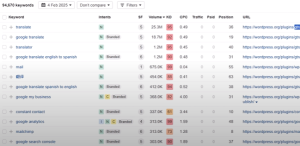
Step 2: Generate WordPress Plugin Code with ChatGPT o3
2.1 Ask ChatGPT for the Basics
Open ChatGPT o3 and prompt it to create a simple WordPress plugin. For instance:
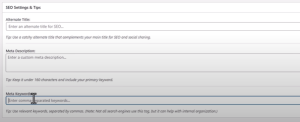
“Create a WordPress plugin that adds a custom SEO checklist to each post.”

ChatGPT will provide:
- A step by step outline
- PHP code for your
plugin.phpfile - Suggestions for additional files (if needed)
2.2 Customize and Refine
Next, refine the plugin by asking ChatGPT to:
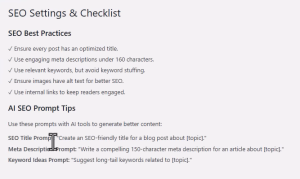
- Add extra functionalities (e.g., infinite scroll, meta tags, or checklists)
- Integrate a settings page in WordPress’ admin menu
- Include interactive features like user prompts or in post editing.
2.3 Test on Your WordPress Site
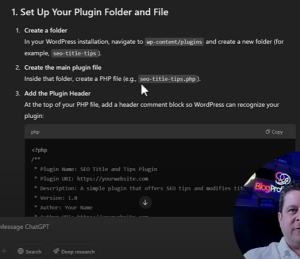
- Zip the Plugin Folder: After pasting ChatGPT’s code into a
.phpfile, compress the folder into a.ziparchive. - Install and Activate: Go to Plugins > Add New on your WordPress dashboard, upload the
.zip, and click Activate. - Check for Errors: Validate that all features function as intended. ChatGPT’s code might need small tweaks.
Step 3: Monetize Your Creation
3.1 Sell Your Plugin
- Freemium Model: Offer a basic version for free, then charge for advanced features.
- One-Time Purchase: Price the plugin at $25–$50, aiming for volume sales.
- Monthly Subscription: Provide ongoing support and premium updates for a recurring fee.
3.2 Upsell Services
Maximize revenue by offering:
- SEO Audits: If your plugin handles SEO tasks, sell in depth consulting.
- Content Creation: Provide AI generated posts or specialized articles.
- One-on One Support: Offer premium clients direct help for higher fees.
Step 4: Drive Traffic and Achieve $1,000/Day
4.1 Content Marketing
- YouTube Tutorials: Showcase how to install and use your plugin. This helps build authority and drives organic traffic.
- Blog Posts: Publish articles on your own site or guest post on industry blogs to reach more WordPress users.
4.2 Social Media and Forums
- Pinterest Pins: Create visually appealing pins linking back to your sales page or tutorial blog posts.
- Facebook Groups & Reddit: Engage in WordPress and blogging communities. Answer questions and gently promote your solution.
4.3 Paid Advertising
If your conversion rates and profit margins are solid, consider:
- Google Ads: Target specific keywords like “best WordPress plugin for SEO.”
- Facebook Ads: Reach bloggers, small businesses, and digital marketers.
Using ChatGPT o3 to build digital tools, especially WordPress plugins, can fast-track your path to a profitable online business. By focusing on genuine user needs, refining ChatGPT’s code, and implementing solid marketing strategies, you’re setting yourself up for substantial income potential, such as earning $1,000 a day.
Ready to start? Pick a plugin idea, open ChatGPT, and let the AI handle the coding. With a proper launch and promotion, your new tool could become the next big thing in the WordPress ecosystem and your key to financial freedom.
Build a $5K Pinterest Business with ChatGPT
Discover how to use ChatGPT for Pinterest marketing. Create viral pins, drive traffic, and build a thriving $5K Pinterest business quickly.
Are you curious about how to combine the power of Pinterest with ChatGPT to build a profitable online business fast? In this guide, we’ll walk you through using ChatGPT’s new features to create Pinterest pins, automate niche research, and even build a one-page website that can put real money in your pocket. Whether you’re selling flowers for Valentine’s Day or exploring any other profitable niche, these tips will help you start earning with your own ChatGPT Pinterest business.
What is ChatGPT’s New Feature for Pinterest?
ChatGPT recently introduced a feature that allows you to generate images and content quickly. By simply asking ChatGPT for multiple pin designs or niche ideas, you can instantly create:
- Unique, eye catching images
- Topic specific blog posts or quizzes
- Monetization strategies tailored to your niche
It’s a game changer because you can produce entire content strategy images, text, and even website code. Almost instantly.
How to Choose a Profitable Pinterest Niche with ChatGPT
One of the first steps in starting your Pinterest business with ChatGPT is selecting a lucrative niche. Pinterest thrives on visual searches and trends, so focus on categories known for high engagement:
- Seasonal Events (e.g., Valentine’s Day, Mother’s Day, Christmas)
- Lifestyle Topics (DIY, Home Décor, Fashion, Beauty)
- Food & Recipes (especially holiday or diet specific)
- Hobbies & Crafts (knitting, scrapbooking, painting)
Simply type into ChatGPT:
“Suggest profitable Pinterest niches with high search volume and affiliate marketing potential.”
ChatGPT will give you plenty of ideas to explore. For example, it might highlight Valentine’s Day gifts or wedding décor, both of which naturally attract buyers who are ready to spend.
Why Valentine’s Day Niches Work
Valentine’s Day is huge on Pinterest because people are constantly looking for:
- Gift ideas for partners, friends, or family
- Date night inspiration
- DIY craft projects
- Decorating tips
When you position your pins and content to meet these needs and include links to relevant affiliate offers. You can see a quick influx of traffic and sales.
Building Your Pinterest Business :
Step 1: Generate Pinterest Pins with ChatGPT
- Ask for multiple designs. For instance:
“Create 5 Valentine’s Day Pinterest pins with no text.”
- Optimize for visuals. Use short alt text that includes your main keyword (e.g., “Valentine’s Day nails using ChatGPT” or “Romantic gift ideas Pinterest pin”).
Pro Tip: Refine the pins in an image editor like Canva by adding short, attention-grabbing text such as “Top 10 Gifts” or “Last Minute Ideas.”


Step 2: Create Engaging Quizzes and Content
Quizzes are a fantastic way to get clicks and keep visitors on your site longer. Ask ChatGPT to generate HTML quiz code:
“Create an HTML quiz for choosing the perfect Valentine’s gift. Include a call-to-action button at the end for my flower affiliate link.”
You can then embed this quiz on your simple one-page website. The interactive element intrigues visitors, helping convert browsers into buyers.


Step 3: Monetize with Affiliate Offers
Use ChatGPT to find the most profitable affiliate programs. Type:
“List high paying affiliate programs for Valentine’s Day flowers, personalized gifts, and last minute gift cards.”
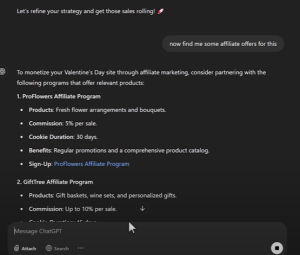
Once you have a list, incorporate your affiliate link directly into your site or quiz results:
- Flower Offers: Many pay a commission per sale.
- Gift Card Offers: Some pay up to $180 just for an email submission (single opt-in).
- Personalized Gifts: Necklaces, mugs, or digital prints are popular.
Setting Up Your One Page Website
You don’t need a massive website. A single page that showcases your quiz, a short blog post, or even a set of curated gift ideas is often enough. Here’s how to do it:
Buy a Domain Name
Search for short, memorable .com domains.
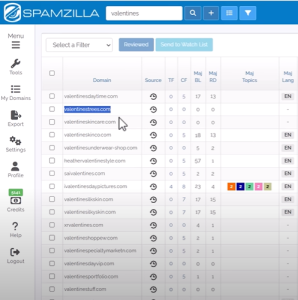
Use GoDaddy’s Bulk Domain Search or SpamZilla for expired domains that might already have backlinks.
Install WordPress or Upload HTML
With WordPress, simply paste your ChatGPT-generated quiz into a new page.
Or upload the HTML file if you prefer a direct approach.
Add Affiliate Links
Make sure your “Buy Now” or “Claim Offer” buttons are easy to spot.
Place them near or inside the quiz results for optimal clicks.
Driving Traffic and Generating Income
Pinterest rewards consistent pinning. Aim to create several pins a day. ChatGPT can help by generating images in bulk. Schedule your pins using a tool like Tailwind or manually post them during peak hours.
- Use Relevant Keywords: Research Pinterest trends (e.g., “Valentine’s gift ideas”) and include these phrases in your pin descriptions.
- Optimize Pin Descriptions: Mention synonyms like “romantic gifts,” “last minute presents,” and “unique Valentine’s Day surprises.”
- Pin Consistently: More pins = more chances to go viral.
As your pins start driving traffic to your website, you’ll see more quiz takers and, consequently, more affiliate sales. Scale by adding new quizzes or tackling new holidays and niches throughout the year.
Building a $5K Pinterest business with ChatGPT is all about leveraging AI to quickly generate quality content and pins, targeting profitable niches (like Valentine’s Day), and monetizing with high-paying affiliate offers. By following the strategies outlined above. Choosing the right domain, creating an interactive quiz, and consistently posting pins. you can transform your Pinterest account into a real money maker.
Ready to get started? Pick your niche, fire up ChatGPT, and take the first step toward launching a profitable online venture. With the right approach and a bit of creativity, you could be earning in no time.
Alibaba’s Qwen Chat AI: Latest Update & Money-Making Tips
Discover how Alibaba’s Qwen Chat AI can boost your online income. Learn its key features, benefits, and strategies to profit from this new AI tool.
The race for artificial intelligence in China is heating up, and Alibaba is leading the charge with its latest innovation, Qwen Chat AI. In this post, we’ll explore what Qwen Chat AI is, why Alibaba is investing heavily in it, and most importantly. How you can leverage its unique features to generate serious online income. Whether you’re an entrepreneur, a content creator, or an affiliate marketer, there are exciting new opportunities on the horizon that you won’t want to miss.
What Is Qwen Chat AI?

Qwen Chat AI is Alibaba’s response to the growing demand for advanced AI tools that can handle a wide range of tasks. From code preview to image and video generation, this system aims to rival or even surpass many of the current AI giants. Think of it as a comprehensive digital assistant that can help with:
- Coding Assistance: Write and debug code with HTML preview.
- Content Creation: Generate articles, marketing copy, and other text based content.
- Media Generation: Create custom images and even short videos directly within the chat interface.
Although the system’s data is trained up to December 2024 slightly behind “live” data. its breadth of functionality is a game changer.
Why Alibaba Is Betting Big on Qwen Chat AI
Alibaba has massive revenue streams, much like Amazon in the United States. By integrating Qwen Chat AI into their ecosystem, Alibaba aims to:
- Improve Customer Support
Faster response times and personalized assistance for millions of online shoppers. - Enhance Shopping Experiences
Tailored product recommendations and efficient searches. - Boost B2B Services
AI-powered virtual assistants for enterprises and advanced market analytics tools for businesses. - Strengthen Alibaba Cloud
Compete with other major cloud providers, similar to how AWS dominates in the U.S.
Standout Features of Qwen Chat AI
1. HTML Preview Mode
Unlike many other AI tools, Qwen Chat AI can render HTML in real time. This means you can write code and instantly see how it looks or functions, which is especially valuable for developers, marketers setting up web pages, and anyone creating quick landing pages.

2. Image and Video Generation
While several AI platforms separate text-based tasks from media creation, Qwen Chat AI integrates both into a seamless workflow. You can chat about a topic, get the text you need, and immediately generate matching visuals or video clips. Without switching tools.


3. Multiple “Modes” for Versatility
From writing blog posts to creating graphics, Qwen Chat AI offers different modes specialized for coding, content generation, and more. This allows you to pick the best model for your specific project.
4. Full PC Access and Task Automation
Qwen Chat AI steps up its game by allowing extended desktop access and automated task running. These built in operators can save you tons of time, helping you delegate repetitive tasks to AI.
5. Data Training Limitation
One caveat is that Qwen Chat AI uses data up to December 2024. While most everyday tasks won’t be affected, the AI might lag on breaking news or very recent trends.
How to Make Money with Qwen Chat AI
Wondering how all these features translate into profits? Here are some proven strategies:
Affiliate Marketing
Generate Landing Pages in Minutes: Use the HTML preview mode to quickly build sales or pre-sell pages.
Create Engaging Images: Design pins or social media graphics to drive traffic to your affiliate links.
E-Commerce & Dropshipping
Personalized Product Descriptions: Stand out by offering AI-generated product copy tailored to specific keywords and audiences.
Automated Customer Chatbots: Solve buyer queries with minimal human intervention.
Freelance Services
Web Development: Build simple tools (like calculators or quizzes) directly in Qwen Chat AI and offer them to clients.
Content Writing & Editing: Provide faster turnaround on blog posts, email marketing campaigns, and social media content.

Consulting & Training
Business Solutions: Show other businesses how to implement Qwen Chat AI for better analytics, customer service, and product recommendations.
Workshops & Webinars: Host training sessions on AI best practices for a fee.
Example: Creating a Quick Landing Page
- Open Qwen Chat AI and select the appropriate mode for HTML preview.
- Prompt the AI to generate a simple, choice based landing page.
- Insert Your Affiliate Links directly into the HTML.
- Export and Upload to your hosting service or WordPress site.
- Promote the Page on social media or via an email list.
With Qwen Chat AI, you can literally have a fully functioning affiliate landing page up in minutes.

As AI technology continues to advance, Qwen Chat AI stands out for its robust feature set that goes beyond simple text generation. From coding assistance to on-the-fly image and video creation, this tool offers a one-stop shop for entrepreneurs looking to streamline operations and boost profits. By understanding its capabilities. And how it fits into Alibaba’s broader ecosystem. You can position yourself at the forefront of the next big wave in online business. Start exploring Qwen Chat AI today, and you might just be the next success story in the ever evolving AI marketplace.